
 Course Type

Definition
A course type is the grouping of courses that have the same objective, content, and form. You store the attributes that are typical for all courses of a given type with the course type. A course type is characterized by the following attributes:
· Delivery Method
Example: Time-Dependent |
Example: Time-Independent |
Classroom training (location-dependent) |
Web-based training (WBT) |
Virtual classroom (location-independent) |
External WBT |
|
Online test |
· Course Type Content
· Completion time
· Course content
· Objectives profile
· Target group description
· Participation fee
· Time schedule
· Trainer
· Resource requirements
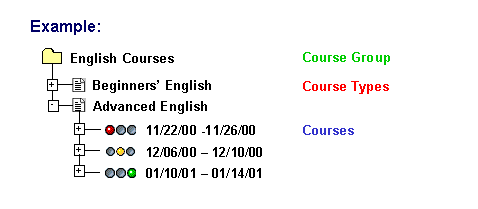
Course types can be classified into course groups, thus forming a hierarchical structure.
Use
Course types:
· Form part of a clearly structured hierarchy and, together with course groups and course dates, make your course offering more accessible and easier to navigate.
· Lighten your workload by enabling one-time data entry. The data you store for the course type can be passed on to each of the related course dates. You have the option of modifying this data in specific instances if required.

You can also use a course type as a template for another course type. The data you created for one course type is then used as default values for the new course type. You can overwrite the data as required.
Structure
When you create a course type, you must maintain the required infotypes in Customizing or in the menu of each delivery method.
Data on the course type that is stored in the system using infotypes.
Infotypes |
Delivery method |
Delivery method |
Delivery method |
Description |
Optional |
Optional |
Optional |
Main Schedule Pattern (Schedule Model) |
Required |
Required |
-- |
Capacity |
Required |
Required |
-- |
Prices |
Optional |
Optional |
Optional |
Course Type Info |
Optional |
Optional |
Optional |
Validity Period |
Optional |
Optional |
Optional |
Course Demand |
Optional |
Optional |
-- |
Billing/Allocation Info |
Optional |
Optional |
Optional |
Costs |
Optional |
Optional |
Optional |
Procedure |
Optional |
Optional |
Optional |
Web Link |
Optional |
Optional |
Optional |
Knowledge Link |
Optional |
Optional |
Optional |
Delivery Method |
Optional |
Required |
Required |
Course Type Content |
-- |
-- |
Required |
Course Content Static |
-- |
Required |
-- |
Completion Specifications |
-- |
Optional |
Optional |
Data on the course type that is stored in the system using relationships.
Relationships |
Delivery method |
Delivery method |
Delivery method |
Belongs to course group |
Optional |
Optional |
Optional |
Requires resource type: |
Optional |
Optional |
-- |
Is held by person/... user/.. external person/... contact person: |
Optional |
Optional |
-- |
Uses material (for participant) |
Optional |
Optional |
-- |
Uses material (for course) |
Optional |
Optional |
-- |
Is organized by organizational unit/... company |
Optional |
Optional |
Optional |
Has prerequisite course type |
Optional |
Optional |
Optional |
Has prerequisite qualification |
Optional |
Optional |
Optional |
Imparts qualification |
Optional |
Optional |
Optional |
Cost center assignment: |
Optional |
Optional |
Optional |
Has participant model appraisal / has course model appraisal |
Optional |
Optional |
-- |
Is planned for job |
Optional |
Optional |
Optional |
Is the responsibility of external person/person/contact person/user: |
Optional |
Optional |
Optional |
When you create a course type, you store all of the data required for holding the course that is not time-specific, such as:
· Description
The Description infotype lets you store descriptive texts for a course type that can be displayed in the course brochure or in the Learning Portal of SAP Learning Solution on the course detail screen. The infotype consists of the subtypes Extended Course Type Text, Course Contents and Notes.
· Main Schedule Pattern (Schedule Model)
This subtype of the Schedule Model infotype lets you define a time schedule that can be automatically applied (copied) when course dates are created or planned.
· Capacity
You can store a minimum, optimum, and a maximum capacity for the course type. The capacity value you store for the course type is used as the default value for the number of participants for the actual course. The overall capacity is determined on the basis of the course capacity and the room capacity. The information in the Capacity infotype plays a role in the following functions:
¡ Booking: the overall capacity (taking account of room capacity and course capacity) defines the borderlines between normal, essential, and waiting list bookings.
¡ Resource selection: using the capacity values stored for the course and for the room, the system proposes only resources (rooms) that have adequate capacity and rates these in relation to the course capacity. The closer the capacity of the resource is to the course capacity, the better suited the resource is for the course, and the higher the suitability value assigned to the resource as a result.
¡ Price proposal: when determining a price proposal for a course type, the system uses the optimum capacity defined.
The capacity stored for the course type is automatically read if no capacity is stored for the course itself.
· Prices
You can store an internal and an external price for the course type. The internal price is used for internal activity allocation purposes, while the external price is used for billing purposes.
If you want to determine a price for the course, you can use the function
Determine price
proposal on this data screen by choosing  .
.
You must first maintain costs (cost items) for the course (type) and for the resource (type) including details of reference units in the Costs infotype.
· For more information, see Price Proposal
You can make the following specifications in the Course Type Info infotype:
In Course Brochure: if you want the course type to be included in the course brochure, select the In Course Brochure indicator. When you start the report to generate the course brochure, you can select the option Selected course types only. The selection referred to is the one you make when you set this indicator for the course type.
SAP Learning Solution does not support convention functions.
If you do not want courses of this course type displayed in the Learning Portal of SAP Learning Solution, select the No Intranet indicator.
In this infotype, you can also make specifications for internal participants and instructors (trainers) that are valid for the Time Management component:
¡ No integration: You use this indicator to deactivate integration with Time Management for participants and trainers of courses of this type. This means that no attendance and absence records are written to Time Management.
¡ Allowed in time off: You use this indicator to allow a person to participate in or teach a course of a certain type even if time off records have been stored for the person during the same period in Time Management.
¡ Minimum percentage (only for participants): You can use this entry to specify the minimum amount of time a participant must be present at a course of a given type to qualify as participation. If the value you specify here is not recorded for a participant, the participation is considered to be insufficient and is automatically canceled. Here, you enter a percentage of the complete course duration.
This entry overrides the value stored for the course type in the SEMIN TIMEP entry in Customizing for Training Management under Integration ® Time Management ® Specify Attendance Types.
¡ Booking options
You can specify whether a course is only bookable as part of a curriculums or whether it can be booked independently as well.
· Relationships
In Training Management, information and attributes of objects are stored in infotypes and relationships. You can store the following relationships for course types in the Relationship infotype:
¡ Belongs to course group
Here you specify the higher-level course group.
¡ Requires resource type:
Here you specify the resource types that are needed to carry out a course of this type.

You must maintain this relationship if you want to use resources in Training Management.
If you want to use the resource types Instructor/Trainer and Material, you must also maintain the relationships is held by (for the resource type Instructor) ) and uses for participant/course Material (for the resource type Material).
¡ Is held by person/... user/.. external person/... contact person:
You specify the instructor(s) to be proposed for the course type as a rule.
¡ Uses Material (for participant)
Here you specify the material that is required per participant from the material master. When you create this relationship, in the Availability Indicators infotype, you must select the option Selected Participants under Amount Available. Under Objects Related to Course Type, you must create relationship A054 (used for participants) with the object type Material. Consequently, you can enter a material number for the course type that specifies which course books are needed from the material master per participant, for example. For more information, see Material Procurement.
¡ Uses Material (for Course):
Here you specify the materials that are required from the material master per course. When you create this relationship, in the Availability Indicators infotype of the related resource type, you must select the option Course under Amount Available, and under Objects Related to Course Type, you must create relationship A055 (used for course) with the object type Material. This means that you when you maintain data for the course type, you can enter a material number specifying which instructor guide is needed from the material master for courses of this type, for example. For more information, see Material Procurement.
¡ Is organized by organizational unit/... company:
Here you specify the training provider. The information stored here as to whether the training provider is internal (organizational unit) or external (company) is used for billing and activity allocation purposes and for the Correspondence function.
¡ Has prerequisite course type:
Here you specify the course type specified as a prerequisite for participation. In the Procedure infotype, you can specify whether a check is carried out for this relationship during booking. (By doing so you can override the general settings made in Customizing for Training Management under Day-to-Day Activities ® Booking ® Participant Checks for this specific course type.)
¡ Has prerequisite qualification:
Here you specify the qualifications that are specified as prerequisites for participation. In the Procedure infotype, you can specify whether a check is carried out for this course type during booking. (By doing so you override the general settings made in Customizing for Training Management under Day-to-Day Activities ® Booking ® Participant Checks for this specific course type.)
¡ Imparts qualification:
Here you specify the qualification attained by attending a course of this type. This relationship is used for the check the system carries out for participation prerequisites and when transferring qualifications to participants during follow-up processing. This information is stored in the Procedure infotype which you can also maintain for the course type (see below).
¡ Cost center assignment:
Here you relate a cost center with the master cost center (for accounting purposes for the cost items of a course).
¡ Has participant model appraisal / has course model appraisal
In this infotype, you can select the forms of appraisal you want to use for course and participant appraisals. The entries you make here override the general settings for this course type made in Customizing for Training Management under Recurring Activities ® Appraisals ® Set Up Control Parameters.
¡ Is planned forjob:
You use this relationship to specify the target group (represented by the object type Job) for which the curriculum type is intended. This information can be printed in the course brochure.
¡ Is the responsibility of external person/person/contact person/user:
This relationship lets you specify a course owner for a course type.
· Validity duration (Depreciation Meter/Validity infotype)
The Depreciation Meter/Validityinfotype lets you specify the period of time in days and/or months during which participation in a course is valid as a prerequisite for participation in a follow-up course.
· Further Information
On this tab page, you can maintain the following infotypes:
¡ Course Demand
The Demand infotype lets you specify what demand there is for courses of a course type per quarter, per location, and per language.
However, we recommend that you determine demand in the dynamic Planning menu instead.
¡ Billing/Allocation Info
The Billing/Activity Allocation Infoinfotype lets you assign course types to sales areas. You need sales areas when you carry out billing for courses. You also specify the controlling area and the activity type for internal activity allocation (for participation and instructor function).
¡ Costs
In the Costs infotype you assign costs to course types. The costs are subdivided into cost items. You should have already created the cost items in Customizing under Course Preparation ® Define Cost Items.
¡ Procedure
In the Procedureinfotype, you instruct the system how to react during checks for double bookings, double prebookings, participation prerequisites, and qualifications. In addition, you specify what follow-up actions are to be executed during follow-up processing.
When you create the Procedure infotype for a course type, you override the general settings made in Customizing for Training Management underDay-to-Day Activities ® Booking ® Participant Checks and under Recurring Activities ® Follow-up Processing for this course type.
¡ Web Link
The Web Linkinfotype lets you link a course type with any URL addresses on the Internet.
¡ Knowledge Link
The Knowledge Link infotype lets you link a course type with the info objects in SAP Knowledge Warehouse (Info Database Version 4).
Most of the above data is optional. It is only mandatory to specify the validity period, and the long and short name of a course.
However, the more information you store for the curriculum type when you create it, the less work you have with each of the individual courses based on it.
¡ Delivery Method
In the Delivery Method infotype you determine the method used to impart or deliver the course.
The delivery method characterizes the course according to the way the course is held and is specified in more detail by its attributes.
If you select either virtual classroom or online test as the delivery method, you must maintain the infotype Course Type Content.
If you select either virtual Web-based training (WBT) as the delivery method, you must maintain the infotypes Course Type Content and Completion Specifications.
If you do not choose a delivery method, the system uses the delivery method that is defined as the default value in Customizing, under Training Management ® Course Preparation ® Create Delivery Methods ® Define Default Delivery Method.
¡ Course Type Content
In the Course Type Contentinfotype, you create a link between the objects from Training Management and the documents from the course content repository.
¡ Completion time
In the Completion Specifications infotype, you enter the time data for location-independent delivery methods (for example, WBT). You can make the following specifications:
· Maximum completion time
· Minimum completion time
· Optimum completion time
· License period
The course is only available in this period.
· Last availability time
Integration
You can create course types in Customizing for Training Management under Course Preparation ® Create Course Type, and in the menu under Settings ® Current Settings ® Course Type.
See also: