 Material Planning Objects/Material Containers (Auth. Materials)
Definition
The planning of material equipment with non-consumable goods (authorized materials) that a force element requires in order to perform its tasks or missions.
Use
In order to perform their tasks, the organizational elements of armed forces, police, and aid organizations require material in the form of non-consumable goods (NCGs). These materials can be equipment, such as particular vehicles, required in the domestic base or operation.
In order to use materials management processes to provide the organizational elements with the equipment they require, or to monitor the current equipment situation, you use material planning objects (MPOs) (grouped using material containers (MCs), if required) to map the authorized materials (required NCGs) for the relevant force element. Also see Assigning Material and Infrastructure Objects .
You can use an authorized/actual comparison to compare a force element’s current authorized materials with its current actual materials. The actual materials are managed as stock in the stock storage location or infrastructure material storage location assigned to the force element (see Stock Element and Provisions Element ).
You can control the following materials management processes on the basis of the definition of the authorized materials with material planning objects:
Supply
You equip a force element by selecting and requesting the required material from the stock of a supplying force element on the basis of the models (material masters) defined for an assigned material planning object. For more information, see Requisitioning and Planning of Material .
Relocation
For the material planning objects assigned to a force element, in relocation planning, you define the relocation step in which the material is to be relocated to the area of operation/exercise. For more information, see Operation, Exercise, and Relocation Planning and Relocation of Material .
Structure
The following fields are available in the
Structures Workbench
on the
Material Planning Objects
and
Material Container
tab pages:
Material Planning Object
and
Material Container/Description
The object ID and description of the assigned material planning object or material container.
Number
The number/quantity of material required.
Minimum
/
Maximum Number
(
Material Planning Objects
tab page only)
The minimum/maximum number/quantity of the required material that is to be assigned.
Logistics Adjustment Parameter/Category/Category Description
For material planning objects only: If necessary, you can correct defined authorized quantities (due to cost-cutting measures, for example). Corrected authorized quantities are taken into account in subsequent processes (authorized/actual comparison). You can also specify a reason for the correction to the authorized materials made using the logistics adjustment parameter.
To be able to use the logistics adjustment parameter, you must activate this function in Customizing, by choosing
Defense Forces & Public Security
→
Organizational Flexibility
→
Assignments
→
Define Settings for Assignments
You define the reasons for the logistics adjustment parameter in Customizing, by choosing
Defense Forces and Public Security
→
Organizational Flexibility
→
Assignments
→
Define Categories for the Logistics Adjustment Parameter
Start Date
/
End Date
The validity period of the assignment of the material planning object or material container to the force element.
Usage Type/Description
This specifies the structures in which the assignment of the material planning object or material container to the force element is valid.
Status
The status of the assignment of the material planning object or material container to the force element. Also see Status Networks . You can use the pushbutton to change the assignment status.
Material Ind.
The material indicator used for the assignment, which you use to specify, for example:
whether the object is relevant for procurement or affects equipment
which procurement channel is to be used
whether the object is also used by a different unit
whether infrastructure material is used (material indicator type)
The material indicator is used as a filter criterion in authorized/actual comparisons to define which material is to be procured.

You can assign different material indicators to assign a material planning object to a force element more than once at a given time.
You define material indicators in Customizing, by choosing
Defense Forces and Public Security
→
Organizational Flexibility
→
Assignment
→
Define Material Indicators
Weighting/Mandatory
You enter a
weighting
value between1and999to specify the significance of the assignment in comparison to other assignments. The classification of the specified factor depends on the method you have chosen for calculating readiness.
You can use the
Mandatory
indicator to define that an assignment for the readiness of a force element or substructure is required. This indicator can also be evaluated for the weighting when readiness is calculated.
For more information, see Determination of Readiness Using Weighting .
Mass Creation
You use this indicator to specify whether this assignment is to be considered for mass material planning. For more information, see Creation of Procurement Proposals .
Equipment Package
(material planning object only)
You can assign an equipment package to a material planning object assignment. In material planning, for materials assigned to this equipment package, the system can then determine the material planning objects that comprise these materials as a model. The system considers these material planning objects as additional authorized materials and transfers the value for
Number
that you have defined for the assignment between force element and material planning object (also see the example below).
Depending on the system setting, the
Material Category
field is available. For more information, see the
Functions for the Equipment of Persons with Material
section.
Comment
A user-defined text for the assignment.
For
Planned
Operation
/
Planned Delimitation Date
/
Status
, see
Delimitation/Deletion with Status Change
.
For more information, see Additional Functions for Assignments .
Storage
These assignments are stored in FORCER framework tables.
Integration
To display details for a material planning object or material container assigned as authorized materials:
select the required object in the selection area of the
Structures Workbench
under
Authorized and Actual Materials
call the required object for display in the Authorized Materials and Material Packages application
Where applicable, in the authorized/actual comparison and material planning, the authorized materials of assigned positions are added to the authorized materials of a force element (if available).
You can also assign technical objects and the documents triggered in the process to equip a force element with material.
You can use equipment packages to plan the material equipment for a force element at material or serial number level.
Example
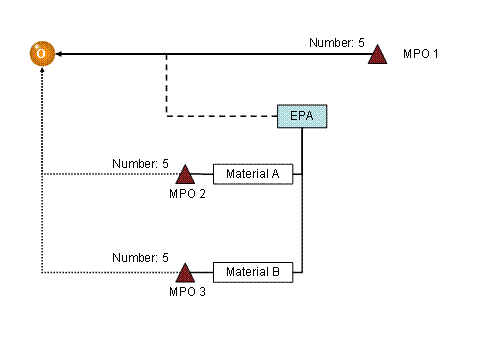
Assignment of an Equipment Package
This example explains how the system processes the assignment of an equipment package for the assignment between a material planning object and a force element:
The material planning object MPO 1 with the number 5 is assigned to the force element.
The EPA equipment package is assigned to this assignment.
The materials A and B are assigned to the EPA equipment package.
The system has determined the material planning objects MPO 2 and MPO 3 for these materials.
The system enhances the authorized materials with the material planning objects MPO 2 and MPO 3, each with the number 5.