 Determination of Readiness Using Weighting
Use
You can calculate the readiness of a force element based on the weighting of relationships and assignments using the functions of the Business Warehouse ( SAP BW).
Integration
For more information about mapping weightings, see Weighting Definition .
You determine readiness using the functions of the
Business Warehouse
. For more information about the relevant BI Content objects, see the documentation for BI Content for the
SAP
for Defense & Security
application
.
Prerequisites
You have defined your requirements for calculating readiness and familiarized yourself with the operation of BI Content.
Features
You define methods for calculating readiness according to your own requirements. The shipped BI Content objects for the
SAP
for Defense & Security
application represent an example template only. The following
example
shows how readiness could be calculated.
Example
Weightings
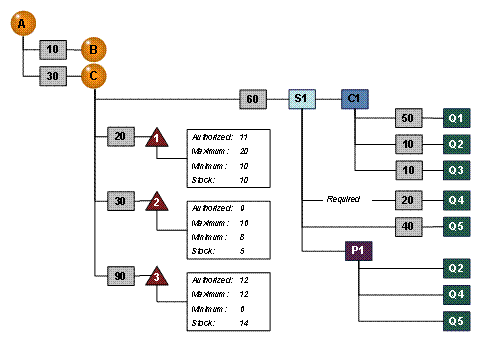
Force elements B with weighting 10 and C with weighting 30 are assigned to force element A .
Three material planning objects ( 1 , 2 , and 3 ) with the weightings 20, 30, or 90 are assigned to force element C .
In addition, position S1 with weighting 60 (shown in the example above) and positions S2 , S3 , and S4 (not shown) are assigned to force element C .
Position S1 is described by job C1 . The qualifications Q1 , Q2 , and Q3 with the weightings 50, 10, or 10 as requirements are assigned to job C1 .
The qualifications Q4 and Q5 with the weightings 20 or 40 as requirements are assigned to position S1 . Assignment to Q4 is marked as required.
Position S1 is filled by person P1 . The qualifications Q2 , Q4 , and Q5 are assigned to person P1 .
Calculating Level of Readiness for Personnel
The system first determines the readiness for training of the positions before calculating the level of readiness for personnel. In this example, the system can determine a corresponding value for position S1 .
Requirements of the Position or Job |
Weighting of the Requirements |
Qualification of Assigned Person P1 |
Level of Readiness for Training of the Position |
|---|---|---|---|
Qualification Q1 |
50 |
No |
0 |
Qualification Q2 |
10 |
Yes |
10 |
Qualification Q3 |
10 |
No |
0 |
Qualification Q4 |
20 (required) |
Yes |
20 |
Qualification Q5 |
40 |
Yes |
40 |
|
|
|
(Values were rounded where necessary)
The system determines which requirements of the position are covered by the qualifications of the assigned person, and calculates the coverage as a percentage by comparing the total weightings of the covered requirements with the total weightings of all requirements. This example produces a level of readiness for training of 54%.
 Note
Note
If the requirement whose assignment is indicated as "required" were not covered, the level of readiness for training of the position would be set to 0% automatically.
To calculate the level of readiness for personnel of a force element, the system then determines which positions are actually filled with persons, and adjusts the weightings to take into account the level of readiness for training of the positions. In this example, the system can determine a corresponding value for force element C .
Positions |
Weighting of Position |
Position Filled |
Level of Readiness for Personnel (Adjusted to Take into Account the Level of Readiness for Training of the Position) |
|---|---|---|---|
Position S1 |
60 |
Yes |
32 (= 54%) |
Position S2 |
30 |
Yes |
30 |
Position S3 |
30 |
No |
0 |
Position S4 |
50 |
Yes |
50 |
Total |
170 |
112 (= 66%) |
(Values were rounded where necessary)
In this example, three of the four positions are filled. The weighting of the assignment for position S1 was adjusted using the level of readiness for training. The system calculates the percentage of the workforce requirement that is covered by comparing the total weightings of the filled positions with the total weightings of all positions. This example produces a level of readiness for personnel of 66%.
Note
If the assignment for position S3 , which is not filled, were indicated as required, the level of readiness for personnel of the force element would be set to 0% automatically.
Finally, to calculate the level of readiness for personnel of the higher-level force element, the system determines the weightings of the lower-level force elements adjusted to take into account the level of readiness for personnel.
Force Elements |
Weighting |
Adjusted to Take into Account Level of Readiness for Personnel |
|---|---|---|
Force element B |
10 |
10 |
Force element C |
30 |
20 (= 66%) |
Total |
40 |
30 (= 75%) |
(Values were rounded where necessary)
In this example, only 66% of the weighting of force element C is used in the calculation so that the higher-level force element A shows a readiness of 75%.
Calculating Level of Readiness for Material
To calculate the level of readiness for material, the system divides the stock (actual material) by the authorized material for each material planning object and multiplies the result by the weighting.
MPO |
Authorized |
Max. / Min. |
Stock |
Weighting |
Level of Readiness |
|---|---|---|---|---|---|
1 |
11 |
20 / 10 |
10 |
20 |
18 |
2 |
9 |
16 / 8 |
5 |
30 |
0 |
3 |
12 |
12 / 6 |
14 |
90 |
105 / 100 |
Total |
140 |
123 / 118 (= 88% / 84%) |
(Values were rounded where necessary)
The system makes further adjustments here if required:
If the stock for a material planning object is lower than the minimum (authorized) value (MPO 2 in the example), the system sets the readiness to 0 automatically.
If the stock for a material planning object exceeds the authorized stock and the level of readiness therefore exceeds a fixed limit value (100 in the example; MPO 3 attains the value 105), you can have the system set the level of readiness to the limit value automatically so that the surplus of one stock does not conceal other missing stocks.
The system totals the level of readiness values of the material planning objects and compares the total with the total of the weighting. In this example, the force element attains a level of readiness for material of 88% without a limit value or 84% with a limit value.