 Structures
Use
Organizational elements of armed forces, police, and aid organizations, which you map in the system as force elements, as well as positions and persons, can be included in different organizational structures.

An o
rganizational structure
is a structure that is modeled between objects such as organizational units (basis of a force element), positions, and persons, by means of relationships.
The following scenarios are possible:
Severalstructures exist alongside one other within an organization.

In a military organization, for instance, there can be parallel organizational structures for peacetime and wartime. Additional structures can exist for operations and exercises.
Objects can be included in several structures simultaneously.
Certain organizational elements or positions exist in both the peacetime establishment and the wartime establishment, while some exist in the wartime establishment only.
Cross-referencesexist between parallel structures.
In order to map command responsibility, organizational elements of an operational structure can be assigned to an organizational element from the peacetime establishment.
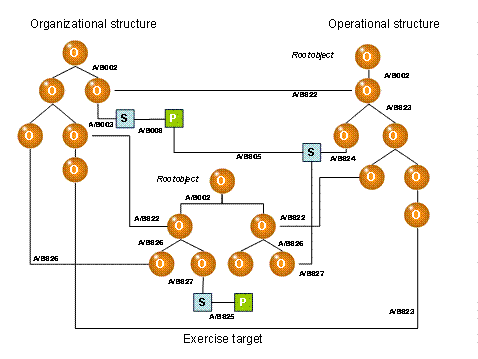
Example of three structures
O = force element (organizational unit), S = position, P = person
You can use such structures to map both the hierarchical arrangement of your organization (the organizational structure and various command and control relationships) as well as functional relationships, such as support relationships. Some of these structures will be permanent in nature, while others will be temporary (in some cases, to the minute). In addition to legally binding structures, you can map non-binding work breakdowns.
In addition to the existing structures, you can:
Plan future structures
Create templates or reference structures to enable you to create structures effectively and consistently
You can use organizational structures to:
Represent reporting paths
Identify supporting units in logistics processes
Identify workflow agents
Pass on properties to lower-level objects
When you create and assign objects, you specify in which structure(s) the object is to be included. This connection is displayed in the object as the usage type.
Integration
Structures are mapped by force elements positions , and/or persons . You can also set up structures using reference force elements .
Prerequisites
If necessary, you have defined the required relationships in Customizing in order to be able to map customer-specific structures (such as work breakdowns).
For more information about the relationships provided and defining your own relationships, see the Implementation Guide (IMG) for
Defense Forces & Public Security
→
Organizational Flexibility
→
Command and Support Relationships
→
Edit Relationships
.
In Customizing for
Defense Forces & Public Security
, you can change the texts that describe the relationships displayed in the
Structures Workbench
by choosing
Organizational Flexibility
→
Structures Workbench
→
Tab Pages
→
Define Tab Pages for Command and Support Relationships.
You have defined in which combinations and the dependencies with which relationships are to be created when objects are created. See also Editing Force Elements
Features
In the standard system, relationships are available for the following structures, which comprise force elements, positions, and persons:
Command and control relationships in the domestic base between force elements, positions, and persons
Administrative chain of command
Command and control relationships in operations and exercises between force elements, positions, and persons
Task organization between force elements
Support relationships between force elements
Reference structures between reference force elements
Editing and Displaying Structures
For information about creating and editing structures, see Editing Relationships
Structures (and the inclusion of objects in structures) are displayed as follows:
Complete structures are displayed in the structure area in the Structures Workbench
Details about the exact inclusion of a particular object are displayed on the object’s tab pages.
The usage type displayed in the object properties gives a general indication of the structure in which the object is included.