 Editing Force Elements
Prerequisites
You have made the Customizing settings listed below.
You are in the
Structures Workbench
(edit mode). You may have to select an
organizational measure
before you can edit force elements.
Create a Root Object
Choose
Extras
→
Create Root Object
.
Specify the properties for this object and confirm your entries by choosing
Execute
The force element is displayed in the structure area.
Choose
Save
The force element is created. The new force element is displayed at present as an unrelated object only. Choose
Load Force Element
→
Structure Search
→
Unrelated Objects
.
To display the force element in the structure area as a root, assign a different force element to it. Either choose an existing force element or create a new one. Choose
Load Force Element
and then
Structure Search
. If the new force element is not yet displayed as a root, choose
Refresh
Creating and Assigning Force Elements
Choose
Create Force Element
In the
Type
field, select the required object subtype. The following are shipped with the standard system:
Force element
The force element for the domestic base, operations, or exercises
Operation/exercise
The highest-level force element for an operational structure or exercise target (see also Creating/Assigning Objects for Op. Structures/Exercise Targets )
Reference Force Element
The reference force element for setting up a reference structure
You define
object subtypes in Customizing for
Defense Forces & Public Security
by choosing
Organizational Flexibility
→
Structures Workbench
→
Define Relationship Types/Groups and Object Subtypes
Enter the required
properties

If you have chosen
Operation/Exercise
, enter the properties for the operation or exercise (see also
Creating/Assigning Objects for Op. Structures/Exercise Targets
).
On the
Objects
tab page, enter a short and long name for each force element to be created.
On the
Relationships
tab page, select the required relationship type in the
Relationships
for
field.
You define
relationship types in Customizing for
Defense Forces and Public Security
by choosing
Organizational Flexibility
→
Structures Workbench
→
Define Relationship Types/Groups and Object Subtypes
. A relationship type represents a relationship or a group of several relationships. Each relationship type can be subdivided into various
relationship groups.
A group of relationships that must be created
A group of relationships comprising at least one relationship that must be created
A group of relationships that can be created
Relationships are assigned to object subtypes, as the following illustration shows:
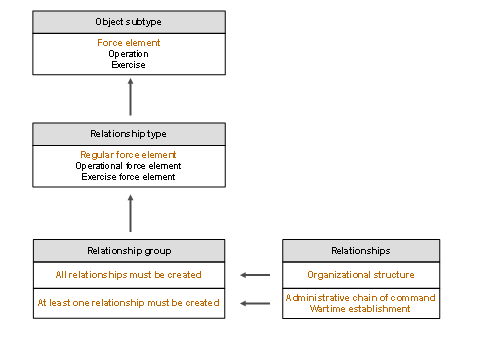
Three relationship types (regular force elementoperational force element, andexercise force element)are defined for object typeforce element
Two relationship groups with corresponding relationships are defined for relationship typeregular force element
You must create the relationships for the organizational structure.
You must create relationships for either the administrative chain of command or the wartime establishment; it is also possible to create relationships for both.
Specify a higher-level force element and the required assignment period for each relationship provided. In line with the relationship groups, the system checks whether you have made all the required entries.
If you have chosen
Root Object
, do not specify a higher-level force element.
Choose
Execute
and save your changes.
Alternatively, you can also create force elements by copying existing force elements.
Delete/Delimit a Force Element
Select the required force element in the structure area.
You can delete force elements with the status
Planned
only.
Choose
Structure Operations
→
Delete Force Element
or
Delimit Force Element
.
If you want to delimit a force element, you have to enter a delimitation date.
Confirm your entries.
See also Dispersal of a Force Element .