 Copying of Force Elements/Structures
Use
You can create force elements or structures by selecting and copying an existing force element and, if required, its lower-level structure as a template. Since the copies do not have to belong to the usage type of the template, you can copy between different structures. You can also use a copy procedure to enhance multiple structures at once. In Customizing, you define which assignments of the template are to be converted to which assignments of the copy.
Prerequisites
You are familiar with the creation of force elements and have made the following Customizing settings in addition to the Customizing settings required for creation:
You choose
Personnel Management
→
Organizational Management
→
Hierarchy Framework
to define which infotypes are to be included in or excluded from the copy. By default, all infotypes, with the exception of infotypes 1980, 1981, and 1982, are copied.
You choose
Defense Forces
& Public Security
→
Organizational Flexibility
→
Structures Workbench
→
Define Relationship Types/Groups and Object Subtypes
to specify which object subtypes are to be available when copying and which relationships are to be available
based on these subtypes.
You choose
Defense Forces
& Public Security
→
Organizational Flexibility
→
Command and Support Relationships
→
Define Usage Types
to define (for copying structures) which relationships of the force element selected as the copy template
(template relationships) are to be converted to which relationships of the copy if the corresponding relationship type has been selected.
To convert assignments of positions and material objects appropriately, the system uses the Customizing settings for usage types to determine which O-S relationships (position assignment) or usage types (material assignments) match the O-O relationships specified here.
You choose
Defense Forces & Public Security
→
Organizational Flexibility
→
Force Element
→
BAdI: Define Follow-Up Activities After Copy Operation
to specify the follow-up actions that the system performs once a force element or structure has been copied.
To generate assignments for logistics work centers after the copy procedure, see Assign Logistics Work Centers After Copy Operation .
Features
Copy Individual Force Element
You can copy the selected force element and assign this copy to one or more structures by selecting a relationship type (in the same way as the creation process). When doing so, you specify which assignments or assigned objects are to be copied:
Structure
You specify whether the lower-level structure of the force element is also to be copied.
Authorized Personnel
You specify whether assigned positions and their relationships to the force element are to be copied.

If the system determines actual personnel for the template during the copy procedure, a dialog box appears prompting you to confirm whether you want to transfer this actual personnel as a staff assignment proposal for the copy. If you choose this option, the system converts assignments of persons to staff assignment proposals automatically.
Authorized Materials
You specify whether assignments to material planning objects, material containers, and equipment packages are to be copied.
Logistical Requirements
You specify whether assignments to provisions packages are to be copied.
Documents
You specify whether assignments to documents are to be copied.
Classification
You specify whether assignments to classes of the classification system are to be copied.
Authorized Infrastructure
You specify whether assignments to infrastructure planning objects are to be copied.
Actual Infrastructure
You specify whether assignments to business entities, real estate contracts, and real estate search requests are to be copied.
Role Assignments
You specify whether assignments to roles are to be copied.
Stock elements, provision elements, and assignments to logistics work centers are copied. External relationships stored in the FORCER framework cannot be copied.
The system determines the key date of the template from the logon date and user-specific processing period. If the logon date is before the processing period, the start of the processing period is used as the key date; if the logon date is after the processing period, the end of the period is used. If the logon date is within the processing period, the logon date is used.
The system uses all infotypes or assignments with the same status as the selected object as templates. The system automatically assigns the
Planned
status to all copies, regardless of the status of the template.
Copying Structures
If you have specified that the lower-level structure of the selected force element is to be copied, the copy procedure for the lower-level force elements proceeds as follows:
Starting from the selected force element, the system copies all force elements assigned below this force element in the selected usage type for the key date. The system also copies all positions assigned to these force elements in the selected usage type for the key date.
The system uses your Customizing settings to determine which relationships or assignments of the template objects are to be converted to which relationships or assignments of the copies. Based on this, the system then determines which relationships or assignments exist between the template objects, and creates the corresponding copies.
Relationships are not created for force elements that do not belong to the determined template objects. The system notes the relationships that were not created in the log so that you can make adjustments if required. If no relationship to be copied can be determined for a copied object, it remains in the system without a relationship.
If you have not specified a higher-level force element for the highest-level force element selected for a relationship of the selected usage type, the system does not create corresponding relationships for the lower-level objects.
Activities
You are in the
Structures Workbench
(edit mode). You may have to select an
organizational measure
before you can edit force elements.
Choose the required structure and, in the structure area, select the force element that you want to use as a template.
Choose
Structure Operations
→
Copy Force Element
If required, you can again specify a different force element as a template in the
Element
field.
Specify which assigned objects or assignments to objects are also to be copied.
In the
V
alid from/Valid to
fields
,
specify the validity period for the copy.
As when you create a force element, select the required relationship type, the required relationships, and each force element to which you want to assign the copy.
Choose
Continue.
If necessary, rename the copy and confirm your entries.
Save your changes.
You can now change or supplement the properties of the copies as required.
Example
The figure below is an example of Customizing for creating and copying force elements.

Example: Customizing for Copying Force Elements
Three relationship types (regular force elementoperational force element, andexercise force element)are defined for object subtypeForce element
For the relationship typeoperational force element, a relationship group defines that relationships must be created for the operational force element.
For copying a structure from the organizational structure (usage typeorganizational structure) to the operational structure (relationship typeoperational force element), it is also defined that the relationships for thewartime establishmentof the force elements used as a template are to be converted to relationships for the operational structure. This also applies to position relationships and material assignments.
If you now want to use a force element (including substructure) of the organizational structure (usage type) as a template for an operational force element (relationship type) in the copy procedure, the system uses the relationships for the wartime establishment as a template for creating new operational relationships.
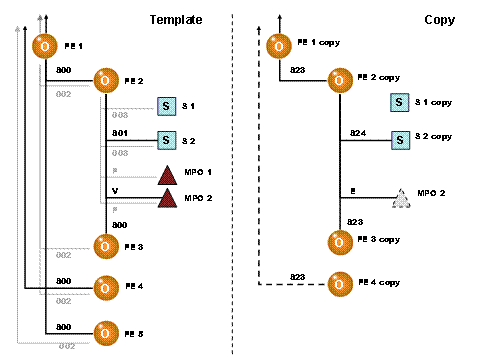
Example: Copy of a Structure
This figure shows how the system copies a structure, including assigned objects and their assignments, according to the example Customizing.
Selected usage type: organizational structure
Selected force element:FE 1
Selected relationship type: operational force element
Customizing for this combination:
Template: wartime establishment
Copy: operational structure
The system determines all force elements and positions assigned to force elementSE 1in the organizational structure (relationships 002 and 003) and copies these:
Force elementsFE 2FE 3, andFE 4
PositionsS 1andS 2assigned to force elementFE 2
Material planning objects are not copied
The system determines the objects for which relationships or assignments for the wartime establishment (relationships 800 and 801 as well as usage type V) exist and converts these to relationships or assignments of the operational structure (relationships 823 and 824 as well as usage type E):
Force elementFE 1is assigned to the new higher-level force element of the operational structure you specified.
Force elementsFE 2andFE 3are assigned to force elementFE 1
PositionS 2is assigned to force elementFE 2. PositionS 1remains without a relationship. An assignment to material planning objectMPO 2is also created.
The relationship forFE 4is not created since the higher-level force element is not part of the copied structure. However, the system issues a warning in the log.
Force elementFE 5was not copied since it is not assigned to force elementFE 1in the organizational structure. Accordingly, a relationship is not created.