Order
Order
Definition
An order is used for planning work as well as for planning and tracking the ensuing costs.
In order to ensure that safety measures are performed for work, you must activate Work Clearance Management for maintenance orders. These orders are referred to as WCM-relevant orders.
Use
The linking of orders to Work Clearance Management takes place at the header level of the order.
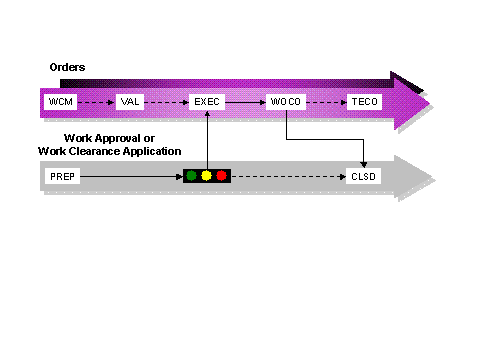
You cannot perform the work for WCM-relevant orders until you have issued the "release for execution" for these orders.
The following points are prerequisites for issuing the "release for execution" of a WCM-relevant order:
The architecture
You have assigned a work approval or work clearance application. This WCM object has been prepared.
The approval status of the assigned WCM object must have the status that is defined in Customizing.
The valuation
All applications are valuated, that is, it is explicitly specified whether each application is mandatory.
The valuation is the basis of the "release for execution", that is, the applications valuated with "Yes" are mandatory.
The WCM-relevant operations if using approval groups
An approval group is assigned to all WCM-relevant operations.
All assigned approval groups are valuated, that is, it is explicitly specified whether each approval is mandatory.
 Caution
The release of the order (status
REL)
does not influence the " Release for execution " (StatusEXEC
) in work clearance management. You can use this to set the order release considerably earlier than setting the "release for execution".In Customizing you can define that the release for execution for the WCM-relevant order is issued automatically if the corresponding prerequisites for the issue have been met.
End of the caution.
The following point is the prerequisite for confirmation that work is completed for a WCM-relevant order:
The completion of work has been confirmed for all WCM-relevant operations.
 Note
NoteYou can define in Customizing that a WCM object is created, assigned, and prepared automatically when you save a WCM-relevant order.
You can use the order data as a basis for automatically generating WCM objects .
End of the note.
Structure
Standard Model
In the standard model the WCM-relevant order is assigned to the work clearance application . The "release for execution" in the WCM-relevant order is controlled by the approval status of the work clearance application.
Note
Note the following assignment rule:
An order can only be assigned to one work clearance application. A work clearance application can, however, be assigned to several orders. (Assignment rule R1)
Enhanced Model
In the enhanced model the WCM-relevant order is assigned to the work approval . The "release for execution" in the WCM-relevant order is controlled by the approval status of the work approval.
Note
Note the following assignment rule:
An order can only be assigned to one work approval. One work approval can, however, be assigned to several orders. (Assignment rule R3)
If you work with work permits , the following additional restriction applies:
An order can only be assigned to one work approval. A work approval can only be assigned to one order. (Restriction for assignment rule R3)
The following figure illustrates the possible links:

As well as the system statusesthat apply to all orders, the following system statuses can occur through the work clearance management for the order:
ID |
Name |
Description |
WCM |
Work clearance management |
Work clearance management is activated for the order , that is, the order is WCM-relevant.
|
VAL |
Valuated |
All applications are valuated .
|
EXEC |
Released for execution |
You have issued the "release for execution" for the WCM-relevant order, that is, the work can start.
|
WOCO |
Work completed |
The work for the WCM-relevant order is completed.
|
BLTC |
Block technical completion |
The technical completion of the WCM-relevant order is not possible. |
The following graphic shows the order processing with valuation :