 Valuation
Use
You can activate the valuation for WCM-relevant orders so that the maintenance workers can decided themselves, whether safety measures must be implemented.
For the valuation you must define explicitly for each application whether it is necessary.

If you work with work permits , you must not activate valuation.
Prerequisites
In Customizing for Work Clearance Management you have defined the following:
You have activated the valuation in the application profile for the planning plant.
You have defined which applications in the WCM-relevant order must be valuated for the planning plant.
Features
If the valuation is activated and the applications are defined, then every WCM-relevant order must be valuated, that is, you must specify during the processing of a WCM-relevant order whether or not it is necessary for each application.
As soon as at least one application is valuated, the order is solely WCM relevant.
During the valuation the system checks whether you are authorized to valuate the application. It also documents who performs the valuation at what time.
You can change a valuation until "
Release for execution
" (status
EXEC – Released for execution
) is issued.
As soon as you have valuated all the applications, the system sets the status
VAL
(
Valuated
) in the WCM-relevant order.
The valuation is the basis of the “Released for execution”, that is, the applications valuated with
Yes
are mandatory.
Activities
Activate work clearance management for the order.
The order is now WCM-relevant and the
Valuation
pushbutton is displayed.
Choose
Valuation.
This takes you to the dialog box with the applications to be valuated.
When you have valuated all the applications, the system sets the status
VAL
(
Valuated
)in the WCM-relevant order:
No application required
The
Release for execution
pushbutton appears in the order and you can set the status
EXEC
(
Released for execution
).
At least one application required
A work clearance application must be assigned to the WCM-relevant order, and this work clearance application must have the
approval status
defined in Customizing. Only then does the
Release for execution
pushbutton appear in the WCM-relevant order and you can set the status
EXEC
(
Released for execution
).
A
work approval
with the applications that were valuated withYesmust be assigned to the WCM-relevant order. The work approval must have the approval status defined in Customizing. Only then does the
Release for execution
pushbutton appear in the WCM-relevant order and you can set the status
EXEC (Released for execution).
Perform the work on site.
Set the status
WOCO (Work Completed)
for the WCM-relevant order.
The following figure illustrates the procedure described above and which statuses are set:
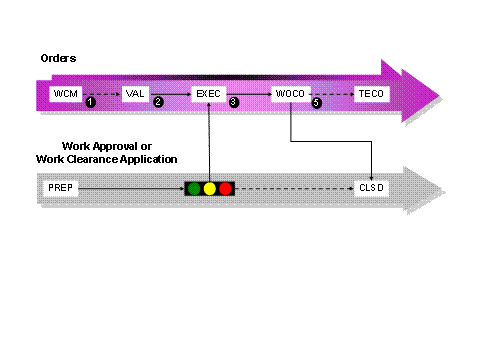
Statuses and Their Meaning
Status |
Description |
|---|---|
WOCO |
The work for the WCM-relevant order is completed. |
CLSD |
The WCM object is closed. |
VAL |
The WCM-relevant order is valuated. |
EXEC |
The WCM-relevant order is released for execution, that is, the work can start. |
WCM |
Work clearance management is activated for the order |
TECO |
The order is technically completed |
PREP |
The WCM object is prepared |