 Approvals
Use
You can use approvals to define certain rules or requirements that must be observed in Work Clearance Management. In addition, you can use approvals to log the execution of certain steps.
You can assign approvals to all WCM objects . You always assign an approval at the header level of a WCM object; thus you approve the whole WCM object and not individual items. You can also use approvals to block the switching in the operational cycle of an Operational WCD .
Before beginning the approval process , you can assign approvals to a WCM object and delete these assignments again.
You can assign several approvals to a WCM object. However, each approval can only be used once per WCM object. You can also assign an approval to several WCM objects; however, for reasons of clarity, this is not recommended.
During the approval process, you can issue approvals and revoke approvals again.
 Note
Note
The approval process begins when you set the
status
PREP (Prepared)
in the WCM object. This means that from this point you can issue and revoke approvals, but you cannot assign any more approvals to a WCM object or delete assignments.
Integration
In Work Clearance Management, the approvals from the
Plant Maintenance and Customer Service
component are used. These approvals are enhanced for functions that only concern Work Clearance Management.
Prerequisites
In Customizing for the component
Plant Maintenance and Customer Service
,
you have defined approvals and approval categories. From the total quantity of these approvals you have selected a partial quantity for Work Clearance Management.
Features
In Customizing for the
Work Clearance Management
(PM-WCM) component, you define which approval can be used for which WCM object. You make further settings, whose effects are described below.
Automatic Assignment of Approvals
You can determine that an approval is automatically assigned to a WCM object when it is created.
 Example
For example, if you know that approvals A, B, and C are always used for the WCM object, then you can define in Customizing that approvals A, B, and C are automatically assigned to the WCM object when the WCM object is created.
You can determine that approvals are assigned automatically when the status
PREP (Prepared)
is set for a WCM object.
Example
Approval determination from the usage:
For example, if you know that approval A is always needed for usage Y, you can define in Customizing that approval A is assigned automatically to WCM objects with usage Y when you set the status
PREP (Prepared)
for the WCM object.
Approval determination from a reference object:
For example, if you know that approval A is always needed for reference object Y, you can define in Customizing that approval A is assigned automatically to WCM objects with reference object Y when you set the status
PREP (Prepared)
for the WCM object.
Approval determination from operational steps:
(Only for Operational WCDs)
For example, if you know that approvals A and B are always used for operational step X, you can define in Customizing that approvals A and B are assigned automatically when the status
PREP (Prepared)
is set for an Operational WCD with operational step X.
Approval determination from work or requirements:
(Only for applications)
For example, if you know that approval A is always needed for requirement Z, you can define in Customizing that approval A is assigned automatically to applications with requirement Z when you set the status
PREP (Prepared)
for the application.
Obligatory Approvals
You can determine that the assignment of an approval to a WCM object cannot be deleted. This makes the approval obligatory.
Hierarchies
You can define hierarchies for approvals to control the approval process within a WCM object.
The approvals at one hierarchy level are always linked by a logical AND. The issuing order is unimportant. This means that the approvals at one hierarchy level must always be completely issued before an approval at the next hierarchy level can be issued.

Example
To issue approval B, C, or D, you must have issued approval A. To issue approval E or F, you must have issued approvals B, C, and D. To issue approval G, you must have issued approvals E and F.
Prerequisites for Issuing Approvals
System Statuses and User Statuses
You can determine that the issuing of approvals can be blocked by the system status or user status.
Assigning Another WCM Object
You can determine that an approval can only be issued when a WCM object is assigned to another WCM object.
Example
Thus, you can, for example, prevent an Operational WCD from being approved before it is assigned to a work clearance application.
Automatic Issuing of Approvals
You can determine that approvals are automatically issued. This only makes sense if you have defined prerequisites (for example, system status) for issuing approvals.
Example
Issuing an approval is dependent on a certain system status of the WCM object. As soon as the WCM object has the system status, the system automatically issues the approval.
Automatic Revoking of Approvals
You can determine that approvals issued on the basis of hierarchy level or a system status are automatically revoked.
Example
Approvals A, B, and C, as well as D (see above graphic) have already been issued. Whoever issued approval A subsequently determines that approval A should not have been issued and revokes it. Through this, approvals B and C, as well as D, are automatically revoked.
Symbolization of the Approval Status
Progress in the issuing of approvals is symbolized by traffic light icons. You can determine exactly which approval has an influence on the traffic lights. Through this you have, for example, in list overviews a quick overview of the progress of the approval process.
The colors of the traffic lights have the following meaning:
|
No approval is issued. |
|
At least one approval is issued. |
|
All approvals are issued. |


Note
The printing of a work permit can be blocked by the approval status.
The approval status of the assigned WCM object is used to control the release for execution of a WCM-relevant order .
Approval Process Across WCM Objects
You can also block the approval process across WCM objects. Thus, approvals in hierarchical or subordinate WCM objects can affect the issuing of approvals within a WCM object.
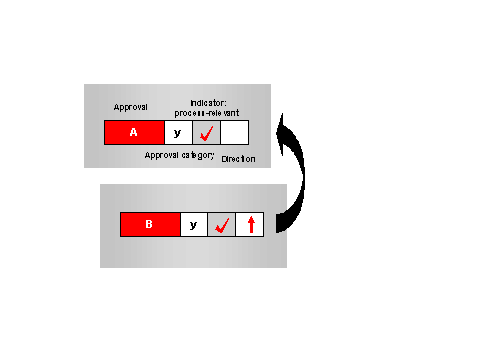
Example
To issue approval B, you must have issued approval A.
The following exception rules apply:
Situation |
Exception Rule |
|---|---|
The system is set up such that approval A of one WCM object waits for the issuing of approval B of another WCM object and the other way round. |
In this case, approvals A and B can be issued independently of each other, that is, the blocking across WCM objects is lifted. |
Approval A is assigned to one WCM object, approval B is assigned to another WCM object. Approval B cannot be issued until approval A has been issued. The assignment of approval A to the WCM object is, however, deleted. |
In this case, the system interprets the missing assignment as approval issued. If you want to avoid this, you must determine that approval A is obligatory. |
 Caution
If you use approval groups in work clearance management at operation level , you must also determine which approvals are combined in an approval group.