 Order Processing with Valuation
Purpose
The following steps describe an example of a process in order processing with valuation . Here, a lockout/tagout is executed using the enhanced model .
Process Flow
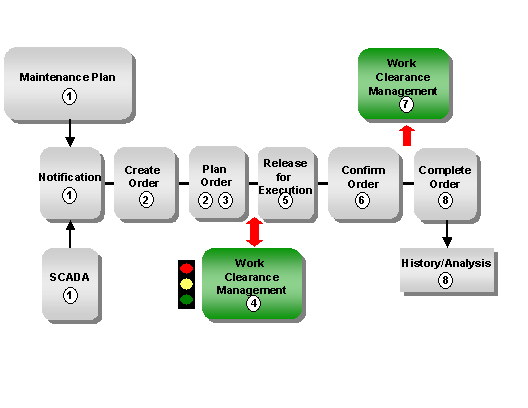
Notifying a maintenance requirement
This can be performed manually using a malfunction report or automatically using a SCADA system in the control room, or by using deadline monitoring of maintenance plans in preventive maintenance.
Creating and planning an order
You plan the activities and resources required, create a cost estimate, and perform scheduling. If the tasks to be carried out require safety measures (for example, a lockout/tagout), you must activate work clearance management for the order .
You must define explicitly for each
application
whether or not it is necessary. When you have valuated all the applications, the WCM-relevant order receives the status
VAL
(
Valuated
).
Create WCM objects and tagging
You create the necessary work approval and all applications (for example, the work clearance application ) with the relevant Operational WCDs that are necessary on the basis of the valuation.
You tag the technical object using the Operational WCD and confirm the execution of the work clearance application and all the additional applications in the work approval.
Issue " Release for execution " in the WCM-relevant order
When all the prerequisites for issuing the "release for execution" are fulfilled, the
Release for Execution
pushbutton appears in the WCM-relevant order. You can now set the status
EXEC
(
Released for Execution
) for the WCM-relevant order.
Executing the work and confirming its completion
During and after the completion of the work, you confirm the resources required (for example, materials, times, and external services) and technical findings. You confirm the completion of the work with the status
WOCO (Work completed).
Close WCM objects and untagging
As soon as you have closed the work approval and all applications (particularly the work clearance application), the Operational WCDs can be untagged, that is you can untag the technical objects.
Then close the Operational WCD.
Completing a WCM-relevant order and copying to an order history
After technical completion, the business completion is performed with settlement of the WCM-relevant order. The WCM-relevant order is then copied into the order history, where it is available for evaluations in the SAP component
Plant Maintenance Information System
(PM-IS).
The following figure is a schematic representation of this process: You can also see here which statuses are set.
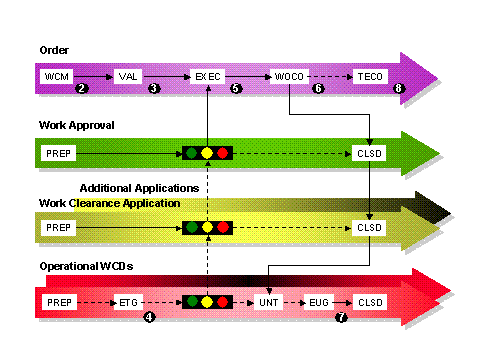
Statuses and Their Meaning
Status |
Description |
|---|---|
WOCO |
The work for the WCM-relevant order is completed. |
CLSD |
The WCM object is closed. |
VAL |
The WCM-relevant order is valuated. |
EXEC |
The WCM-relevant order is released for execution, that is, the work can start. |
WCM |
Work clearance management is activated for the order. |
ETG |
The Operational WCD is tagged. |
EUG |
The Operational WCD is untagged. |
UNT |
The Operational WCD is untaggable. |
TECO |
The order is technically completed. |
PREP |
The WCM object is prepared. |