
 Enterprise Reporting, Query, and
Analysis
Enterprise Reporting, Query, and
Analysis

This IT scenario shows how business experts can use the reporting and analysis tools available in SAP NetWeaver Business Intelligence (BI) to provide BI information customized for the different categories of users in your company.
Business Explorer
The tools in the BI Suite, subsequently referred to as Business Explorer (BEx), allow business experts to create and distribute reports and analyses. These tools are fully integrated and have user-friendly, intuitive interfaces.
You can perform a detailed analysis of BI information both on the Web and in Microsoft Excel. You can also define formatted reports optimized for presentation and printing.
Web applications and formatted reports can be converted quickly and simply into PDF files and printed.
Users access BI information from the portal. Users can execute information broadcasting functions, for example, to distribute this information by e-mail, or broadcast it to Knowledge Management (KM folders) and collaboration rooms.
Visual Composer BI Integration
The integration of BI into the Visual Composer also provides the option of including BI data in composite applications that users can access in the portal.
Business experts create iViews or portal pages based on data from SAP or third-party systems. The data can be stored relationally or multidimensionally. A set of query templates that cover specific business aspects and the user-friendliness of Visual Composer support business experts in creating BI applications.
Architecture of the IT Scenario
The graphic below provides an overview of the architecture:
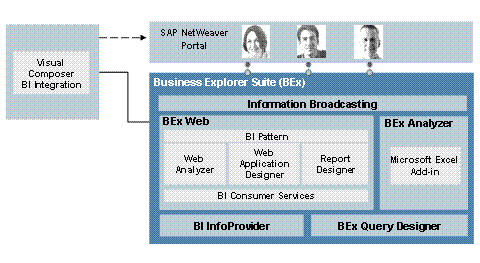
BI applications are created using the various tools from the Business Explorer Suite or Visual Composer. The applications can then be published to SAP NetWeaver Portal.
BEx Query Designer can be used to create queries. These can be used for Microsoft Excel-based analysis in BEx Analyzer or for Web-based analysis in BEx Web Analyzer. The data analysis is based on InfoProviders from SAP NetWeaver BI.
In BEx Web, Web Application Designer can be used to create Web applications, Report Designer can be used to create formatted reports and Web Analyzer can be used for Web-based special analyses. Using information broadcasting, you can broadcast the generated content from BI by e-mail, or publish it to the portal.
Required or Optional Installable Units
To use this IT scenario, you require the following installable units:
System with activated usage types:
● BI Java Component (BI Java)
● Business Intelligence (BI)
● Enterprise Portal (EP)
● Application Server ABAP (AS ABAP): for Internet Graphics Server (IGS)
● Application Server Java (AS Java): for Adobe server
Standalone engines:
● TREX
You can also use the precalculation server standalone engine for the Microsoft Excel Integration and Information Broadcasting scenario variants.
For more information about the required system landscape, see the SAP NetWeaver Master Guide.
Integration with Other IT Scenarios
Implementation of the Enterprise Data Warehousing IT scenario is a prerequisite for the Enterprise Reporting, Query, and Analysis IT scenario. This IT scenario includes all data modeling, data staging, transformation, and metadata management processes; from administration and performance management, to user management.
To use the Query, Reporting, and Analysis, Performing Ad Hoc Query and Analysis, and Information Broadcasting scenario variants, you also require the following IT scenarios:
● Running an Enterprise Portal
This IT scenario is a prerequisite for central, role-based access to SAP NetWeaver. With the Enterprise Reporting, Query, and Analysis IT scenario, you can publish content from BI to the portal and allow users to work with structured data from BI together with unstructured data and the various functions in the portal.
● Enterprise Knowledge Management
In the portal, this IT scenario provides central and role-based access to information in your company and establishes a link between structured business data and unstructured documents.
With user collaboration in the portal, users can use services for collaboration to edit documents (including BI documents) in an application sharing session, for example.
The Enterprise Reporting, Query, and Analysis IT scenario serves as the basis of the Business Planning and Analytical Services IT scenario. This IT scenario allows business experts to accelerate the decision-making process, predict future trends based on historic analyses, uncover hidden or complex relationships between data, and provide all decision makers with a central point of access to data and information.
Scenario Variants
The IT scenario consists of the following scenario variants:
Variants |
Description |
The Query, Reporting and Analysis scenario variant shows how business experts can create BI applications with the Business Explorer tools and publish them to the portal. |
|
Using BEx Web Analyzer, business experts can analyze ad hoc queries and create query views for various data sources. |
|
With the Microsoft Excel Integration scenario variant, business experts can use BEx Analyzer to create Microsoft Excel-based BI applications and workbooks and use these to analyze data. |
|
Information broadcasting allows you to make objects with content from BI available to a wide range of users, according to your requirements. |
|
Using the Visual Composer, business experts can model BI applications and make them available in the portal. |
More Information
The following role-specific guides contain further information about this IT scenario:
User Roles and Tasks |
Guide |
Planning the installation of the IT scenario |
For more information, see the Master Guide – SAP NetWeaver available on SAP Service Marketplace at service.sap.com/instguidenw70 ® Installation. |
Planning the upgrade to the IT scenario |
For more information, see the Upgrade Master Guide – SAP NetWeaver available on SAP Service Marketplace at service.sap.com/instguidesnw70 ® Upgrade. |
Installation and upgrade |
|
Configuration |
SAP Solution
Manager or Technology Consultant’s Guide:
|
Administration |
Technical
Operations Manual for SAP NetWeaver:
|
Security/user administration |
SAP NetWeaver Security Guide: Enterprise Reporting, Query, and Analysis |
Development |
SAP NetWeaver
Developers’ Guide:
|
Power-user activities |
Power User Guide:
|
 Technology
Consultant's Guide
Technology
Consultant's Guide