
 Business
Planning and Analytical Services
Business
Planning and Analytical Services

The Business Planning and Analytical Servicesscenario contains processes that collect data from InfoProviders, queries, or other BI objects, convert them using various methods, and write back new information to BI objects (such as InfoObjects or DataStore objects).
This scenario enables business experts to accelerate the decision-making process, predict future trends based on historic analyses, uncover hidden or complex relationships between data, and provide all decision makers with a central point of access to data and information.
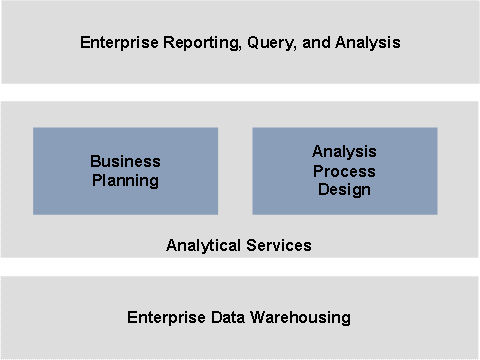
The following figure illustrates the positioning of the scenario and its variants in the context of SAP NetWeaver BI:
Required Usage Types of SAP NetWeaver
To use this scenario, you require the following technical usage types from SAP NetWeaver:
● Business Intelligence (BI)
● BI Java Component (BI Java)
● Enterprise Portal (EP)
● Application Server ABAP (AS ABAP): for Internet Graphics Server (IGS)
● Application Server Java (AS Java): for Adobe server
You also require the standalone Search and Classification engine (TREX).
You can also use the liveCache standalone engine and, for the Analysis Process Design scenario variant, the precalculation server standalone engine.
For more information about the required system landscape, see the SAP NetWeaver Master Guide.
Integration with Other IT Scenarios
As a prerequisite for the Business Planning and Analytical Services scenario, you have to implement the Enterprise Data Warehousing and Enterprise Reporting, Query, and Analysis scenarios.
The Enterprise Data Warehousing scenario contains all processes that system administrators need to set up a highly flexible, reliable, robust and scalable BI solution and administrate it easily. For more information, see Enterprise Data Warehousing.
The Enterprise Reporting, Query, and Analysisscenario contains all processes that business experts need to provide BI information tailored to the different user types in their companies. For more information, see Enterprise Reporting, Query, and Analysis.
Furthermore, you require the Running an Enterprise Portal IT scenario for the Business Planning scenario variant. This is a prerequisite for central, role-based access to SAP NetWeaver.
Scenario Variants
The Business Planning and Analytical Servicesscenario consists of the following scenario variants:
Variants |
Description |
In the Business Planning variant you have the following two options: Option I: Excel-Based Business Planning: Contains all processes a planner needs to edit planning applications in an Excel-based environment with many functions, on the basis of a central data store. Option II: Web-Based Business Planning Contains all processes a planner needs, independent of their location, to simply and intuitively use planning applications without having to install a front end. |
|
The Analysis Process Design variant contains all processes that allow you to explore and identify hidden or complex relationships between data in a simple way. |
More Information
The following role-specific guides contain further information about this IT scenario:
User Roles and Tasks |
Guide |
Installation and upgrade |
You can find this guide at service.sap.com/instguidesNW70. |
Configuration |
For more information, see the SAP Solution Manager. |
Administration |
Administrator's
Guide (Technical Operations Manual):
|
Security |
Security Guide:
|
Development |
Developer' Guide:
|
Power-user activities |
Power User Guide:
|
 Business Planning and
Analytical Services
Business Planning and
Analytical Services