
 Business Planning

Use
Set this variant if you want to run planning scenarios. In the BI system, BW-BPS (Business Planning and Simulation) is available as of SAP NetWeaver 2004 for this purpose. BI Integrated Planning is available as of SAP NetWeaver 7.0. Both solutions use similar concepts and can be operated in parallel in the system. Unlike BW-BPS, the new solution is completely integrated into the BI system. This allows you to build integrated analytical applications that contain planning and analytical functions. Therefore, we recommend that you use the BI Integrated Planning structure when you implement new scenarios.
Architecture of the Scenario Variant
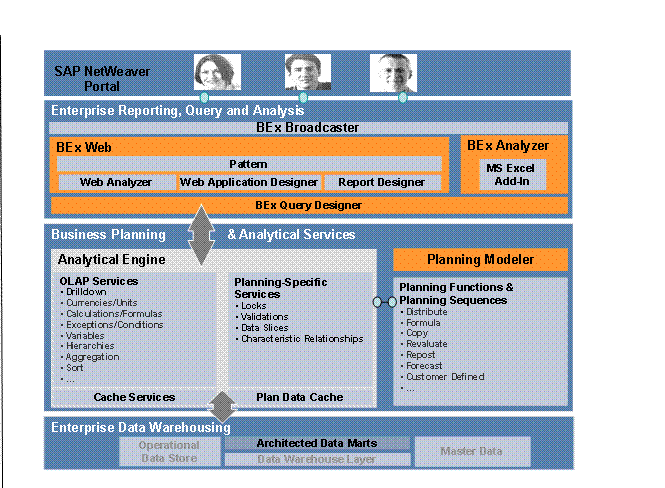
The following figure provides an overview of the architecture:
Required Usage Types of SAP NetWeaver
To use this scenario variant, you require the following technical usage types from SAP NetWeaver:
● Business Intelligence (BI)
● Enterprise Portal (EP)
IT Processes of the Scenario Variant
This scenario variant consists of the following IT processes:
Process |
Description |
You use this process to create your planning model in the planning modeler. You select a real-time InfoCube to store data. To specify the level on which data can be recorded or changed, you must first define a special type of InfoProvider, an aggregation level. You can also create filters that represent a certain section of a dataset. |
|
You use this process to create planning functions, and if necessary, planning sequences, in the planning modeler. Planning functions allow system-based processing or generation of data. You can execute functions online or in the background as planning sequences. |
|
You use this process to generate input-ready queries for InfoProviders of type aggregation level. By selecting and combining InfoObjects (characteristics and key figures) in a query, you specify what data can be recorded in manual planning. Whether a particular cell is input-ready depends on the drilldown; specifically, whether characteristic relationships and data slices are permitted for the cell. |
|
You use this process to embed queries into Microsoft Excel workbooks. You either select the queries using the BEx Analyzer, or you create a new query using the BEx Query Designer. |
|
You use this process to customize the design and layout of Microsoft Excel workbooks. You do this using the design functions of the BEx Analyzer as well as the formatting and formula options from Microsoft Excel. You select design items. You must select a query or create a new one to specify the data connection. |
|
|
|
You use this process to create Web templates using the BEx Web Application Designer, or Excel applications using the BEx Analyzer. You insert Web items and assign them to the required InfoProvider. You also configure how they are to interact. |
You use this process to execute a planning application. You can execute it on the Web or in Microsoft Excel. You can also execute planning sequences in the background as a step within a process chain. |