
 Ad Hoc Query and Analysis

With this variant, business experts can perform ad hoc data analyses, create query views, and save and distribute the results of their ad hoc analyses. Business Explorer (BEx) provides BEx Web Analyzer for this purpose. BEx Web Analyzer is a user-friendly analysis tool that can be called in the Web browser using a URL or in the portal as an iView.
It shows how business experts can run easy to create analyses of business data in the Web or the Portal using data providers based on data from the SAP system. Analysis and navigation options such as swapping columns, adding and removing characteristics and key figures using drag and drop, setting filter values, and drilling down data to the characteristic values are offered for this purpose. Users can also display data in charts, and create exceptions and conditions.
After the analysis, the changed drilldown state of the data can be saved as a query view. The query views can then be used as data providers for BEx Web applications, workbooks in BEx Analyzer, and reports in BEx Report Designer. The analysis results can also be saved and distributed using information broadcasting.
Architecture of the Scenario Variant
The graphic below provides an overview of the architecture:
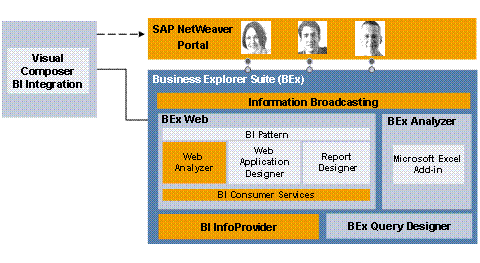
In BEx Web Analyzer, you select the data provider, perform the ad hoc analysis on the data, save the drilldown state of the data resulting from execution of the analysis and navigation as a query view, and generate a new data provider. Data providers are based either on BI InfoProviders, queries (which are based on BI InfoProviders) or query views. The saved query views can also be used as data providers in other BEx tools. You can save the views resulting from execution of the analysis on the Web application in the portal (BEx Portfolio) and use information broadcasting to broadcast them by email or to the portal. Web Analyzer can be called using an URL in the Web browser or as in iView in the portal.
IT Processes in the Scenario Variant
This scenario variant consists of the following IT processes:
Process |
What You Need to Know |
In this process, you select a data provider to form the basis of the ad hoc analysis. In Web Analyzer, data providers of type query view (runtime object) are used. A query view can be based on the following elements: ● InfoProviders from SAP NetWeaver BI ● Queries from SAP NetWeaver BI (these queries are based on InfoProviders) ● Saved query views from SAP NetWeaver BI |
|
In this process, you run an ad hoc analysis of the business data. A large number of analysis options are available to you in BEx Web Analyzer. For example, you can set filter values, generate a ranked list condition (top N) and display the data in chart form. Once you have analyzed your data, you can save the changed drilldown state of the data as a query view and use it as a data provider in the Web Analyzer or in other BEx tools as required. You can also save the result of the Web application generated by the analysis and distribute it using information broadcasting. |