
 Information Broadcasting

Information broadcasting allows you to make objects with content from business intelligence available to a wide range of users, according to your requirements. The following options are available:
● Distribution of BI data based on queries, query views, workbooks, Web applications, and reports
● Generation of files in various formats, including HTML, MHTML, PDF, ZIP, online links, alerts
● User-specific or role-specific distribution to required recipients, such as individual users, groups, distribution lists (including non-SAP users)
● Master-data-based distribution to the required recipients (based on the master data stored for a characteristic in the BI system, such as the cost center manager of a cost center)
● Broadcast by e-mail, to a printer, or to the portal (collaboration rooms, the universal worklist (UWL) or to KM folders such as the BEx portfolio)
● Distribution at a required time: ad hoc, scheduled, when data is changed, or based on exceptions
Information broadcasting is tailored for specific groups of users. Information consumers can use the Broadcasting Wizard, and the step-by-step instructions it provides, to distribute ad hoc content from BI. Business experts defining queries, Web applications, or workbooks call BEx Broadcaster directly from the design tools. Here, they can distribute or schedule the distribution of generated BI objects to the required recipients by e-mail or to the portal.
Structured BI data (precalculated documents with historic data, online links to the current data, or alerts) are available to users in the portal, along with unstructured data from Knowledge Management. Users can hold discussions based on the BI data or work in collaboration rooms. They can use various Knowledge Management functions to work with BI data. You can also receive notifications whenever a document changes; for example, when a new precalculation is performed, or you can add evaluations, feedback, or personal notes to documents.
Architecture of the Scenario Variant
The graphic below provides an overview of the architecture:
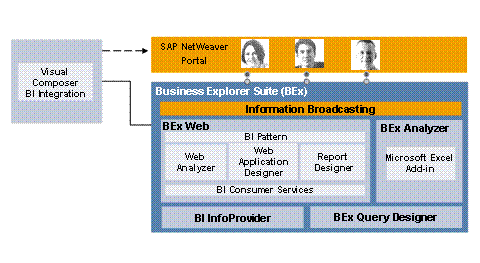
You use information broadcasting to distribute the BI objects that you have defined using the various Business Explorer design tools by e-mail or to SAP NetWeaver Portal.
IT Processes in the Scenario Variant
This scenario variant consists of the following IT processes:
Process |
What You Need to Know |
In this process, you create a broadcast setting in which you specify which BI object is distributed to which recipient at which time or event using which distribution type (e-mail, portal, alert framework, and so on). |
|
In this process, the system determines which settings you have defined and processes them. |
|
In this process, the system checks the alert category of existing exceptions and forwards the alerts to the required recipients as specified in the alert category settings, for example to the universal worklist (UWL). |
|
In this process, users can access the distributed BI data and alerts using the BEx Portfolios or the universal worklist. Users can use various Knowledge Management and collaboration services when working with the BI data. For example, you can hold discussions or use functions such as subscribe or download from documents. |