
 Microsoft Excel
Integration
Microsoft Excel
Integration

This variant describes how business experts can run complex analyses on BI data using Microsoft Excel functions. Business Explorer (BEx) provides BEx Analyzer for this purpose. This is a design and analysis tool integrated with Microsoft Excel. With BEx Analyzer, BI data can be presented and analyzed interactively in the Microsoft Excel environment.
Data binding in BEx Analyzer is performed using queries, query views or InfoProviders. BI data can thus be analyzed in a variety of ways and added to a Microsoft Excel workbook. Using the open dialog, business experts can select queries, query views, or InfoProviders or call BEx Query Designer to create new queries.
The layout and interaction of the workbooks can be adapted to meet specific user requirements. Formatting and formula functions from Microsoft Excel can also be used.
The workbooks can be saved as favorites or made available to other users using the role concept.
Workbooks can also be precalculated and sent by e-mail to make them available to other user groups. Information broadcasting functions are used for this purpose.
Architecture of the Scenario Variant
The graphic below provides an overview of the architecture:
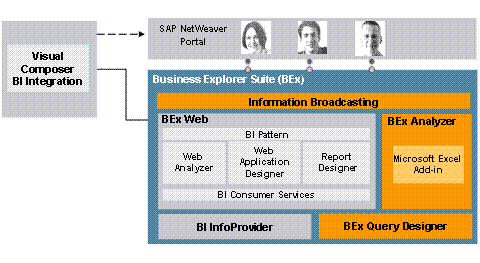
Using BEx Analyzer, which is integrated with Microsoft Excel, you can present and analyze BI data interactively in a Microsoft Excel environment. Queries (query views or InfoProviders) that have been defined using BEx Query Designer are executed here in workbooks. Information broadcasting allows workbooks to be precalculated and sent by e-mail.
IT Processes in the Scenario Variant
The Microsoft Excel Integration scenario variant comprises the following IT processes:
Process |
What You Need to Know |
In this process, you create queries for InfoProviders. You refine the data to be evaluated in the InfoProvider by selecting and combining InfoObjects (characteristics and key figures) in a query. Defining queries allows you to evaluate the data in an InfoProvider quickly and specifically. Queries form the basis of the analyses and reports that you create with other Business Explorer tools. |
|
In this process, you embed one or more queries (query views or InfoProviders) that you can use to analyze BI data, into a Microsoft Excel workbook. You can save workbooks in your favorites, or use the role concept to make them available to other users. |
|
In this process, you create the workbook design. You can specify the layout and interaction of the workbook and access formatting and formula functions from Microsoft Excel. |
|
In this process, users call and process workbooks in BEx Analyzer or in the portal. They can thus analyze BI data, navigate in the workbook and distribute the results to other users. |