
 Enterprise Knowledge Management

Enterprise Knowledge Management provides central and role-based access to the information in your company and creates a connection between structured business data and unstructured documents.
The IT scenario allows users to exchange documents and information across technical system boundaries.
Enterprise Knowledge Management contains the tools to integrate different data sources and to create, administer, and distribute information. It allows consolidation and integration of intranet platforms and makes available integrated search technology that takes into account all data stores in your company.
The IT scenario comprises the set-up and operation of an integrated authoring environment for information workers. In this authoring environment, users can contribute to the creation, distribution, and classification of information or benefit from the information, irrespective of their role.
Together with other IT scenarios, Enterprise Knowledge Management, which is Java-based and portal-based, provides the means to connect information in both Java systems and ABAP systems.
The IT scenario provides the following benefits to your users:
● Receipt of relevant, role-based, and personalized information
● Automatic notification about new or changed information
● Quick finding of information using advanced search functions
● Direct options for reacting to information
● Display of information from different data sources on a common user interface
● Simplified exchange of information between users
● Clear structuring due to automatic classification
● Means of storing and efficiently using unstructured information
There are the following benefits for your IT operations:
● Integration of your existing information landscape
● Or a complete switch to the KM capabilities of SAP NetWeaver
● Implementation of a consistent Content Management system
● Administration of business applications and Content Management in a single platform
● Use of integrated search technology for company-wide stores
Architecture of the IT Scenario
The graphic below shows the IT scenario architecture:
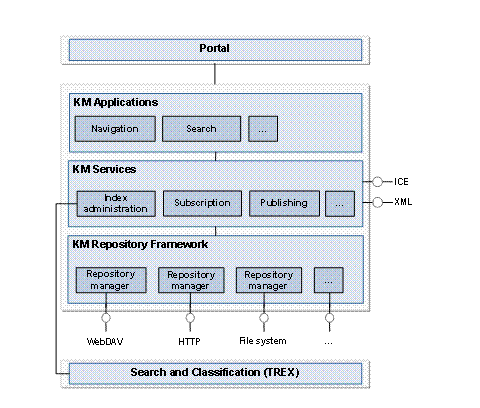
With the repository managers, the repository framework allows integration of heterogeneous data sources in the portal. Among others, there are repository managers for integrating WebDAV, HTTP systems, and file systems. You can connect additional data sources using partner software and an open interface.
Knowledge Management services (KM services) provide functions that can be implemented in repositories, including subscription and publishing. There are interfaces for the open standards XML and ICE. Using the index management service, the SAP NetWeaver stand-alone engine Search and Classification (TREX) accesses the content of the connected repositories through the repository framework to index, classify, and search these.
KM applications, such as navigation and searching, are integrated in iViews and are launched through the portal.
Required and Optional Installable Units
To use this IT scenario, you require the following installable units:
System with activated usage types:
● Application Server Java (AS-Java)
● Application Server ABAP (AS ABAP) – only required for the Documentation, Manuals, and Training Material Management variant
● Enterprise Portal (EP)
Stand-alone engines:
● Search and Classification (TREX)
For more information about the system landscape required, see the Master Guide.
Integration with other IT Scenarios
There are required or logical combinations with the following IT scenarios:
● Running an Enterprise Portal
The prerequisite for central, role-based entry to SAP NetWeaver.
● Enabling User Collaboration
In the portal, users can use collaboration services, for example, to edit documents in an application sharing session.
● Information Broadcasting
In the portal, users can use Knowledge Management and Collaboration functions when working with BI data.
● Business Task Management
In the portal, users can coordinate and manage their tasks. In doing this, they can receive notifications from business applications and from KM services on a common user interface.
● Enabling Platform Interoperability
This IT scenario covers the interoperability of SAP NetWeaver with platforms from other manufacturers. Integration of different data stores in the repository framework is an important part of this interoperability.
Scenario Variants
The Enterprise Knowledge Management IT scenario can be described in the following main scenario variants:
Variant |
Description |
This variant comprises the configuration of the necessary infrastructure for implementing the Enterprise Knowledge Management IT scenario. It contains the following processes: ● Integrating repositories ● Defining metadata ● Indexing documents ● Creating taxonomies ● Configuring user interfaces This variant is the prerequisite for the Content Creation, Publication, and Access scenario variant. |
|
This variant comprises the tasks of content managers and authors who make content available for users. These tasks include: ● Creating an authoring environment ● Creating documents ● Making information available Once these processes have been completed, users can perform the following tasks: ● Viewing documents ● Working with documents |
|
Documentation, Manuals, and Training Material Management
|
This variant comprises the management of documentation, manuals, and training material and the administration of the authoring environment in SAP Knowledge Warehouse. It contains the following processes: ● Managing training material, documentation, and manuals ● Editing training material, documentation, and manuals ● Publishing training material, documentation, and manuals ● Viewing training material, documentation, and manuals |
Additional Information
The following role-specific guides contain further information about this IT scenario:
User Role and Task Area |
Guide |
Planning installation of the IT scenario |
For more information, see the Master Guide – SAP NetWeaver on SAP Service Marketplace at service.sap.com/instguidesnw70 ® Installation. |
Installation und upgrade |
|
Configuration |
SAP Solution Manager or Technology Consultant‘s Guide:
|
Administration |
SAP NetWeaver Technical Operations Manual:
|
Security |
SAP NetWeaver Security Guide: |
Development |
SAP NetWeaver Developer's Guide:
|
Power user activities |
Guide for power users:
|
 Technology
Consultant's Guide
Technology
Consultant's Guide