
 Enabling User Collaboration

This IT scenario allows efficient collaboration in your corporate portal. It allows individual users and teams to communicate within their business processes and access shared data in virtual rooms.
Enabling User Collaboration makes communication and sharing data an integrated part of the working day.
This IT scenario provides the following benefits:
● Increases user productivity by enabling more efficient project work for teams
● Encourages innovation by optimizing collaboration in teams
● Reduces costs by shortening the collaboration cycle
● Optimizes decisions by increasing the quantity of information that the decisions are based on
● Accelerates problem solving processes
Architecture of the Scenario
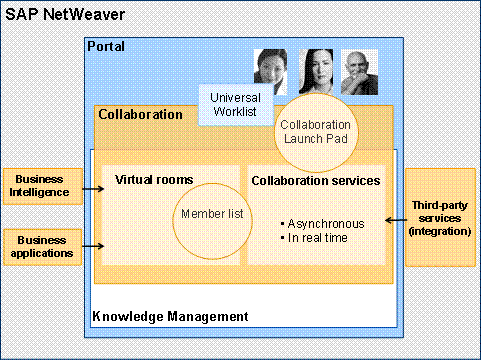
From a technical perspective, the Enabling User Collaboration IT scenario uses the capabilities in SAP NetWeaver Portal and Knowledge Management. The task management features integrated in rooms are based on the Universal Worklist (UWL) in the portal.
Within SAP NetWeaver, you can integrate third-party services, for example, e-mail and calendar functions from Microsoft Exchange or Lotus Domino and WebEx for online sessions. You can integrate SAP NetWeaver applications (for example, BI analyses) and third-party applications in rooms.
Users can use the Collaboration Launch Pad in the portal and the member list in rooms to launch collaboration services.
Required Usage Types of SAP NetWeaver
● EP (Enterprise Portal)
● Optional:
○ BI (Business Intelligence)
○ AS (Application Server Java)
Integration with other IT Scenarios
The Enabling User Collaboration IT scenario builds on the Running an Enterprise Portal IT scenario and is closely linked to the Enterprise Knowledge Management IT scenario. In addition, the Business Task Management scenario is required for ad hoc collaboration.
Scenario Variants
Scenario Variant |
Description |
This scenario variant illustrates how portal users can handle business problems quickly and efficiently online. It comprises the search for the right communication partners and the use of collaboration services in portal. |
|
Collaboration in Virtual Rooms
|
This scenario variant illustrates how portal users plan and carry out their team work and project work in virtual rooms. The scenario variant includes making available the required room templates and room part templates, creating the room, and working with documents together. It describes how the room administrator manages the lifecycle of rooms. The lifecycle of a room comprises room creation, room usage, and room deletion after completion of the teamwork or project work. |
More Information
For more information about the Enabling User Collaboration scenario, see:
● The role-specific guides:
User Role or Task Area |
Guide |
Configuration |
SAP Solution Manager |
Administration |
|
Security |
|
Development |
Developer Guide
for
|
Power user tasks |
 Technical Operations
Manual for Collaboration
Technical Operations
Manual for CollaborationThe Internet address service.sap.com (use the following quick links):
Folders |
Quick Link |
SAP NetWeaver Release 7.0 |
● /instguidesNW70 |
Subfolders ●
Installation ●
Upgrade ●
Maintenance ●
SAP Notes |
●
/installNW70 ●
/upgradeNW70 ●
/MaintenanceNW70 ● /SAPNotesNW70
|