
 Meter Management

Use
Oil companies use sales meter readings to calculate fuel sales volumes. The billing process can use this meter reading data to calculate the amount to claim from service station partners for fuel sold at a location.
Meter management: overview
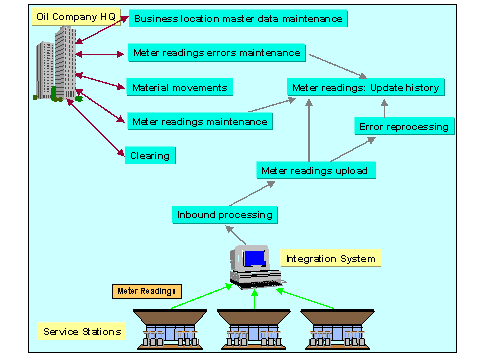
SSR allows you to:
- Assign sales meters to locations
- Assign meters to storage objects
- Receive meter reading data from locations
- Maintain meter reading data manually
- Process errors that occur in the meter reading upload process
- Use meter reading data to create billing and goods movement documents
Prerequisites
In Customizing for the Industry Solution Oil & Gas (Downstream), you must define:
Processing Profile by choosing SSR ® Basic Settings ® Define processing profile.
At least one access profile by choosing SSR ® Fuels Processing ® Process Configuration ® Define access profile.
Features
SSR provides the following:
- Master meter definitions per location. You can assign meters to each location, defining validity periods, if required, and the type of data required (that is, sales by material or sales by material and service type). For more information, see
Assigning Meters to Business Locations.
Interface for meter readings upload. Intermediate documents (IDocs) or BAPIs can be used to transfer meter reading data from business locations to the Oil & Gas system. For more information, see Interfaces to External Systems.
Manual update of meter readings, if no electronic update is available.
Meter reading error maintenance. A dialog transaction allows you to analyze, authorize blocked, and reprocess rejected meter readings.
Meter reading history. You can use a meter reading history report to display data held in the meter reading upload tables.
Check of target price against the actual price received with meter readings.
Clearing of meter reading data to delete the last meter readings received from the location and generate cancellation records for subsequent processes. This makes it possible to receive the same or previous meter readings.
Business add-ins that allow you to define your own checks and schedules for meter reading uploads
Activities
For more information about user activities relating to meter readings, see
Maintaining Meter Readings
Handling of Meter Reading Errors
Displaying Meter Reading History Data
Clearing Meter Readings
Meter Error Reprocessing
Updating Aggregated Meter Reading Data
Creation of Material Documents from Meter Readings
In Customizing for the Industry Solution Oil & Gas (Downstream), you can:
- Define your own checks on uploaded data by choosing SSR
® Fuels Processing ® Process Configuration ® Business add-in for meter readings user checks.
Define your own schedules for meter reading upload by choosing SSR ® Fuels Processing ® Process Configuration ® Business add-in for meter readings process schedule def.
See also:
Processing of Meter Readings