
The Object Component Screen
Function
You can distinguish different types of object component screens.
The data for an object are sometimes grouped in contents-related groups which perhaps may even be maintained and stored separately.

A program in ABAP/4 is divided into the attributes, the program source, the text elements and the documentation. Every object component has its own screen and can be maintained and stored separately.
An object sometimes consists of object components which are identical in structure. In these cases, the object components are often displayed in a list, from which an object component can be chosen.
An accounting document has different items which all have the same structure. An info-type human resource master record has different lines on the time axis which all have the same structure.
Sometimes not all data can be included on one screen and therefore have to be distributed over several templates which are sequentially linked together.
In the RF vendor master record in the R/2 System, the screens of a record are linked together: The sequence is predefined and the record can only be posted after all screens have been processed (they are not "actual" object components but the screens are treated as such).
Navigation Options at Higher Hierarchy Levels
With the Back function, you get to the screen which is exactly one level higher in the hierarchy, for example, the object component list screen or the initial screen (depending on what is available or where the user came from). With the
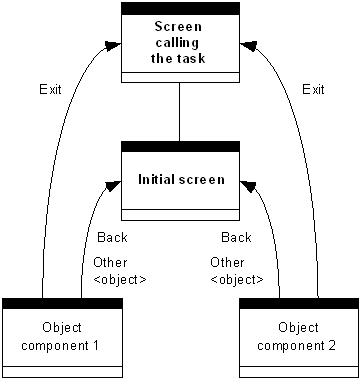
Navigation options to higher hierarchy levels (1)
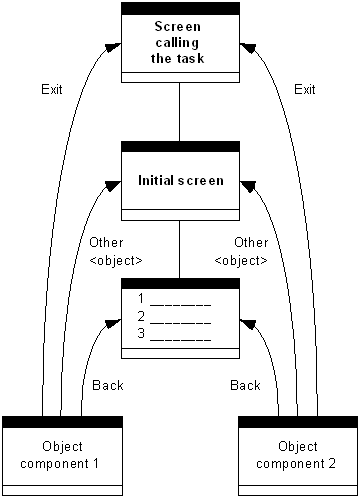
Navigation options to higher hierarchy levels (1)
In some cases (for example fast entry), it can be useful to link the function
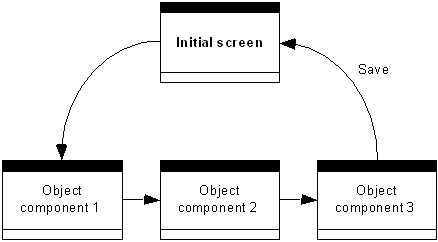
Navigation to the initial screen when saving
If navigation to a superordinate hierarchy level is impossible, for example, because data is still inconsistent, the
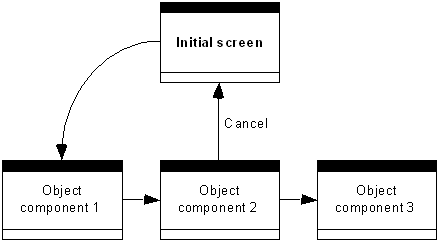
Cancel is to be supported even when data is inconsistent
In R/2, the user has chosen Create supplier. On the second screen of the screen sequence, he wants to cancel the process. The data cannot be saved as it is not yet complete, but the user should be able to cancel the process in order, for instance, to return to the initial screen. (If data can be held, the function Hold should of course also be supported.)
Navigation Options on the Same Hierarchy Levels
If it was possible when accessing the object processing to choose the object component via various functions, then the same functions are also to be available for navigating on the same hierarchy level.
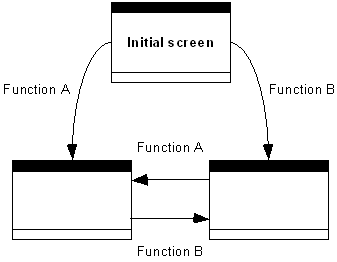
Same navigation functions at the same hierarchy level as for navigation at the lower hierarchy level
For the navigation between the same hierarchy levels in SAPoffice, you use the same functions that apply to the initial screen.
If the access to the object processing occurred via the object comoponent list screen, then it is possible when processing an object component to branch with the function
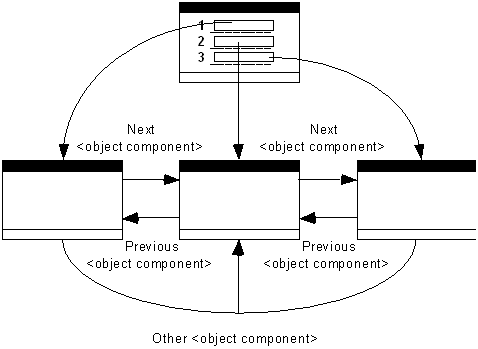
Navigation when accessing via the list screen
In the case of the RP master data, the user has chosen the residence of a person on a list at a certain date. With Previous record, he receives the previous residence, with Next record, the next residence.
If a selection has already been made by selecting something from the object component list, the functions only branch between these selected lines.
In a list of line items, the first, third and seventh item were selected, and then the first is displayed. With Next item, the selected item 3, the next item in the list, is displayed, rather than item 2.
If the displayed screen in turn consists of a list/table via which the user can branch to a "component of object component" screen, then Previous <object component> and Next <object component> only navigate at the current level.

Please refer to Previous <object component>, Next <object component> (Functions) for an example.
If you can change the view on subordinate screens - that is, if the user can look at yet further screens for an object component - then after selecting Previous <object component>, or Next <object component> he should see again the original view with which he initially accessed the display of the object components of the next displayed object component.
Please refer to Previous <object component>, Next <object component> (Functions) for an example.
If the object components are concatenated in a predefined sequence, it is possible to branch to the previous screen with the function
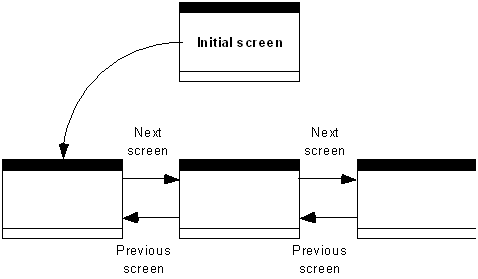
Navigation in a predefined sequence
In R/2, a predefined sequence of screens is processed when creating a vendor. In this case, you should branch to the next screen with the function
Navigation Options at Lower Hierarchy Levels
If the subordinate hierarchy levels can be chosen freely, any functions can be defined (see initial screen); if a choice was made from a list, then a distinction is to be made as on the object component list screen (see that topic).