
Exit or End <application> (Function)
Exit
or End <application> is a navigation function the user can choose to leave the current task or application. Exit leaves the current task and returns to the screen which has called the task, usually the screen of the application level.
In the application level this function is referred to as End <application>. The user has to explicitly specify what is exited (for example, Exit document processing, Exit Screen Painter, Exit material master). The user then returns to the main menu level.
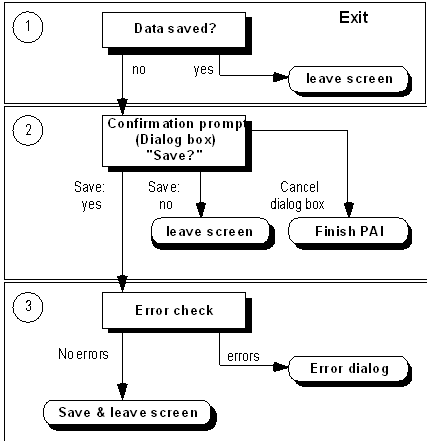
If data may be lost when leaving the task, a dialog box appears displaying a confirmation prompt.
If the task was called, Exit returns to the calling screen. If the task was called with "LEAVE TO TRANSACTION", it is up to you whether you want to guide the user to the last screen before the task or to another screen. It is recommended, however, to guide the user to a consistent screen in a task area (several transactions) after Exit (for example, to the initial screen or the screen of the application menu).
Difference to Function Code "N"
With Exit, PAI modules are possibly still being processed and therefore checks are performed.
Exception: On initial screens, neither a check for incorrect data is performed nor a confirmation prompt is displayed, unless the task only consists of the initial screen.
Access
The function has to be always active. Exception: In dialog boxes, there is no Exit function.
Function Key |
Pull-Down Menu |
Pushbutton |
Access Character |
Icon |
F15 * ; not active without function key |
Last option in the menu <Object> |
Standard toolbar (position is determined automatically) |
X for Exit |
(Standard Toolbar) |
*)
F15 must not be assigned to another function.Technical Notes
You have to provide the function Exit with a function code which is indicated as of category "E" in the Menu Painter. In addition, first define a MODULE x AT EXIT-COMMAND in the flow logic of the screen at the event PAI. This module is processed before all checks of DYNP so that you have control before DYNP.
If data was changed, a confirmation prompt is to be displayed. Checks should only be performed when the users replies "yes" to the question "Do you want to save the entered data?". An identification is set for Save and the other modules of PAI are processed.
If data was incorrect, the system starts an error dialog. At the end, the user can either choose the function Exit again - the confirmation prompt appears again - or choose the function
Continue (Function). If the data is free of errors, then - provided the identification Save is set - the data is saved at the end by PAI and the task is left.If the confirmation prompt is answered with "No", the task is left without saving the data.
If the confirmation prompt is cancelled, the other modules for PAI are processed.
Cross-References
