 Combined Statement Creation
You use the process for the creation of combined statements to simplify the creation of correspondence for accounts that are participants in a master contract. Instead of bank statements for individual accounts, there is just one joint combined statement.
The process involves providing data (business partner addresses, header data of the combined statement agreement), and details of the participating accounts (turnovers, balances, and settlement details) to an output management system (OMS). Consolidation of the data and the print formatting must take place in the OMS. It is also possible to add additional (external) information to the combined statement in the OMS.
 Note
Note
Data processing in an output management system is not part of this process.
Process Combinations
Note
You can combine this process with other processes in Master Contract Management. For an overview of all combination options, see Master Contract Management (FS-MCM).
Prerequisites
Communication Between Logical Systems
The combined statement
function requires connection of an account-managing system to Master Contract Management (FS-MCM)
. Account Management (FS-AM)
is connected in the standard system.
For more information, see Communication with Logical Systems.
Output Management System
Since in Master Contract Management and Account Management the process only involves the provision of data but not its output, the combined statement
function requires the connection of an output management system.
Customizing Settings
Product
The master contract must have the Combined Statement
feature.
If you use Account Management as account-managing system, the participating accounts must have the Combined Statement - Participant
feature.
Data Sets
To control the print formatting in the output management system, the following data set function is available to you. If you wish to use this function, you must have created the data sets in Customizing for Master Contract Management (FS-MCM)
in the Customizing activity Edit Data Sets for Combined Statement
.
For more information about these settings, see the documentation for the Customizing activity.
Locks
If you create locks for accounts in the account-managing system, in Customizing for Master Contract Management (FS-MCM)
under 
Master Contract

General Settings
 , you must execute the Customizing activity
 Assign Process Usage Locks to Master Contract Applications
so that the data of the locked accounts does not appear on the combined statement. For more information, see the Contract Locks
section.
For more information about the settings, see the documentation for the Customizing activity.
Process
Master Data Editing
Create a master contract. Choose a product for which the
Combined Statement
feature attribute is activated.For more information, see Creating Master Contracts.
The system displays the active combined statement agreement on the
Combined Statement
tab page. A master contract can only have one combined statement agreement. However, you can divide this agreement into multiple periods and assign each period its own periodicity.For more information, see Editing Combined Statement Agreements.
If you use Account Management as account-managing system, the information about the participation in a combined statement agreement is displayed on the
Combined Statement Participants
tab page for those accounts that are integrated in this process. For more information, see Combined Statement Participants.The data about participation in master contracts in general is displayed on the Participation Information tab page.
You assign the required participating accounts to the master contract on the
Contract Relationships
tab page. These can be checking accounts, deposit accounts, or loan accounts, for example.For more information, see Editing Contract Relationships for Combined Statements.
Provision of Data
Provision of Data in Master Contract Management
When you execute combined statement creation , the system works through the master contracts in accordance with the time period settings made in the contract in the following steps:
The system transfers the following information for processing in the connected OMS:
Information about the master contract
A list of the accounts participating in the master contract, including a unique technical ID
The system sends a request to the account-managing system to provide the information about the participating accounts and calculates the due date for the creation of the next combined statement.

Provision of Data
For more information about the mass run, see the system documentation for the report
Create Combined Statement
. You can find this on theSAP Easy Access
screen under Financial Services
Master Contract Management
Combined Statement
Periodic Tasks
.For more information about the data provided, see Combined Statement.
Call-Up of Business Add-In
Add External References to Combined Statement
You can use the Business Add-In (BAdI)
Add External References to Combined Statement
to add external references (such as data from customer-specific enhancements or from other connected systems). This is available to you in Customizing for Financial Services under Master Contract Management
Master Contract Applications
Combined Statement
Business Add-Ins (BAdIs)
.For more information, see the documentation for the Customizing activity.
Provision of Data in the Account-Managing System
For every participating account, the system transfers the information about the account to the connected OMS. If you use Account Management as account-managing system and execute the combined statement creation there, the system works through the accounts in accordance with the request from Master Contract Management.
For more information about the mass run, see the system documentation for the report
Create Combined Statement
. You can find this on theSAP Easy Access
screen under Financial Services
Account Management
Periodic Tasks
Combined Statement
.For more information about the data provided, see Combined Statement.
 Example
Date |
Events |
|---|---|
1. January 2008 |
A master contract is created with the An account is created with the The account is assigned to the master contract as a participating account. The master contract adopts the binding agreement of the account. |
15. January 2008 |
Even though bank statement creation is due according to the binding bank statement agreement, none is created, as the master contract has adopted the binding agreement. |
31. January 2008 |
A combined statement is created. It contains the data of the master contract and the account since their creation on January 1, 2008. This information is legally binding. |
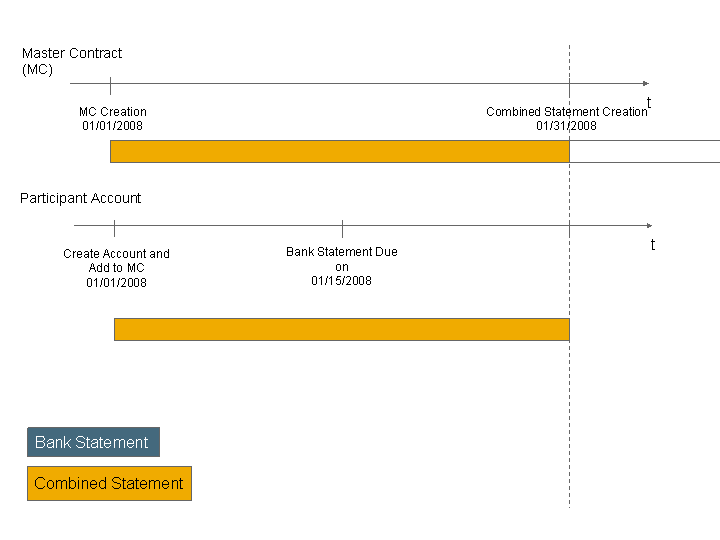
Combined Statement Creation
Example
Date |
Events |
|---|---|
1. January 2008 |
A master contract is created with the An account is created with the The account is assigned to the master contract as a participating account. The master contract does not adopt the binding agreement of the account. |
15. January 2008 |
A bank statement is created. It contains the data of the account since its creation on January 1, 2008. This information is legally binding. |
31. January 2008 |
A combined statement is created. It contains the data of the master contract and the account since their creation on January 1, 2008. However, this information is for information purposes only. The legally binding data is output on the bank statement. |
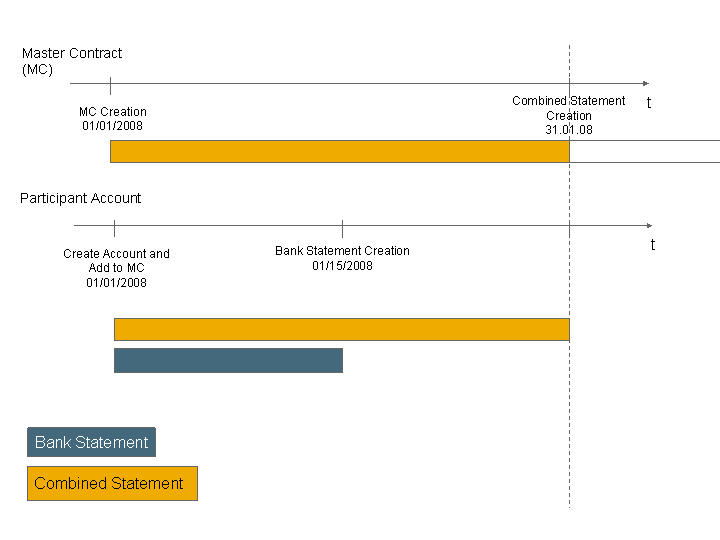
Combined Statement Creation
Contract Locks
You can lock accounts and master contracts, thus excluding them from processing in this process.
For more information about using locks in Master Contract Management and Account Management, see Posting Lock Management.
Locked Master Contracts
If a master contract is locked on its due date, the system does not create a combined statement.
Once the lock is lifted, the system selects this contract the next time a mass run for the creation of combined statements is scheduled and creates the combined statement that then contains all the data of the account or the master contract since the last combined statement was created.
If the master contract remains locked so long that the first due date has already passed after the lock is set up, the system skips this due date.
Example
In accordance with the combined statement agreement of the master contract, creation of the combined statement is scheduled monthly, on the last day of the month.
A combined statement is created on December 31, 2007.
The master contract is locked on January 12, 2008.
No combined statement is created on January 31, 2008 - even though the master contract is due.
The lock on the master contract is lifted on February 12, 2008. Since the mass run for the creation of combined statements is scheduled daily, the system selects the master contract in end-of-day processing on February 12. A combined statement is created. It contains the data of the master contract and the participating accounts from the last combined statement creation on December 31, 2007 until January 31, 2008.
A combined statement is created on February 28, 2008. It contains the data of the master contract and the participating accounts since January 31, 2008.

Master Contract Lock (Example 1)
Example
In accordance with the combined statement agreement of the master contract, creation of the combined statement is scheduled monthly, on the last day of the month.
A combined statement is created on November 30, 2007.
The master contract is locked on December 23, 2007.
No combined statement is created on December 31, 2007, nor on January 31, 2007, even though the master contract is due.
The lock on the master contract is lifted on February 12, 2008. Since the mass run for the creation of combined statements is scheduled daily, the system selects the master contract in end-of-day processing on February 12. A combined statement is created. It contains the data of the master contract and the participating accounts from the last combined statement creation on 30.11.07 until January 31, 2008.
A combined statement is created on 28.02.08. It contains the data of the master contract and the participating accounts since January 31, 2008.
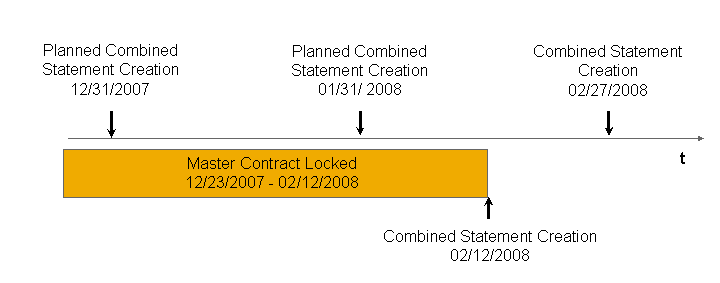
Master Contract Lock (Example 2)
Locked Participating Accounts
If a participating account is locked on the date when the master contract is due, the system creates a combined statement containing the information that the account is locked. This combined statement does not contain any details about the turnovers on the account.
When the lock is lifted, the following, periodically created combined statement contains the turnover details of the account since the last creation of the last combined statement.
Example
In accordance with the combined statement agreement, creation of the combined statement is scheduled monthly, on the last day of the month. The master contract has adopted the binding bank statement agreement of the account.
A combined statement is created on 31.12.07.
The participating account is locked on January 12, 2008.
A combined statement is created on 31.01.08. Master Contract Management provides the connected OMS with the following information:
Data of the master contract
Notification that the participating account is locked
The account lock is lifted on February 5, 2008.
A combined statement is created on 28.02.08. The combined statement contains the data of the master contract since the last combined statement was created on January 31, 2008 and the data of the account since the combined statement was created on December 31, 2007.

Account Locks (Example)
More Information
For more information about the various possible constellations for creating combined statements, see Combined Statement Creation: Examples of Special Cases
For more information about the combined statement functions, see Editing Combined Statement Dates and Displaying Combined Statement History.