 Posting Lock Management
Purpose
This component exclusively and centrally manages the locks of the
Account Management (FS AM
) and
Master Contract Management (FS-MCM)
system.
Posting Lock Management (FS AM PLM or
FS-MCM-PLM
)
is responsible for manual and automatic processing of
PLM Documents
.
Implementation Considerations
Posting Lock Management is an additional application and requires implementation of
Account Management (FS-AM)
or
Master Contract Management (FS-MCM)
.
Before you can
Posting Lock Management
, you must set the
Activate Component
indicator in the
Account Management (FS AM)
Customizing settings by choosing

Basic Settings

Activate Special Components.
 Note that you cannot activate PLM later after the go-live date. Deactivation is possible at any time.
Integration
The following graphic shows the role of
Posting Lock Management
in
Account Management (FS-AM)
and
Master Contract Management (FS-MCM)
.
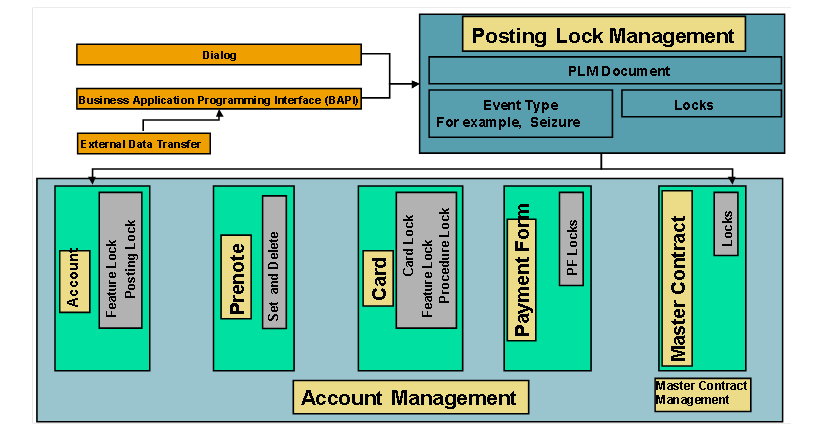
Scope of Functions
Posting Lock Management
controls the responses of the system to lock-relevant business transactions . This component incorporates the triggering events and manages the required locks.
Posting Lock Management
takes PLM documents through various channels and determines the system responses. Typically,
Posting Lock Management (FS-AM-PLM)
sets and deletes locks in
Account Management (FS-AM)
and in
Master Contract Management (FS-MCM)
and triggers posting of charges.
Posting Lock Management
is also responsible for deadline monitoring of the PLM documents .
An important characteristic of
Posting Lock Management is
your flexible settings for the system responses . The
Event Type plays a key role. On the event type you set, among other things, which locks are to be set. When the validity of a PLM document expires, depending on the event type, the PLM document is closed automatically or an SAP Business Workflow is started according to the advance warning days defined in Customizing..
In addition to the control data,
Posting Lock Management
also provides flow data. For each lock-relevant business transaction, a PLM document is generated containing all relevant data for the business transaction .
Change documents enable changes to the PLM documents to be tracked and so meet auditing requirements. A change history lists all changes and you can also have the changes to individual fields displayed via the detail view.
Closed PLM documents can be archived. Archiving serves to relieve the storage capacity of the system and achieve improved processing times.
The generation and processing of PLM documents in productive
Posting Lock Management
runs largely automatically, without manual intervention . Typically, the PLM documents are not entered via dialog mode in the SAP System, but rather via external systems, in the back office, Call Center or at the counter, for example.
Posting Lock Management
provides a user-friendly dialog interface for manually entering and changing PLM documents .