 Determination of Pricing Criteria (FS-MCM-PCD)
Using this component, banks can make offers to their customers with special conditions. If a contract holder fulfills certain requirements, both the holder and other beneficiaries, such as spouses, can profit from benefits.
 Example
If a customer has a salary account at the bank with regular deposits, he/she receives the following preferential conditions:
Lower debit interest for a loan
Higher credit interest for a time deposit account
Lower or no charge payments
The level of the benefit depends on the extent to which the customer fulfills the pricing criterion used.
Example
If the total balance of all the accounts at the bank is >= 1,000,000 USD, the customer receives the highest benefit level 3 and gains the most.
Integration
Overview of Components Involved
The following graphic shows the connection between the components involved:
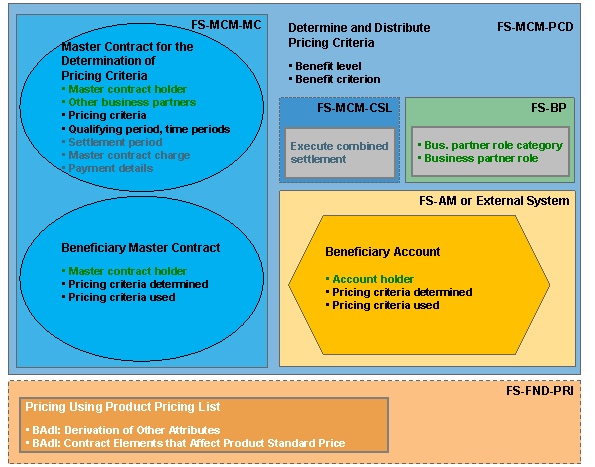
Component Overview
Master Contract for the Determination of Pricing Criteria in MCM
The Determination of Pricing Criteria is part of Master Contract Management (FS-MCM) and manages the benefit level and benefit criterion as well as the qualifying period and time periods for a master contract for the determination of pricing criteria.
 Note
Note
The beneficiary contracts are not linked by contract relationships with participating accounts, but via the business partner role category of the business partner in the Business Partner for Financial Services (FS-BP).
Beneficiary Contracts in MCM and AM
Both master contracts in Master Contract Management (FS-MCM) and account contracts in Account Management (FS-AM) or a comparable application can be used as beneficiary contracts. Beneficiary contracts receive the pricing criteria determined and used from one or more master contracts for the determination of pricing criteria.
Note
You can use the following account categories for beneficiary accounts:
Loans
Current (checking) accounts
Deposits (savings)
Beneficiary Roles in the Business Partner (BP)
The system benefits the accounts and master contracts of all business partners that have the benefit role (BCA080 master contract holder or BCA100 beneficiary for pricing) entered in the master contract for the determination of pricing criteria.
Product Pricing List in Foundation (FND)
The beneficiary contracts can receive their preferential conditions from the product on which they are based. The condition groups are arranged in hierarchies and derived using the product pricing list in the Pricing (FS-FND-PRI) component by means of the following Business Add-Ins:
BAdI: Derivation of Other Attributes
with the sample implementation classPRI_DERIVE_PRICING_ATTR_SAMPLE
in Customizing for
Foundation
under
Pricing

Business Add-Ins (BAdIs)

BAdI: Contract Elements that Affect Product Standard Price
with the sample implementation classCL_BCA_EI_CN_PRI_ATTRDEP_SAMPE
in Customizing for
Account Management
under Contract Management
General Settings
Business Add-Ins (BAdIs)
General BAdIs
in Customizing for
Master Contract Management
under Master Contract
Business Add-Ins (BAdIs)
General BAdIs
Contract Elements that Affect Product Standard Price
Charge for Preferential Offer
You can levy a periodic charge for the preferential offer that the customer has to pay in advance, regardless of whether or not he/she actually receives the benefits. You can do this by debiting an advance charge to the payment details in the master contract for the determination of pricing criteria (when the contract is concluded and then annually, for example).
Note
Technically, the charge is determined during the combined settlement. For this reason, you must also use the Combined Settlement (FS-MCM-CSL)
component and activate the combined settlement
feature in the master contract for the determination of pricing criteria.
For more information, see Example: Charge for the determination of pricing criteria.
Features
Use Pricing Criteria
To derive preferential prices from the product pricing list for contracts, you can use the following pricing criteria:
Product
Business Partner Role
Benefit Criterion
Benefit Level
In order to do so, in Customizing for Master Contract Management , you must choose Master Contract Applications
Determination of Pricing Criteria
Business Add-Ins (BAdIs)
BAdI: Determination of Pricing Criteria
and create and activate a customer-specific BAdI implementation.
For more information, see Product Pricing List.
Define Benefit Levels
In the master contract for the determination of pricing criteria, you can activate the benefit level on the Determination of Pricing Criteria
tab page and specify a benefit level from which the system derives the prices using the product pricing list. You can also specify a qualifying period and define the time periods you want the system to use for determining and distributing the pricing criteria. For more information, see Editing Determination of Pricing Criteria.
You must define benefit levels that affect the price used as pricing criterion:
in Customizing for Master Contract Management under
Master Contract Applications
Pricing Criteria Determined
Define Benefit Levels
in Customizing for Account Management under
Product Management
Pricing Criteria Determined
Define Benefit Levels
Assign Benefit Role
The Business Partner for Financial Services (FS-BP) component provides two business partner role categories that can be used as beneficiary roles. The master contract holder of a master contract for the determination of pricing criteria whose role is BCA080 master contract holder always profits from the preferential conditions. When you create a master contract, you specify the master contract holder. If you wish, you can assign other business partners in the role of BCA100 beneficiary for pricing to the master contract for the determination of pricing criteria, such as a husband, wife, or partner. You do this on the Business Partner
tab page. The beneficiaries for pricing also profit from the preferential conditions. For more information about the procedure, see Editing Business Partners.
Use Different Benefits for Master Contract Holder and for Beneficiaries
To define different prices for master contract holders and beneficiaries for pricing, you can use one of the following procedures:
Create customer-specific differentiation category with the number of beneficiaries as condition
Assign different condition groups
Assign different individual conditions
For more information, see Financial Conditions (CA-FIM-FCO)
Define number of beneficiaries as derivation attribute of the product pricing list in the
BAdI: Derivation of Other Attributes
.
Use Multiple Master Contracts for the Determination of Pricing Criteria with Identical Master Contract Holders or Identical Beneficiaries
In the following cases, the system saves the pricing criteria for every combination of product of the master contract for the determination of pricing criteria and role of the business partner:
A business partner is the master contract holder of multiple master contracts for the determination of pricing criteria
A business partner receives preferential conditions from multiple master contract as beneficiary
Check Business Partner
You can check the use of business partners in multiple master contracts for the determination of pricing criteria as master contract holder and as beneficiary. To do so, using the sample implementation class CL_BCA_CN_PRI_CRIT_DET_EX
of the BAdI definition BAdI: Customer-Specific Cross-Checks
, you must create and activate a customer-specific implementation in Customizing for Master Contract Management
under Master Contract Applications
Determination of Pricing Criteria
Business Add-Ins (BAdIs)
. By issuing a message, for example, you can indicate that a business partner is only master contract holder in onemaster contract for the determination of pricing criteria.
Determine and Distribute Pricing Criteria
Using the report Determination and Distribution of Pricing Criteria (transaction /FSPAC/PC_RUN
), you can periodically determine the previously defined pricing criteria for all due master contracts for the determination of pricing criteria and distribute the pricing criteria used among all beneficiary contracts. You can start the report on the SAP Easy Access
screen under Master Contract Management
Determination of Pricing Criteria
Periodic Tasks
and execute it as a single run or a mass run.
Define Pricing Criteria to Use
The report Determination and Distribution of Pricing Criteria
can determine multiple different pricing criteria for a certain beneficiary contract, because the beneficiary contract receives the criteria from multiple master contracts with the same product, for example. In this case, the system determines the pricing criteria it has to use with the customer-specific implementation of the Business Add-In BAdI: Determination of the Pricing Criteria to Use
, based on the benefit level and the business partner role category. The report distributes the pricing criteria with the highest benefit level and gives the role category BCA080 master contract holder preference over the role category BCA100 beneficiary (pricing).
Display Pricing Criteria Determined and Used
In the beneficiary contracts on the Pricing Criteria
tab page, you can view the attributes of the pricing criteria determined and used, and also their origin:
For a beneficiary account contract in
Account Management (FS-AM)
on the Pricing Criteria tab pageFor a beneficiary master contract in
Master Contract Management (FS-MCM)
on the Pricing Criteria tab page
Use Customer-Specific User Interfaces
For more information, see Orchestration of the Interfaces for the Determination of Pricing Criteria.
Transfer Contracts to External Systems
For more information, see Contract Management in External Systems.
Update Pricing Criteria
For more information, see Pricing Criteria Update.
Automatically Use Loan as Payment Details in the Master Contract for the Determination of Pricing Criteria
If you wish to link benefits to the disbursement of a loan, you can automatically store the loan contract as payment details in the master contract for the determination of pricing criteria to the loan disbursement event, trigger a settlement, and debit the charge to the loan. To do so, you must choose Account Management
Order Management
Account Order
Business Add-Ins (BAdIs)
BAdI: Events
and create and activate a customer-specific BAdI implementation with the new sample implementation class CL_BCA_OR_DISB_ORDER_PACK_MGMT
. For more information about loan disbursement, see Disbursing Loans.
Control Release of Changed Pricing Criteria
If the benefits deteriorate for the customer and then release is no longer required, in Customizing for Master Contract Management
under Technical Settings
Business Transaction Events / Event Control (FS-AM)
Define Own Function Modules (Process)
, you can implement the function module SAMPLE_PROCESS_BCPI_0BANK004
for the Business Transaction Event (BTE) 0BANK004
for the application component FS-AM.
Execute Migration
To migrate the pricing data from a legacy system, use the migration object Pricing Criteria
. For more information about the migration object, see Customizing for Master Contract Management under Technical Documentation for Master Contract Management (FS-MCM)
Concepts and Guidelines
Migration
Pricing Criteria
.
Constraints
You cannot display the beneficiary contracts for a master contract for the determination of pricing criteria.
You can only change the pricing criteria in the present, not in the future or in the past.
Example
More Information
For more information about the connection of external systems, see Communication Between Logical Systems.