 Combined Settlement
Business object in Master Contract Management (FS-MCM)
that determines the charges that are calculated and posted periodically for accounts participating in master contracts. Depending on the feature, this business object also determines the interest.
Combined settlements are carried out at regular intervals for the master contract settlements in the context of the periodic tasks. You can set an appropriate settlement frequency (time periods) for all master contracts of a product, or individually for a master contract.
 Note
Note
Compensation supports multi-level master contract hierarchies. This means that you can add any number of participating accounts or other master contracts as participants to a master contract.
For more information, see Editing Contract Relationships for Compensation.
Bundle pricing calculation does not support multi-level master contract hierarchies. For more information, see Editing Contract Relationships for Bundle Pricing Calculation.
Structure
There are two forms of combined settlement that mutually exclude each other. They are represented as attributes in the product, where you can choose one of them:
You can execute a combined settlement for master contracts with feature 0403, compensation, that compensates the charges and interest of the participant contracts, thus optimizing them on behalf of the business partner.
You can execute a combined settlement for master contracts with feature 0303, bundle pricing calculation. This allows you to offer preferential prices for charges under certain circumstances.
You make the settings for the combined settlement in master contract processing on the combined settlement tab page.
You use the same transaction and reports for executing and processing a combined settlement for both features.
Transactions and Reports
Transaction |
Report |
|---|---|
|
Edit combined settlement dates |
|
Execute combined settlement |
|
Reverse combined settlement |
|
Display combined settlement |
|
Display accrual/deferral |
|
Determine backdated changes (mass run) |
|
Request account settlement date (mass run) |
|
Execute combined settlement (mass run) |
|
Reverse combined settlement (mass run) |
|
Execute accrual/deferral (mass run) |
|
Application log - request account settlement date |
|
Application log - execute combined settlement |
|
Application log - reverse combined settlement |
|
Application log - execute accrual/deferral |
For detailed information about the reports, start the respective report and choose  (
(Program Documentation
).
Integration
(Sub) components
The following graphic shows the combined settlement
within the Master Contract Management (FS-MCM)
component with the subcomponents Financial Condition (FS-MCM-CD)
, Product Management (FS-MCM-PR)
, Master Contract (FS-MCM-MC,
and Account (FS-AM-CM-AC)
in Account Management
.
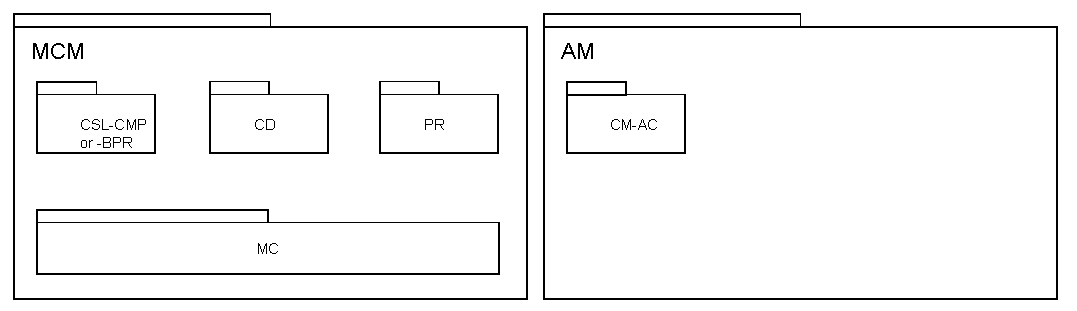
Subcomponents of Master Contract Management
Customizing
The Customizing activities you need to carry out depend on which feature is active. For more information, see the documentation for the processes: Compensation and Bundle Pricing Calculation.
Enterprise Services
You can use Enterprise Services of the following business objects:
Bank Account
Bank Account Pending Settlement Entry
Bank Account Settlement
Bank Account Settlement Request
Bank Combined Settlement
Current Account Contract
For more information, see SAP Help Portal at 
http://help.sap.com/

SOA
SAP for Industries
SAP for Banking
Enterprise Services for banking services from SAP
 .
.