
 Default Framework Pages
Use
Default Framework Page
The default framework page supplied with SAP NetWeaver Portal provides the navigational and structural "components" required to navigate and operate the portal. You can modify it or create your own framework pages to meet the requirements of your organization.
Location in Portal Catalog: Portal Content > Portal Users > Standard Portal Users > Default Framework Page (pcd:portal_content/every_user/general/frameworkpage)

Refer to SAP note 687485 before making changes to the default framework page. Do not modify the delta link source object of the above-mentioned framework page, which is located in a sub-folder under the Content Provided by SAP folder.
For information on the intended runtime use of the user interface components in the default portal desktop, see Portal Interface.
Headerless Default Framework Page
The headerless default framework page supplied with the portal supports the headerless navigation mode (see Headerless Navigation). It is not accessible through the Portal Catalog and has no editable properties.
For more information on navigation, see Navigation.
Integration
The default framework page supplied with SAP Enterprise Portal is a single portal page containing default iViews and pages. These components are positioned in the framework page using default page layouts also supplied by SAP.
Pages and iViews in the Default Framework Page
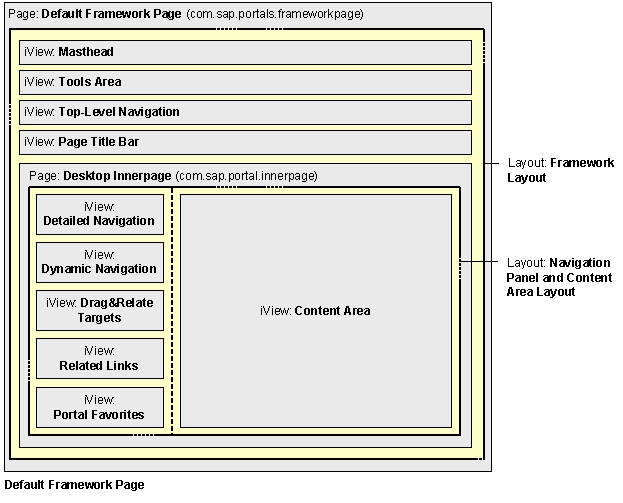
The default framework page contains the following iViews and pages:
...
1. Page: Default Framework Page (com.sap.portals.frameworkpage)
This is a portal page that contains the following iViews and pages:
a. iView: Masthead iView

An administrator can show or hide the links in the Masthead iView at runtime by setting the Show Link in Masthead: <Link Name> properties in the iView using the Property Editor.
b. iView: Tools iView
This iView is assigned to the default framework page, but is by default in a hidden state. To display it, change the property of this iView by editing the default framework page (see Editing Content and Layout).
c. iView: Top-Level Navigation (see Top-Level Navigation)
d. iView: Page Title Bar (see Page Title Bar Navigation)
e. Page: Desktop Innerpage(com.sap.portal.innerpage)
This object is a portal page embedded in the main Default Framework Page page. It contains the following iViews that comprise the navigation panel (see Navigation iViews) and the content area:
i. iView: Detailed Navigation (see Detailed Navigation)
ii. iView: Dynamic Navigation (see Dynamic Navigation)
iii. iView: Drag&Relate Targets (see Drag&Relate Targets)
iv. iView: Related Links (see Related Links)
v. iView: Portal Favorites (see Portal Favorites iView)
The Portal Favorites iView is available only after you have installed Knowledge Management.
vi. iView: Content Area
The following figure illustrates the relative positioning of the components in the default framework page.
Layouts in the Default Framework Page
The pages and iViews in the default framework page are spatially positioned through the use of two default page layouts:
Page Layout |
Assigned to Page |
Description |
Framework Page Layout (pcd:portal_content/com.sap.p |
Default Framework Page |
Layout is a single full-width column |
Navigation Panel and Content Area Layout (pcd:portal_content/com.sap.p |
Desktop Innerpage |
Layout is a two-column layout: · Navigation Panel: A narrow column on the left for the navigation panel and its iViews. · Work Area: A wide column on the right for the content area. |