
 Drag&Relate Targets
Definition
A Drag&Relate target is an iView that possesses drag-on capabilities and has been associated to a page or iView containing draggable data in the form of links. It can retrieve from a database source information that is related to the information that is dragged onto it.
See Enabling Drag&Relate for more information about drag-on support.
Use
Drag&Relate targets offer the possibility of a relation-resolving process that connects information from independent systems.
Drag&Relate means that when you click an iView, you launch a request that returns information. If that iView is defined as a Drag&Relate target, then when a link from another iView is dragged onto it, the launched request is modified by the additional dragged content. The dragged content acts as conditions that filter the data which is returned by the Drag&Relate target iView.
For example, a user dragging a part number from an asset management system iView onto a geographical information system iView that is a Drag&Relate target, could map all installations of a certain type of equipment at a particular site.
Integration
For a user to capitalize on Drag&Relate capability, both the Drag&Relate target and the object to which you want to associate the target must be part of the user’s content.
Drag&Relate
iViews that are assigned to a user’s role appear in the Detailed Navigation area of the navigation panel. These iViews
are preceded by an icon,  indicating that they are
Drag&Relate-enabled and therefore Drag&Relate target candidates for
the page or iViews currently displayed in the portal content area.
indicating that they are
Drag&Relate-enabled and therefore Drag&Relate target candidates for
the page or iViews currently displayed in the portal content area.
The portal content administrator can access the Drag&Relate Target Editor directly from a Portal Catalog object’s context menu, or from an object editor, and assign Drag&Relate iViews as Drag&Relate targets to the object being edited.
At runtime, Drag&Relate functionality is seamlessly merged with portal navigation. When an end user displays a page in the portal content area, all Drag&Relate targets assigned to that page, or to iViews contained in that page, are displayed in the Drag&Relate Targets area of the navigation panel.
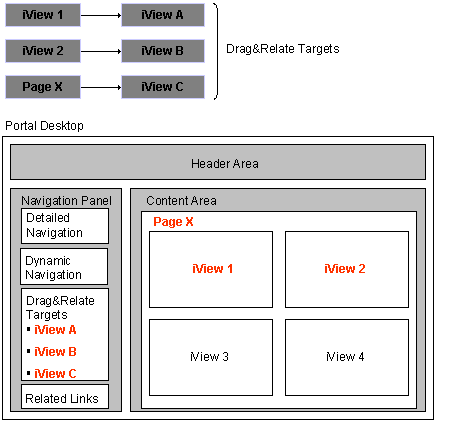

The iViews or pages to which Drag&Relate targets are assigned must have draggable data, appearing in the user’s content area as links. Draggable data is defined as such in the applications that are the source for the iViews or pages in the content area.