Navigation iViews
Use
The portal’s various types of navigation iViews provide several entry points to the content supplied with your roles. A navigation iView is one that, when launched, produces a substantial content change. This change can be the result of either navigating to a different content source, or generating different content by the same source.
Navigation actions can include:
· Launching a new page in the work area
· Running a web link in a new window
· Running the same iView with different context
Integration
Default Framework Page iViews
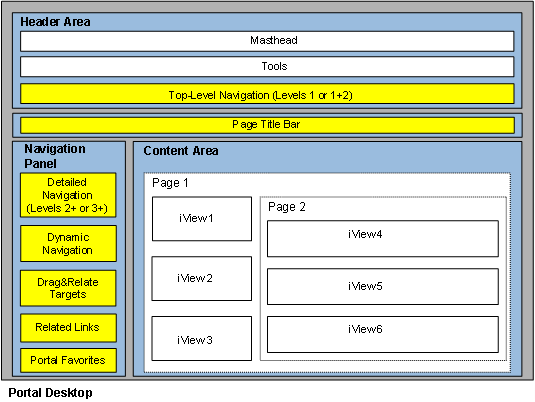
The following comprise the navigation iViews provided with the Default Framework Page:
iView |
Description |
The navigation bar in the header area of the portal provides the initial entry point to portal navigation. Top-level navigation (TLN) displays up to two levels, as determined by the administrator through the “Number of Display Levels” property in the TLN iView. This highest navigation level is defined at the time of the administration of your roles. |
|
This hierarchy of links appearing in the navigation panel is an extension of top-level navigation. All the structures as of level one, two or three (depending upon the level defined in TLN) in the navigation hierarchy of a role, belong to detailed navigation. |
|
This area is a virtual placeholder for dynamic navigation iViews, which are related to and enable further probing into the content displayed in the content area. The links displayed in a dynamic navigation iView launch different queries to a single data source. |
|
The Drag&Relate target objects that are relevant to the content in the content area are displayed in the Drag&Relate Target iView. |
|
This is a list of links representing iViews that are topically relevant to the content displayed in the content area. These links open in a new window. |
|
An iView that is part of the Default Framework Page, located just below TLN and containing tools that enhance portal navigation. |
|
An iView in the navigation panel that lets you store portal navigation objects and KM elements. |
Workset Map iView
The portal provides a component used to generate an iView for navigating through a workset. For information see Navigation with a Workset Map.
Service Map iView
The portal provides a component used to generate an iView for navigating through an SAP service module. For information see Navigation with a Service Map.
Web Target iViews
The portal lets you create iViews based on Web input forms. These iViews accept business object parameters, which they process to return an appropriate result set. For information see Navigation with Web Target iViews.
Features
· If the content displayed in the content area has associated dynamic navigation iViews, then these appear under their own names in the Dynamic Navigation area of the navigation panel. The heading “Dynamic Navigation” does not ever appear.
· The other navigation panel iViews always display their headings, but they are expanded only when they contain navigation links.
· By default, when there is no content in any of the navigation panel iViews, the portal opens with the navigation panel collapsed. Other configurations are possible. For more information, see Initial State of Navigation Panel.
· Objects which are needed for certain navigation operations, but do not need to be displayed in the navigation hierarchy can be made invisible. For information see Defining Invisible Navigation Nodes.
Example
The following figure illustrates the portal iViews (indicated in yellow) that are relevant for navigation: