
Goto (Menu)
The Goto menu is a pull-down menu at task level. It contains all object components of the current object the user can navigate to by choosing the option.
This pull-down menu is obligatory. It always appears directly to the right of the Edit menu as the third item in the menu bar.
Illustration
The only obligatory menu option of this menu is the function
Back which is the last option in this menu.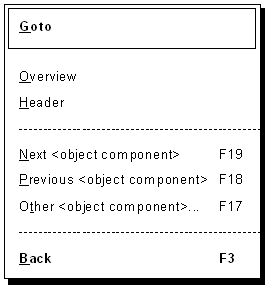
Example for the Goto menu
Use
The processing of an object consists of a sequence of object component processing. This menu contains all object components of the chosen object and is used for navigating to the screens on which the data of these object components can be displayed or edited. It is the navigation menu within the individual object components of an object.
The mentioned object components which are included in this menu for a direct navigation by choosing a menu option should be available for all objects of the class, if possible.
Pull-Down Options
The Goto menu generally contains the following options:
Overview, Header,...
Choosing one of these menu options, the system navigates to the named data screen. General SAP screens, such as the Overview screen, Detail screen or Header, are entered in the Goto menu with the name for the <screen> as defined in
Title Bar. For all screens not included in the list of general SAP screens, a significant name has to be found which is included in the title and in the menu.Next, Previous, Other <Object Component>...
The current object component is changed by choosing one of these options:
Next <object component> goes to the next one, Previous <object component> to the previous one and Other <object component> navigates to the object specified in a dialog box. The functions Previous screen and Next screen are to be used for the relative screen change in fixed screen sequences (see Functions - Overview).Back
The function Back must always be available. When navigating within an object, it goes to a defined object component within the object from where the user can continue to work well-ordered. The current task is not interrupted. Checks are performed. A confirmation prompt must be issued to avoid a possible loss of data.
Back is the last option of the pull-down menu at first level. If the Goto menu is divided up into several menus (for example, in Header and Item), then Back is to be included in the first menu from the left as the bottom option of the pull-down menu at first level.
Cross-References