
Back (Function)
Back
is a navigation function which navigates to the previous level in the structure of a task. Back navigates to the previous, higher level in the hierarchy of a task structure. You must indicate to the user, for example in the title bar, that navigation takes place within a hierarchy.Back includes checks. If an error occurs on a screen, the system displays an error message and the user cannot leave the screen.
Exception: If possible, neither a check for incorrect data is performed on the initial screen when using Back nor a confirmation prompt is issued, unless the task only consists of the initial screen.
No Data Loss
Back
should generally not "lose" the data entered between the present screen and the navigation option.If unsaved data may be lost, the system should display a confirmation prompt to inform the user about the critical situation. This should also allow the user to save the data or to cancel the request (see Prompts in Dialog Boxes). If the user decides not to save the data, the data is lost.

If the user has completed the initial screen and initiated Back, the previously displayed data will not be displayed (except for SPA/GPA parameters) when displaying the initial screen later.
Possible Navigation Conflicts
If, within a task, the user can navigate to a screen from two (or more) positions that rank directly "above" the screen, then Back can, of course, only return to one of these lcoations.
This problem particularly occurs, if the navigation option is predefined as specified in the guidelines. For example, if one of the Back functions from a displayed object component navigates to a higher-level list/table.
It should be considered carefully, whether
should be offered with regard to the Back function. The navigation option the user most likely expects should be implemented with Back. The remaining option should be assigned to another function.
As an alternative, you can name one function Back to <x> and the other Back to <y> if there are two (or more) navigation options that return to similar positions in the hierarchy.
Access
The function should always be active unless this is not possible for technical reasons.
Exception:
In dialog boxes the function Back is not available.Function Key |
Pull-Down Menu |
Pushbutton |
Access Character |
Icon |
F3 * |
Last option in the menu Goto |
Standard Toolbar (position is determined automatically) |
B for Back |
(Standard Toolbar) |
*)
F3 must not be assigned to any other function
Technical Notes
If the user chooses Back, the entered data is processed first. If the system detects an error during the check, it initiates an error dialog.
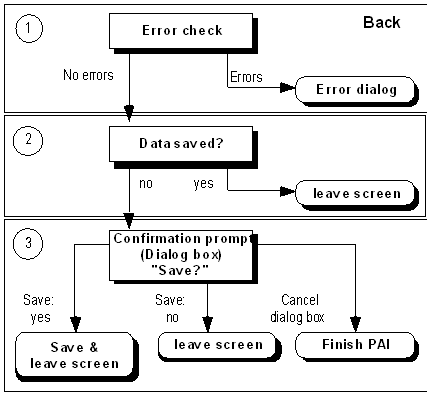
Exception: On the initial screen, no checks for incorrect data should be performed. You have to provide the function Back with a function code specified as category "E". In addition, first define a MODULE x AT EXIT-COMMAND in the flow logic of the screen at the event PAI. This module will be processed before all checks of the DYNP are performed. This way, the user has control and can execute "Back" although there is incorrect data.
Cross-References
