
Overview of Navigation Options
The R/3 System offers a large number of different navigation options as illustrated in the following graphic. For more information on navígation options please refer to
Navigation Between Screens.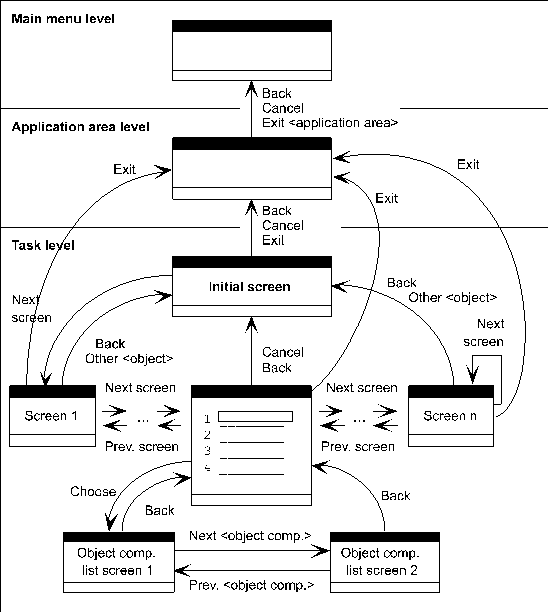
Overview of important navigation options
Explanations: The rectangles represent screens which are allocated to the various levels of the SAP System. The arrows illustrate navigation options from one screen to another; navigation is initiated on the initial screen by the functions next to the arrow.

To maintain transparency, only commonly used options have been included in above figure. Additional options are often possible as well. In actual tasks, the options not shown can be even more useful than those shown in the graphic. You should therefore refer to the corresponding function names for options that are allowed for the respective function.
Classification of Navigation Functions
Detailed information on these functions is provided in the topics with the respective functions names.
Navigation functions in the standard toolbar
Back,
Cancel, Exit or End <application>, First Page, Last Page and Previous Page, Next Page are implemented as pushbuttons in the standard toolbar (see illustration) and can be initiated with the mouse.

Navigation functions in the standard toolbar