
The Initial Screen
Function
On this screen, the user generally chooses a particular object which he wants to subsequently process. The user may also specify processing control, enter values for the Copy from function or select views for later processing.

For creating a vendor in RF, for example, the company code and the account group have to be entered; for changing a human resource master record in RP, the personnel number and the info type, i.e. a particular view of the human resource master record, have to be entered. In ABAP/4, the program name has to be entered.
Navigation Options at Higher Hierarchy Levels
With the "Exit" function, the user returns to "the screen calling the task", that is, exits the processing of objects in an object class. The functions
Back and Cancel have the same effect.
After choosing the menu option Create accounts receivable, the system displays the initial screen. By pressing

Both functions should be supported.
Exit or End is an absolute branch which always branches to "the screen calling the task" whereas Back means a relative branch to the next higher hierarchy level. The Exit function is to be displayed in the pushbutton layout on the initial screen.Navigation Options at the Same Hierarchy Level
There are no screens at the same hierarchy level.
Navigation Options at Lower Hierarchy Levels
If the object components the user actually wants to work with are contents-related groups of data and can be defined without restrictions (see below), the user can freely define navigation options for selecting a group.
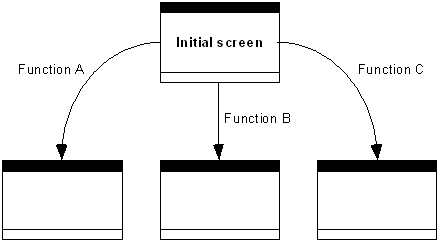
Navigation options from the initial screen
Branches that cannot be carried out because they are object-dependent result in an error message.
"Continue" can carry out a default branch here.
In the R/3 SAPoffice task, there is one function to get to the screen of the inbox folder, another function to get to the outbox folder, another function to display the private folders and yet another function to display the shared folders.
If too many different views are possible, the navigation options which are used less frequently should only be selectable via pull-down menus.
If the next screen is predefined by the software developer, for example, a list of the object components (see below) or the first screen of a sequence of screens, the user can get there by using the Continue function.
Please note, however, that predefined screen sequences should be avoided in R/3, wherever possible.
After entering the account number, company code and account group in the R/2 System under Create vendor master records, you get to the first object component screen which contains the basic supplier data by pressing Continue.
Navigation Options to the Initial Screen
In addition to the relative navigation options that are possible to the initial screen, the function
Other <object> always returns to the initial screen, providing this is technically possible and meaningful.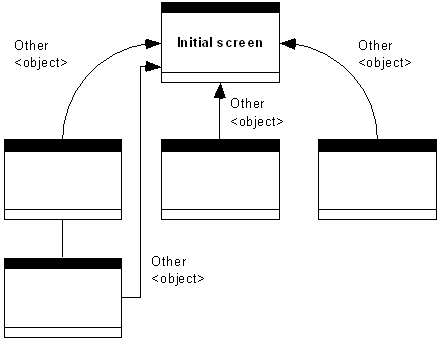
If possible, Other <object> navigates to the initial screen.
In addition to the function
Other <object>, the standard functions Create, Display, Change, Edit, Single Processing, Collective Processing, Enter, Single Entry, Collective Entry, also always navigate to the initial screen. This is not pointed out separately in the following.