 Editing a Security Transaction
Editing a Security Transaction
Use
The
Security Transactions chapter provides you with an overview of the transaction management functions in Treasury Management. On the one hand, it explains central terms for transaction management and describes the order in which you process transactions. And on the other hand, it gives you an overview of the settings that you need to make in Customizing beforehand.Below you will find information on the prerequisites that must be fulfilled in the application before you can create a security transaction. It also provides an overview of the functions that are available for processing financial transactions.
Prerequisites
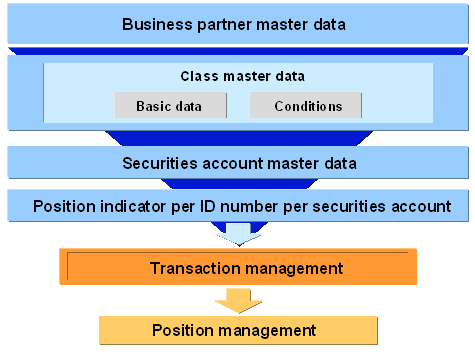
You must have entered the following
Master Data before you can begin entering purchases and sales for securities in the transaction management functions:Overview: Prerequisites
Procedure
Function |
Entries |
Comments |
Create |
For more information, see: Creating a Security Order/Contract |
|
Change |
For more information, see: Changing a Security Transaction |
|
Execute |
For more information, see: Executing a Security Order |
The function for executing an order transfers a security transaction from the Order activity to the Contract activity. You can change the order data according to the actual transaction data. If you assigned processing category 00001 to the transaction, the data if fixed when you save the transaction, and it is assigned the posting status Flagged for posting. |
Settle |
|
When you settle a transaction, the system checks the security transaction data and enhances it, if required. It also fixes the data when you save the transaction (actual records) and assigns the Flagged for posting indicator to the transaction flows. Use the Security transaction ® Note function to transfer the security transaction to the posting status Flagged for posting. The transaction flows are not yet fixed and remain in the planned records status. |
Display |
|
|
Reverse |
For more information, see: Reversal |
|
Expiration |
Choose Trading ® Transaction ® Expiration. |
If the order requirements are not fulfilled, the order expires. You can represent this activity in the system using the Expiration of Security Order function. Once you have executed the function, the Order activity becomes an Order - Expiration activity. |
Display history |
Choose Trading ® Transaction ® Display history or Back office ® Transaction ® Display history. |
Use the history function to display the sequence of previous activities related to the transaction you have selected. |