 Security Transaction
Security Transaction
Use
A security transaction represents the purchase or sale of securities (classes) in the position.
A security transaction usually passes through the following steps: an enquiry is made, the transaction is concluded and then posted. These steps are represented in the system by the various activity categories and processing categories a transaction can have.
Activity categories
Processing categories
Use processing categories to determine which activity categories a transaction passes through. You assign the processing categories at transaction type level in Customizing by choosing Define Transaction Types. You can choose from the following processing categories:
Overview: Possible activity chains per activity category
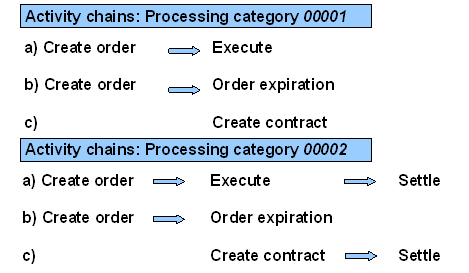
When the last activity category of the activity chain has been saved, the planned records for a transaction are transferred to actual records and assigned the Flagged for posting status. Choose Transaction ® Post in the accounting area to trigger the update to the general ledger (after the transaction has been released, if required). After you have run the posting report program, the transaction flows are assigned the Posted posting status.
Posting status
Blocked for posting |
The transaction flows take this status if
The transaction flows still have planned records status, and the transaction can still be changed. |
Flagged for posting |
If the transaction has reached the posting-relevant activity and has been saved, it is assigned the posting status Flagged for posting. This fixes the transaction flows and gives them actual records status. The transaction can no longer be changed. |
Posting carried out |
If the flows were updated to the general ledger using the posting report program, they are assigned the Posting carried out status. |
Posting flagged for reversal |
If a transaction that has posted flows has been reversed by the Transaction ® Reverse function, the flows are assigned the Posting flagged for reversal status. |
Posting reversed |
If the flows that were reversed have been updated to the general ledger using the Accounting ® Transaction ® Reverse documents function, the flows are assigned the Posting reversed status. |
Integration
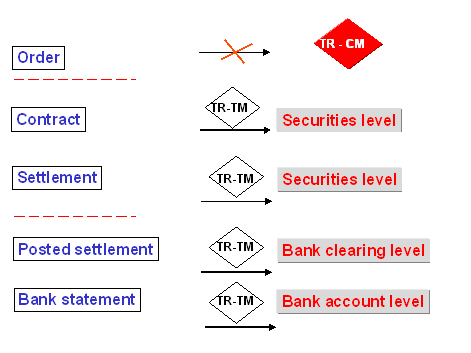
Integration: Securities Management and Cash Management
Prerequisites
You must make the following settings in Customizing before you can enter transactions:
Specify the transaction types required for purchases and sales for each product type.
 Transaction type for purchase of a fixed-interest bond:
Other IMG activities are also available:
Features
When you enter a transaction, you have the option of entering other flows that are related to the transaction.
Typical examples of other flows are:
Flows that are automatically generated for a transaction also appear amongst the other flows. These include accrued interest flows for a bond purchased and/or tax flows generated automatically. You can change or delete these flows, if required.
Once a transaction has reached the activity category "contract", the transaction cash flow displays the flows that result from the transaction.
A correspondence function is available. It enables you to generate letters of confirmation. Depending on the settings you make in Customizing, you can generate correspondence when you conclude a contract and/or settlement it.
See also:
CorrespondenceYou can set up the system so that transactions can only be posted after one or several employees have checked them.
Activities
For more information on editing security transactions, see
Editing a Security Transaction. The Relevant for posting activity is the last activity in the activity chain. When you use processing category 00001, the activity relevant for posting is the Contract, and with processing category 00002, it is the Settlement.