 Correspondence
Correspondence
Use
With the Correspondence function, you can generate and send out special correspondence relating to the financial transactions managed in the SAP R/3 System.
Correspondence can be sent directly from the system via fax, e-mail, SWIFT Files or IDocs (in money market and forex trading), or output via a printer.
Correspondence serves documentation and helps to match financial transactions that have been carried out.
Prerequisites
- whether an internal or external correspondence type is involved.
- whether the correspondence should be archived (Indicator 'Optical archive')
Business object BUS2042; document type TRO_CONF
- whether possibly no initial reversal correspondence should be generated for external correspondence types.
- which language the correspondence should be in.
- For the creation of IDocs, you can define the Partner type and Partner number here. These settings determine a receiver port in the SAP Basis communication interface. The following scenarios are possible:
 Example of a correspondence activity:
In company code 0001, an external correspondence (001) is to be generated for purchases of fixed-interest bonds (Product type 041) for activity, Contract (20). This results in the following:
CoCd. |
ProdTyp. |
TransTyp. |
ActCat. |
CorrTyp. |
Form |
0001 |
04I |
100 |
20 |
001 |
F_TR_CONFIRM_ALL |
 Specify a sample text with individual layout that is output at the time of correspondence generation with the current transaction data.You can define different sample texts for different product and transaction types, activities, etc.
The SAPscript forms (Sample Customizing) F_TR_CONFIRM_ALL (as sample confirmation letters for external correspondence) and F_TR_DEALER_ALL (as sample confirmation letters for internal correspondence) are described in the respective form documentation.
You will find technical information for structuring SAPscript forms in TR confirmations via
Structure of SAPscript forms.
4. You also specify here whether correspondence should be generated automatically for each correspondence activity. Automatically means that the planned record for correspondence is immediately carried out when you save the correspondence-relevant activity.
If you do not set this indicator, when you save the correspondence-relevant activity, the planned record for correspondence is saved. Correspondence is then generated via the report entitled 'Outgoing correspondence'.
Process: Creation of correspondence planned records
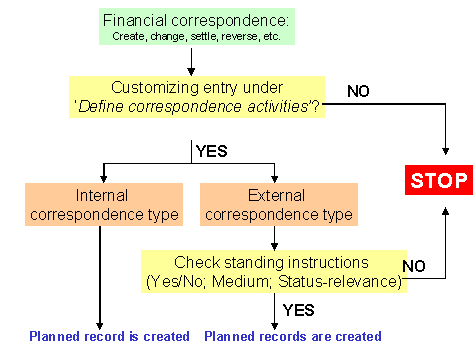
5. The status-relevant external correspondence can be counterconfirmed. Set the 'Counterconfirmation required' indicator here.
If you have made correspondence settings in Customizing of the application areas, you can control the settings via the Check IMG activity.
For each correspondence type per business partner at contract type, product category, product type and transaction type level, you determine which media (Printer, fax, E-Mail, SWIFT or IDOc) will be used to generate correspondence.
 If no assignment is made in the standing instructions for the business partner, then no external correspondence is generated for the financial transactions with this business partner.
If you wish to send correspondence via email, the communication interface, SAPconnect, must be set up. (Also refer to note number: 152474).
You also establish here whether a counterconfirmation is required.
In field, F (Leading transfer medium for correspondence status), you establish which of the selected media should have leading status. Also refer to the F1 Help for this field.
When are messages output?
Status at activity level Outgoing correspondence |
Status at activity level Incoming confirmation |
Activity/Message |
Not required |
Not required |
- |
Required |
Not required |
Activity transition, e.g: Settlement ® T0 828 Rollover ® T0 828 |
Required |
Required |
Activity transition, e.g: Settlement ® T0 827 Rollover ® T0 827 |
Carried out |
Required |
Activity transition, e.g: Settlement ® T0 829 Rollover ® T0 829 |
Carried out |
Matched |
Change ® T0 843 |
The short texts for the messages are as follows:
T0 827 Confirmation and counterconfirmation not yet carried out.
T0 828 Confirmation (Correspondence type X, medium Y) has not yet been carried out.
T0 829 Counterconfirmation match not yet carried out.
T0 843 Current activity already counterconfirmed.
Message categories:
W = Warning message
E = Error message
I = Note
- = Switch off message
Example:
If you define message T0 843 as the E message for user X, then this user can no longer change a transaction that has already been counterconfirmed.
Features
Correspondence can be defined as
The planned records generated for correspondence can be automatically carried out when you save the correspondence-relevant activity. Alternatively, the planned records are saved and then carried out via the 'Outgoing correspondence' report.
The data for the financial transactions is prepared and put in the confirmation letters (forms).
Correspondence can be output via a printer or fax machine. It can also be sent directly from the system via e-mail.
For fixed-term deposits and forex transactions, SWIFT files (MT 300, MT230) or IDocs can be generated.
You can also have a counterconfirmation status for the financial transaction:
After you have set the 'Counterconfirmation required' indicator via 'Define correspondence activities' and also in 'Standing instructions for correspondence', you can use the following functions for counterconfirmation:
1. In the money market and forex trading areas, counterconfirmation takes place via the 'Incoming confirmations' function.
2. In other areas, you can set the counterconfirmation-relevant correspondence activities as matched via the 'Correspondence monitor'.
Correspondence letters can be archived (Optical archiving). You access the archived correspondence from the transaction display. If you are in the display/change mode for a transaction, you can display the correspondence activities via Goto. By double-clicking on a line from the correspondence overview, you activate the archive link and you can display the transaction. The content of the file is displayed for SWIFT correspondence.
The confirmation status information (i.e. time, activity, processor, form used and the output medium for incoming and outcoming confirmations) is in the transaction.
Via 'Message control' , you can check whether the outgoing confirmation of the previous activity has already been carried out for each activity transition.
The Correspondence monitor has the following editing and monitoring functions:
See also:
 Incoming confirmations (only for money market and forex trading)
Generate SWIFT file (only for money market and forex trading)
Correspondence monitor
Incoming confirmations (only for money market and forex trading)
Generate SWIFT file (only for money market and forex trading)
Correspondence monitor