 Routing
Use
At task creation, TRM
ascertains for suitably qualified resource types all possible routes between the source and destination, as well as traversal time, according to a chosen routing strategy.
At task selection, TRM
assigns to a resource the highest priority task, based in part on the resource’s distance from the task source. Where appropriate, TRM
also re-sequences the routes of clustered tasks and tasks in bundles.
Integration
The routing mechanism operates as part of the prioritization of tasks.
Prerequisites
You have defined the site map.
Activities
Using the BAdI LTRM_MODE_SET
, you can determine how routes are created during task creation. The options are:
Direct route to final destination only
Highest priority route option (final destination or P&D)
Routes to P&Ds only
If you do not use the BAdI to determine a routing strategy, the system’s default strategy is to determine the direct route to the final destination and, if the final destination route is not possible for any resource types, the highest priority route to a P&D.
If you have defined a mandatory route, it takes precedence over any of the above strategies.
Route Management receives the source, destination, handling unit type and operation information from Task Management.
Route Management determines possible routes for each possible resource type, according to the chosen routing strategy, taking into account some of the following:
The exit node of the source zone
Any P&Ds dedicated to the source zone
Any other possible P&Ds not dedicated to the source zone
Mandatory routes and exceptions
Obstacles
Any P&Ds dedicated to the destination zone
The entry node of the destination zone
The destination bin
Route Management calculates the following distances:
Between the extreme (start or end) source bin in each zone nearest to the zone’s entry/exit node, and each zone’s entry/exit node
Between the zone entry/exit nodes
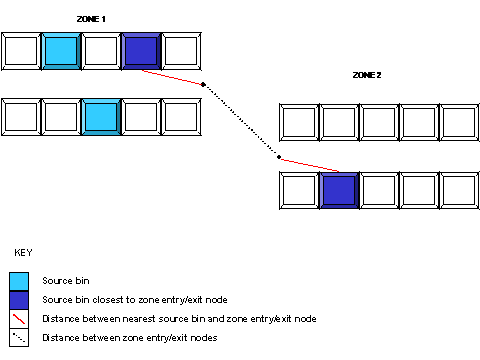
If there are any obstacles, the route is calculated via edges of the obstacles (line of sight).
 Note
Note
You can define route exceptions to set your own distances for specific resource types. For more information, see Route.
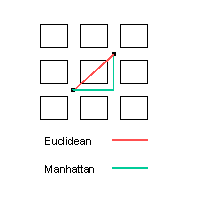
The routes are calculated according to predefined metrics. There are two standard metrics that can be used:
Euclidean metric: distance = |dz| + square root (dx^2 + dy^2).
Manhattanmetric: distance = |dx| + |dy| + |dz|
Note
You define inter-zone metrics in Customizing for Logistics Execution
→ Task & Resource Management
→ Master Data
→ General Settings for TRM
.
You define intra-zone metrics in Customizing for Logistics Execution
→ Task & Resource Management
→ Master Data
→ Site Map Management
→ Define Zones, Operations, and Serving Zones
→ Define Zones.
The possible routes/route combinations per resource type are determined as follows:
For each zone X
, Route Management determines:
A sequence of zones, with zone X
as the first zone in the sequence, and each successive zone being the closest zone to its predecessor
A sequence of zones, with zone X
as the last zone in the sequence, and each predecessor zone being the closest zone to its successor
This results in 2n combinations per resource type, where n is the number of relevant zones.
Route Management calculates the duration of each route for each possible resource type by taking into account the distance and the resource type velocity (defined in Customizing for Task & Resource Management
®
Master Data
®
Resource Management
).
Route Management calculates the rest of trip duration for those routes that do not involve movement straight to the final destination.
At task selection, TRM may re-sequence task routes in the following cases:
Task bundle picking where none of the tasks involve an empty pallet zone
Clustered tasks
Routes are re-sequenced according to the current location of the resource to whom the tasks are assigned.
Example
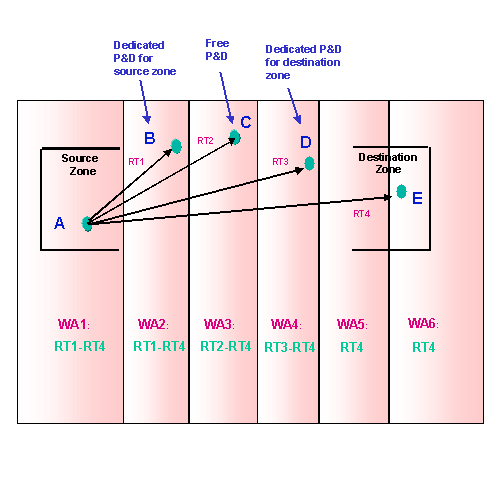
A request involving moving handling unit type 1 from source zone A to destination zone E is created. Resource types 1-4 can all carry handling unit type 1.
First Scenario:Default RouteOption
If no routing strategy has been defined using the BAdI, the default routing strategy is used. Using this strategy, TRM
determines that the only possible route is from A to E by resource type 4.
Second Scenario: HighestPriority RouteOption
If you have selected the highest priority route option using the BAdI, TRM
determines all possible routes, whether direct to the final destination or to a P&D. These routes are then prioritized, with a task being created using the highest average priority route option.
Start point | End Point | Resource Types |
|---|---|---|
A | B | 1-4 |
A | C | 2-4 |
A | D | 3-4 |
A | E | 4 |