 Route
Route
Definition
A route is a course of travel between a starting point and an end point.
Use
At task creation , the system determines route options for resource types . For more information, see Routing .
You can influence the way in which
TRM
determines routes by defining
mandatory routes
.
You can also define exceptions for specific routes.
MandatoryRoutes
In Customizing for

Task & Resource

Management
Control Data
Define Mandatory Routes
 , you may define mandatory routes that must be taken for certain
handling unit types, if you have a preference for a particular route. Each mandatory route involves an intermediate (via) zone between the source and destination zones.
, you may define mandatory routes that must be taken for certain
handling unit types, if you have a preference for a particular route. Each mandatory route involves an intermediate (via) zone between the source and destination zones.
At task creation, the system does not always know the handling unit type that will be used for the task, such as in the case of picking. To deal with these cases, you can do one of the following things:
Use BadI LTRM_TO_RQST_CHANGE to create the source handling unit type.
In Customizing, define a mandatory route and choose
All HU types.
 Note
Note
You can disable and enable mandatory routes using the
Maintain mandatory routes
Monitor method. For more information, see
Monitor Methods
.
Route Exceptions
In Customizing for
Task & Resource
Management
Control
Data
Define
Route
Exceptions
, you can do the following for specific resource types:
Disable a route
Manually change the calculated distance of a route
Note
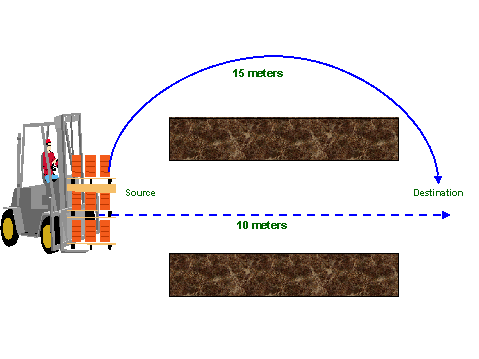
The narrow aisle forklift can pass through the narrow aisle but the standard forklift has to make a detour. In this case, the route distance for the standard forklift will not be the calculated 10 meters but rather 15 meters. In this case, you would manually change the distance to 15 meters.
Structure
For distance calculation purposes, a route is divided into different segments.

In the case of a simple movement task from bin A (located in zone 1) to bin B (located in zone 2), the system calculates the route distance by determining the following three segments:
The distance between bin A and the exit node of zone 1
The distance between the exit node of zone 1 and the entry node of zone 2
The distance between the entry node of zone 2 and bin B