 Price Catalog Inbound Processing
Purpose
You can use this process for mass transfers of article master data from external data pools or bilateral transfers from the vendor. For retail companies, the transfer and efficient processing of this data is particularly important because of the high volume of data.
The process uses the following functions:
It supports the three GDSN messages Subscription, Notification, and Confirmation in accordance with the GS1 XML standard. It enables you to use of the new SAP Enterprise services (
TradeItemCatalogue
) that are delivered with the mapping. For more information, see
Optimized Master Data Exchange Using SAP Enterprise Services
.
Continued support of EANCOM-PRICAT messages
ALE processing for the price catalog IDoc
You can use simple PRICAT inbound processing (PRICAT transaction, see PRICAT Processing ) to create or change article data manually or automatically from catalog data.
You can use enhanced price catalog inbound processing (transaction W_PRICAT_MAINTAIN, see Enhanced Inbound Processing of External Master Data ) to create or change article data from catalog data, manually or automatically, on an interface capable of dealing with mass data. During this, the system takes into account single and generic articles as well as bills of material and prices.
With the catalog selection for editing (transaction W_SYNC, see Catalog Selection for Editing ), which comes before the enhanced price catalog inbound processing, you can select precisely which catalogs are to be displayed in the enhanced price catalog processing. Following the selection, you go directly to enhanced price catalog processing.

You can use only transaction PRICAT or transactions W_PRICAT_MAINTAIN / W_SYNC (enhanced price catalog - inbound processing/ catalog selection) to create article data. We recommend using the enhanced processing function by way of the catalog selection.
The enhanced processing function (W_PRICAT_MAINTAIN) includes the following functions:
XML processing in the XI system, if the SAP Services for GDSN are used (see SAP NetWeaver Exchange Infrastructure )
Proxy inbound and outbound for the GDSN retail messages
Maintenance interface for managing subscription messages - see Processing Subscriptions
Validation and Enrichment Processor with which customers can define their own rules and enhance the receipt of messages - see Validation and Enrichment Processor
Option to enrich provided fields with data that does not come from the data pool - see Validation and Enrichment Processor .
Clearly-arranged maintenance interface makes it easy to view and adjust data - see Enhanced Inbound Processing of External Master Data .
Mass processing option - see Enhanced Inbound Processing of External Master Data .
Scheduled data transfer - see Preparing for Scheduled Master Data Transfer .
Automatic transfer of data - see Preparing for Scheduled Master Data Transfer
Confirmation - see Processing Confirmations .
The creation of single, generic, and structured articles in SAP systems is supported. You can create basic data, purchasing info records and purchase and sales conditions. You can both create new articles and modify existing ones.
The catalog selection for processing (W_SYNC) provides
a differentiated selection of the catalogs displayed in the enhanced price catalog processing
An overview of the selected catalogs
a preview of the relevant catalog items
•the facility to control which catalog groups (and thus which employees) are assigned to which catalogs for processing.
the link to workflows - facility to restrict the selection to catalogs that are contained in your workflows.
Functions in the External System
You can convert the message format (PRICAT or ANSI X12) to IDoc format if the IDoc PRICECATALOG is used.
Authorization objects
The following authorization objects use the individual functions:
Confirmation: WGDS_CONF
Price catalog editing (only transaction PRICAT): W_PRICATIN
Message inbound: WGDS_ACT
Subscription: WGDS_SUB
VE Processor: WER_ACT.
Prerequisites
The Retail Switch Framework is activated.
Process Flow
Processing Step |
For more information, see the following: |
|---|---|
Customizing: Settings for the interface, and for XI ( SAP NetWeaver Exchange Infrastructure ). |
the Implementation Guide (IMG) for Sales and Distribution under
|
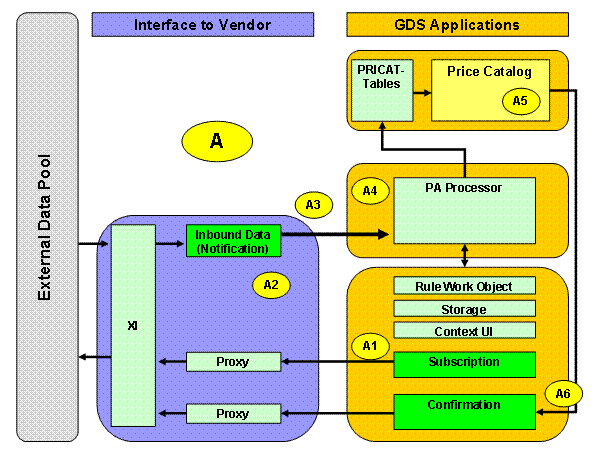
A1.Create and send the subscription |
Optimized Master Data Exchange Using SAP Enterprise Services and Enhanced Inbound Processing of External Master Data |
A2. Message inbound - Receipt of subscribed data from the data pool by means of XI |
|
A3.Notification - Display and process received catalog data |
|
Optional: changes to the rules that check and enhance the external data Check and enrich the data |
|
A5. Manual or automatic processing using transaction W_PRICAT_MAINTAIN |
|
A6. Send confirmations, return GDSN confirmation messages to the data pool. |
Processing Step |
For more information, see the following: |
|---|---|
The person responsible specifies whether a sender is allowed to import catalog data into the system, and makes settings for the interface. |
|
B1. You can import a price catalog to BAPI PRICECATALOGUE as an IDoc or directly using the SAVEREPLICA method. Vendors normally write changes into the same catalog. When the history is active, the system creates change rows with the current date. |
|
B2. The system checks data for errors and adds additional information. |
BAdI WRF_PRICAT_IN_CUST, Method INBOUND_CHANGE the Implementation Guide (IMG) for Sales and Distribution under
|
B3. The system saves the data in the catalog tables and makes it available for further processing. |
|
B4. You can process data manually using the PRICAT transaction, or automatically using transaction W_PRICAT_MAINTAIN. |
|
If the system can find an article number or reference article number during automatic further processing, it creates or changes the article data. During manual further processing, the person responsible calls her data pool, then checks and adjusts it so as to be able to subsequently create or change article data. |
|

For further information (including a step-by-step guide and information on configuration), see the
SAP Service Marketplace under the Internet address
service.sap.com/retail
-> Expert Knowledge Corner -> Data Synchronization ->
http://service.sap.com/~sapidb/011000358700000970282007EOverview Data Synchronization Guides