
 Condition Technique

Purpose
The settings for determining the rules stored in the system and the mechanism for determining the rules are represented by means of the condition technique. This technique offers multi-level processes and flexible handling of variable parameters; that is, every step of the rules stored in the system can define the next check step.
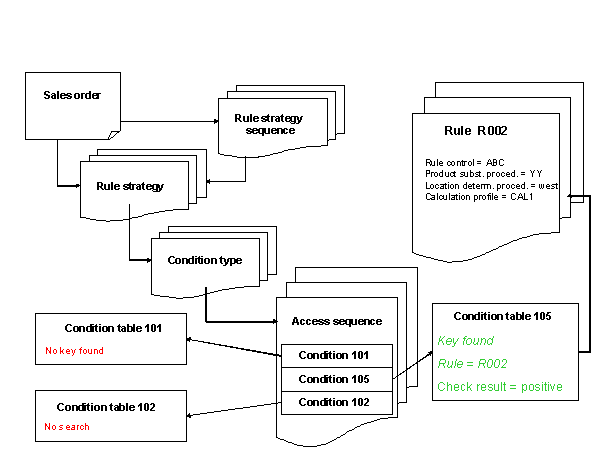
Process
To configure the condition technique, you must carry out the following process steps:
...
1. Create a field catalog by choosing the desired fields from the reference structure.
For more information, see Maintaining the Field Catalog.
2. From the field catalog, choose the fields that should be used as the key combination for the condition table, and generate the condition table.
For more information, see Creating Condition Tables.
3. Create an access sequence and define the accesses to the condition tables and their fields.
For more information, see the Implementation Guide (IMG) for SAP Supply Chain Management (SAP SCM) under Advanced Planning and Optimization → Global Available-to-Promise (Global ATP) → Rule-Based →Maintain Access Sequences.
4. Create a condition type and assign the access sequence to it.
For more information, see the IMG for SAP SCM under Advanced Planning and Optimization → Global Available-to-Promise (Global ATP) → Rule-Based Availability Check → Maintain Requirements Profile.
5. Define one or more rule strategies and determine the control of these.
For more information see Maintaining Rule Strategies.
6. If you would like to combine several rule strategies, define a rule strategy sequence.
For more information, see Rule Strategy Sequence.
7. Assign activation parameters to the rule strategies, and, if necessary, to the rule strategy sequences.
For more information, see Assigning a Rule Strategy or a Rule Strategy Sequence.
8. Create a rule.
For more information, see Integrated Rule Maintenance.
9. Determine rule determination by assigning condition records to a rule.
For more information see Creating Rule Determinations.