 Informix Data Recovery


Informix Data Recovery
Use
Data recovery involves a series of operations that enable you to copy the Informix database data so that, in the event of failure involving data loss, you can restore your system and quickly resume normal working with minimal loss. Failure can range from a corrupt disk drive to a full-scale disaster that destroys your computer site. Although data recovery routinely involves copying data to archives and backups, it also enables you to restore your database, if necessary (that is, to enable you to recover from a problem or failure).

Data recovery at database level does not replace your routine system backups at operating system level. Make sure that, when you make routine system backups, you include the configuration files essential for data recovery. For more information about these files, see the Informix documentation.
For more information about how data recovery fits into the wider picture of ensuring high availability of your SAP System with the Informix database, see
 High Availability.
With
The term "logical-log file backup" – often shortened to "logical-log backup" or even "log backup" – remains the same.
In summary, backup is the
ON-Bar term for all copies of the database taken for recovery purposes.The following operations constitute data recovery:
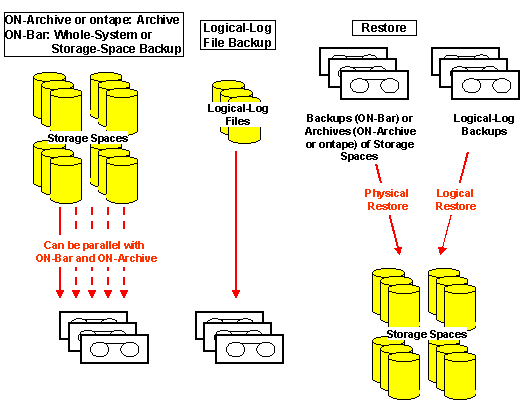
An archive is a copy of all or a portion of the data that the Informix database server manages. More precisely, an archive is a copy of one or more dbspaces and any supporting data required to restore them.
Refer to
An
Refer to
Informix Whole-System and Storage-Space Backups.A logical-log backup is a copy of the transaction data held in the logical-log files, used by the database server to record ongoing database activity between archives. Since the logical-log file is reused, it must be backed up regularly. The term "logical-log file backup" is sometimes shortened to "logical log backup", "log backup", or just "backup".
Refer to
A restore recreates database data after failure has occurred in which data is damaged. The restore happens in the following phases:
Refer to
You can perform all the operations mentioned above with the data recovery tools supplied by Informix, that is,
ontape , ON-Archive , and ON-Bar . However, there are differences in what these tools can do. Refer to Comparison of ontape, ON-Archive, and ON-Bar for Data Recovery.The following diagram summarizes the major data recovery operations:
See also:
ON-Bar for Data Recovery ON-Archive for Data Recovery ontape for Data Recovery Database Backup (ON-Bar) Archive (ON-Archive and ontape) Logical-Log Backup RestoreInformix documentation
at http://www.informix.com