 Informix Whole-System and Storage-Space Backups


Informix Whole-System and Storage-Space Backups
Use
Whole-system and storage-space backups are copies of the Informix database that you make with the data recovery tool
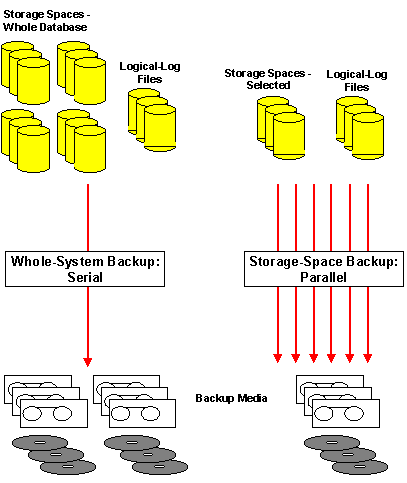
ON-Bar . These terms refer to the scope of the database backup and have the following meanings:This is a backup of all storage spaces (that is, dbspaces and blobspaces) and logical logs after a single checkpoint.
A whole-system backup is equivalent to a full-system level-0 archive with the Informix tools
ON-Archive or ontape . Refer to Informix Archive. A whole-system backup can also be used to replicate an Informix instance.This is a backup of one or more selected storage spaces, or of all storage spaces. A storage-space backup copies the tables and indexes in each specified storage space so that they can be restored later to the state they were in at the time that the backup began.
ON-Bar
extracts data in parallel streams, the number of which is determined by the BAR_MAX_BACKUP parameter in the ONCONFIG file. How the data is then fed to the output devices depends on your storage manager. Since the data is extracted in parallel, you must have backups of the corresponding logical logs if you want to use a storage-space backup for a restore, because the logs synchronize the different parts of the backup.
Since whole-system backups are always performed serially, they are slower than storage-space backups on large databases.
Features
The following graphic shows the main features of whole-system and storage-space backups:
Whole-System and Storage-Space Backups
Activities
You can perform an
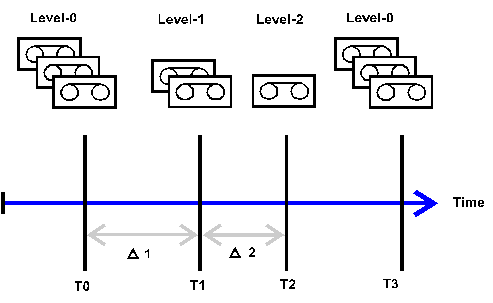
ON-Bar database backup at the following levels:This is the baseline backup. It contains a copy of all pages that contain data for the specified storage spaces. However, it might take a long time to complete if your database is large.
This backs up only data that has changed since the last level-0 backup of the specified storage spaces.
This backs up only data that has changed since the last level-1 or level-0 backup of the specified storage spaces.
Note that you can not use level-1 and level-2 backups without the corresponding previous level-0 backup.
For example, you might perform a level-0 backup twice a week and a level-1 backup on the remaining days in the week.
Backup Levels
You can use the
 DBA Planning Calendar in the Computing Center Management System (CCMS) of the SAP System to schedule whole-system and storage space backups. The DBA Planning Calendar also enables you to look at the results of past backups and see the resources that are required for future backups.
See also:
Informix documentation
at http://www.informix.com