 Database Backup (ON-Bar)


Database Backup (ON-Bar)
Purpose
With the Informix database, you can create a backup of the whole system or selected storage spaces using
ON-Bar. The database backup can be serial (for the whole system) or parallel (for all or selected storage spaces):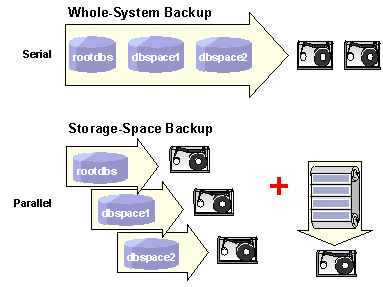
For more information, see
Informix Whole-System and Storage-Space Backups?
If you use
ON-Bar for database backup, you must also use it for logical-log backup. You cannot use different tools for database and logical-log backup, because the data produced is not compatible.Prerequisites
You have completed the preparations necessary for using
ON-Bar and have chosen a storage manager. Refer to Configuring ON-Bar.Process Flow
Result
You now have a backup of your database that you can use in the event of failure to
restore the database.
See also:
Informix documentation at
http://www.informix.com