 Informix Restore


Informix Restore
Use
A restore recreates Informix database data that has become accessible because of hardware or software failure, hardware replacement or user error. For example, the following might mean that you have to perform a restore:
Features
There are the following types of restore:
You must use this type of restore when any of the "critical" dbspaces (that is,
You can use this type of restore when the critical dbspaces are still operational and the Informix server is therefore online. It can be used to restore selected (but not all) dbspaces.
Activities
You perform a restore in the following steps:
When a severe failure has caused the database server to go offline, you must do a full-system cold restore. At this point, a number of logical-log files have not yet been backed up. In this case, the first step is to back up these files before starting the physical restore. You can then use the files after the normally backed up logical-log files in the logical restore phase to make sure that the database is completely up-to-date. To salvage logical-log files, the dbspace containing them (that is,
If the database server has not gone offline as a result of the failure, make sure that you back up the logical log in the normal way immediately before bringing the database server down. Then you do not have to salvage the logical-log files as described above.
This is the process of restoring storage space (that is, dbspace and blobspace) data from an archive (
ON-Archive or ontape ) or a whole-system or storage-space backup ( ON-Bar ).This is the process of recreating transactions in the physically restored storage space from the first step. The transactions occurred after the archive (
The following graphic illustrates what a database restore involves:
Database Restore
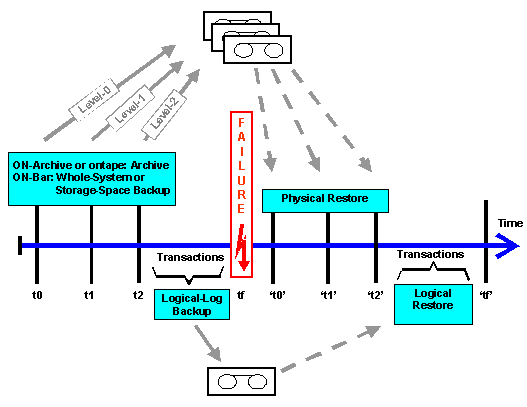

You should normally also create logical-log backups between times t0, t1, and t2. The diagram only shows the logical-log backups taken between t2 and the failure at tf because these are all that are required for the logical restore, assuming you are restoring from a sequential archive (
If you are restoring from a parallel archive (
ON-Archive ) or a storage-space backup ( ON-Bar ), then you must have the transactions from the time between the level-0 archive or storage-space backup and the point of failure. That is, you must have backups of the transactions between t0 and tf.For further information about restores, see the following:
You can do a restore to a specified point-in-time if necessary. Refer to
You can do a restore to a specified point in the logical-log files.
This report is very useful to help you identify the tapes required for the archive. Refer to
See also:
RestoreInformix documentation at
http://www.informix.com