 Informix Logical-Log Backup


Informix Logical-Log Backup
Use
A logical-log backup is a copy of the logical-log transaction data that the Informix database server creates to record ongoing database activity.

The full name for a backup is "logical-log file backup," although "logical log backup" and "log backup" are also used.
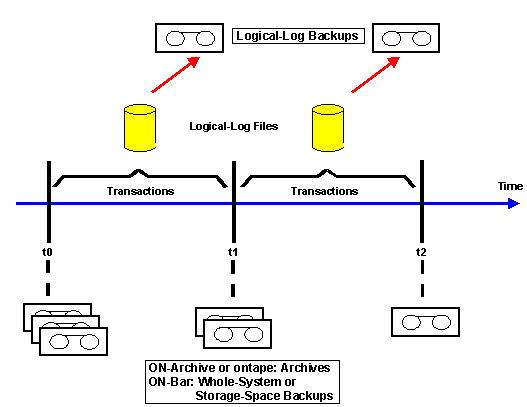
Whereas an archive is a copy of database data at a specific point in time, a logical-log backup records transactions that occurred after the archive was taken. Such transactions are stored in the logical-log files. If the database needs to be restored, the archive is first restored and then the log backup is used to roll forward transactions, so producing a consistent and up-to-date database. Backup data is written to a save set on the storage medium.
Integration
Informix supplies tools that you can use to perform a logical-log backup. See
Comparison of ontape, ON-Archive, and ON-Bar for Data Recovery for a comparison of these tools.Features
It is important to back up the logical-log files because this allows the database server to reuse them and make room for subsequent transactions. If the logical log completely fills, the database server stops processing and you have to perform an emergency backup (but this does not apply if you are using
ON-Bar , which prevents the logical log filling completely). Although SAPDBA supports emergency logical-log backup for ON-Archive , the procedure is awkward. Avoid emergency logical-log backup by developing a sensible approach to backing up your logical log.The following diagram illustrates what a backup is and how it relates to an archive:
Logical-Log Backup
Activities
You can use the
 DBA Planning Calendar in CCMS to schedule backups, but only if you are using
ON-Archive
or
ON-Bar
as your logical-log backup tool. The DBA Planning Calendar also lets you look at the results of past backups and see which resources are required for future backups.
DBA Planning Calendar in CCMS to schedule backups, but only if you are using
ON-Archive
or
ON-Bar
as your logical-log backup tool. The DBA Planning Calendar also lets you look at the results of past backups and see which resources are required for future backups.
See also:
Logical-Log Backup Emergency Logical-Log BackupInformix documentation
at http://www.informix.com