 Measure Area
Definition
The subdivision of an organizational measure into business-related data areas. All the data within one area is given the same status when changes are made as part of an organizational measure.
Use
You divide an organizational measure into measure areas so that you can make a joint status change for each individual area for data changes to the organizational measure. In Customizing, you define the data areas represented by these measure areas.
For information about defining measures areas, see Defining Organizational Measures .
Structure
If you manually create the measure area for an organizational measure directly or the system automatically creates a measure area, the following values are transferred as default values from the organizational measure. You can change these values as required. Otherwise, these fields are empty when you create a new measure area.
Header
Measure Type
Header Element
Effectiveness
The system automatically assigns the
Case ID
The following properties can be assigned for the instance:
Person Responsible
The user, position, or organizational unit responsible for this measure area. The users able to make changes depend on the authorizations they are assigned.
Measure Area
The assignment to one of the measure areas defined in Customizing. The following measure areas are provided with the standard system:
Description |
Assigned Measure Subareas |
Structure |
Force Element |
Personnel |
Authorized Personnel |
Material |
Authorized Materials |
Materials Management |
Logistical Requirements, Materials Management Master Data, Supply Relationships |
Maintenance |
Maintenance Master Data, Maintenance Relationships |
Accounting |
Accounting |
Infrastructure |
Infrastructure |
Task Organization |
Task Organization |
Logistical Command and Control Support |
Logistical Command and Control Support |
Relocation |
Relocation |
Work Centers |
Work Centers |
If necessary, you can define new measure areas in Customizing, by choosing
Defense Forces & Public Security
→
Organizational Flexibility
→
Structures Workbench
→
Organizational Measure
→
Define Measure Areas
.
Assign the required
measure subareas
to the measure areas. You assign these measure subareas in Customizing, by choosing
Defense Forces and Public Security
→
Organizational Flexibility
→
Structures Workbench
→
Organizational Measure
→
Assign Measure Subareas.
You use the measure type of the organizational measure to define which types of measure areas are possible for the organizational measure. The system automatically creates the corresponding measure areas.
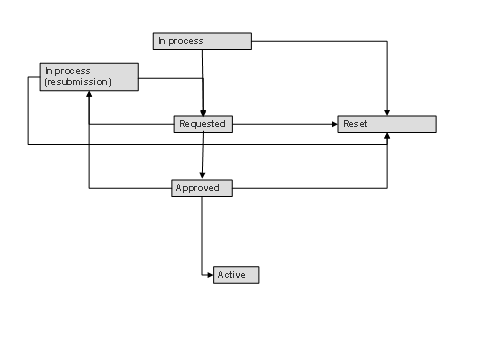
Status
The status of the measure area that specifies the status of the changes in the individual areas. The following statuses are available:
In Process
: The processors receive an appropriate work item and can make the required data changes. These changes are assigned the status
Planned
Requested
: All changes in a measure area have been completed and are assigned the status
Requested
. Processors cannot make any more changes.
Approved
: All changes to this measure area are assigned the status
Approved
Active
: All changes to this measure area are assigned the status
Active
In Process (Resubmission)
: You can change the status of a measure area from
Requested
or
Approved
to
In Process (Resubmission)
in order to continue processing. No new work items are generated.
Reset
: With the exception of the status
Active
, you can change the status of a measure area from any status to
Reset
. If possible, any data changes made are deleted or indicated as reset (or similar).
If you reset the higher-level organizational measure, the system automatically resets the relevant measure area.

Do not change the status profile for the measure areas, since if you do, the subsequent status change will no longer work for the objects in question.
If the status of a measure area is changed, the system automatically triggers the checks and follow-up actions defined for the status change of objects in accordance with the higher-level measure type.
Change Data
Specifies when and by whom the organizational measure was created, last changed, or completed.
Related Objects
The objects assigned to the organizational measure.
Notes
A user-defined text for a more detailed description
Process Route
The process route describes the sequence of processors (users, positions, or organizational units) for making the data changes for this measure area. On the basis of this process route, these processors receive corresponding workflow items requesting that they change the data.
You can assign measure areas to
measure types in Customizing (see
organizational measure
) to define a process route that is
automatically created by the system. You can modify this process route manually.
Log
A list of all changes made to this measure area.
Change Documents
A list of all data changes assigned to the measure area via change documents.
A measure area can include a multitude of additional properties and assignments (document assignments, transaction jumps, and so on). For this purpose, use the
Case Management
adjustment functions.