 Organizational Measure
Definition
An object for grouping together several measure areas that contain changes to force elements, positions, organizational structures, and object assignments.
Use
You use this object to group together all changes that are related from abusiness perspective that were carried out as part of an organizational change. This includes:
Changes that were carried out together
Changes that are to undergo the same status change
Changes that have been grouped in measure areas
You can also display completed organizational measures and the changes made within them at a later point in time.
For information about creating organizational measures, see Defining Organizational Measures .
Structure
An organizational measure includes the following properties:
Heading
The name of the organizational measure.
Case ID
The organizational measure number assigned by the system.
Measure Type
Type of organizational measure
In Customizing for
Defense Forces & Public Security
, you define measure types by choosing
Organizational Flexibility
→
Structures Workbench
→
Organizational Measure
→
Define Measure Types
You use the type to define the following for an organizational measure:
Which
tab pages in the
Structures Workbench
and thus which objects and assignments can be edited for the organizational measure
In Customizing for
Defense Forces & Public Security
, you define the assignment of tab pages to measure types by choosing
Organizational Flexibility
→
Structures Workbench
→
Organizational Measure
→
Assign Tab Pages.
You can access only those tab pages that you have already specified in Customizing for the
Structures Workbench
.
Which checks and follow-up actions are to be carried out when the status changes
Which measure areas are to be created automatically for the organizational measure
In Customizing for
Defense Forces & Public Security
, you define measure areas by choosing
Organizational Flexibility
→
Structures Workbench
→
Organizational Measure
→
Assign Measure Areas
Object Type
Select the required object type.
Header Element
The highest-level force element that is automatically displayed in the
Structures Workbench
when the transaction for editing this organizational measure is called up.
Effectiveness
The date on which this organizational measure is to be effective. This value is used as a default value for object editing.
Status
An organizational measure has the following statuses:
In Preparation
: The organizational measure is created in the system.
In Process
: The organizational measure is being implemented, that is, the changes to be made within the organizational measure are being implemented or are already in the course of being approved.
Reset
: The organizational measure was canceled during the editing process and will no longer be executed completely. All of the changes already made were reversed. For some data, this means that the changes still exist in the system but that they are marked as
reset
‚
delimited
, or
locked
, for example. The organizational measure is closed.
Partially Active
: One or more measure areas of the organizational measure are active. At least one measure area of the organizational measure is not yet active and still has one of the earlier statuses.
Active
: The organizational measure was executed completely; all changes in all of the areas concerned are already active. The organizational measure is closed.
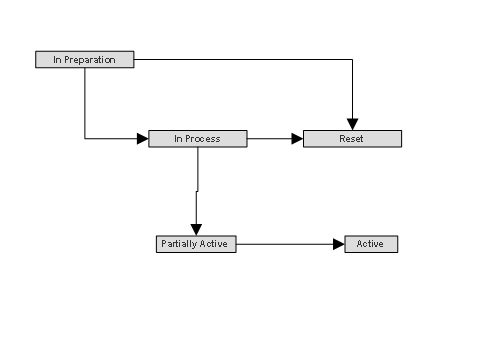
Organizational Measure Status Network

Do not change the status profile for the organizational measures, since the subsequent status change will no longer work for the objects in question.
Person Responsible
The user, position, or organizational unit responsible for this organizational measure. Which users can make changes depends on the authorizations they are assigned.
Change Data
Specifies when and by whom the organizational measure was created, last changed, or closed.
Linked Objects
The objects assigned to the organizational measure, in particular the measure areas .
You see both the measure areas that the system created
automatically on the basis of your Customizing settings and those that you added
manually. In this screen area, you can create new measure areas or change existing ones.
Notes
User-defined text for more detailed description
Process Route
The process route describes the sequence of processors (users, positions, or organizational units) for processing the assigned measure areas. As defined by this process route, the processors receive workflow items for processing the measure areas.
Log
A list of all changes made to the organizational measure.
Change Documents
A list of all data changes assigned to the organizational measure by means of change documents.
The
Warning
field may show that a change was made that does not belong to the data area of the measure areas that exist for the organizational measure.
Measure Areas
An overview of all measure areas assigned to the organizational measure.
An organizational measure can include a multitude of additional properties and assignments (document assignments, transaction jumps, and so on). For this purpose, use the adjustment functions in
Case Management
.