 Personnel Assignment
Use
You use the personnel assignment functions to assign persons from the domestic base to the positions in an operational structure or exercise target.
Prerequisites
You have created persons in your HR system.
If necessary, you have specified a force provider or initial supplier of personnel for the operational/exercise force element for which you want to fill positions.
You are familiar with the operational/exercise relationships .
Features
The
Personnel Categories Planning
application (transactions /ISDFPS/PERS1 and /ISDFPS/PERS2) is available for assigning persons to positions in operational/exercise force elements.
View: Detail Screens
You choose the
Detail Screens
pushbutton to obtain the standard screen layout of the
Structures Workbench
. The
Staff Assignment Proposal/Staff Assignment
tab pages are also available for you to assign personnel.
View: Search for Personnel Categories
You choose the
Search for Personnel Categories
pushbutton to obtain the following screen:
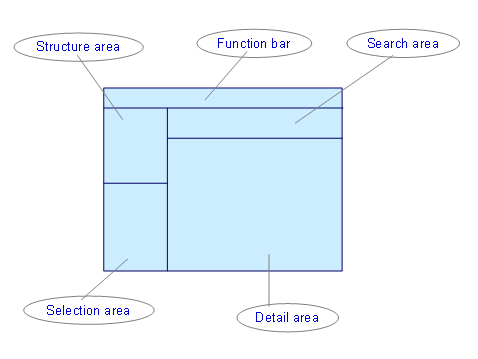
Screen Layout
Structure Area and Function Bar
For more information, see Structures Workbench .
Selection Area
Displays the positions in the operational/exercise force element for which you want to assign personnel.
Search Area
Similar to the search for force elements (see Searching for Force Elements ), a search function is available that you can use to search for suitable persons to fill a position or force element:
On the
Contingent
tab page, you can use the contingent assignment to find persons of the relevant force provider or initial supplier of personnel.
On the
Qualification
tab page, you can find persons by qualifications.
On the
Force Element
tab page, you can find persons directly or indirectly assigned to a specific force element in the organizational structure.
On the
Persons
tab page, you can find persons directly.
On the
Position
and
Job
tab pages, you can find persons assigned to a specific position or job.
The following special conditions apply (unlike for the search for force elements):
When searching by qualification, you can use the
All Qualifications
option to replace the OR operator with the AND operator.
A search using several tab pages is permitted only if you combine qualifications with jobs, positions, force elements, or contingents. No other combinations are permitted.
Detail Area
For every person selected using the search area, the following properties are displayed in addition to the name and personnel number:
Availability
The system determines whether data exists for the person in the infotype 0748 (Command and Control Relationships) or 2001 (Absences). If no data exists, the person is available. Otherwise, you need to check in detail whether the person is available for the required period.
Force element and position to which the person is assigned
You can display the personnel master data for a selected person by choosing the
Details
pushbutton.
Activities
You can:
Fill positions with persons directly. See Direct Execution/Deletion of Staff Assignment .
Create and, if required, implement staff assignment proposals. See Staff Assignment Proposal .