 Using ILM Retention Management in the Application System
You use the Retention Management functions of SAP NetWeaver Information Lifecycle Management (ILM)
to manage the lifecycle of the data of a live application system from its creation (database) to its destruction (database or ILM store). Since transferred data remains accessible and the time periods required by law can be adhered to, you can regularly store data that is no longer required for operations in the ILM store and optimize the data volume in your system.
ILM Retention Management
offers the following functions:
Putting legal holds on documents that are relevant for legal cases so they cannot be deleted or destroyed. Legal holds affect the data in the database as well as the data in the ILM store.
Grouping data objects that are to be stored or queried together in audit areas.
ILM rules for time-based management of data objects, for the following purposes:
Restriction of the retention period for reasons of data protection
Adherence to legal requirements for retention periods for tax auditing and product liability purposes.
Deleting data for which the retention period has expired and for which there is no legal hold.
The following figure describes the Retention Management functions in the application system.
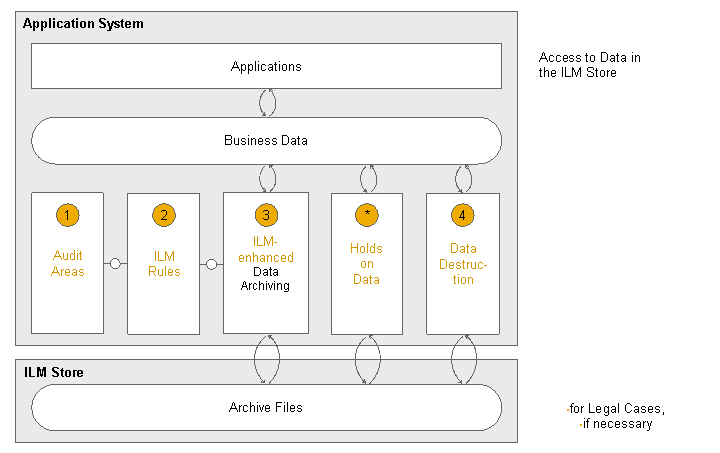
Retention Management Functions in the Live Application System
Procedure
1. Know the Settings and Effects of RM Functions
Before you use the Retention Management functions, familiarize yourself with the necessary basic knowledge.
Customizing settings on which the Retention Management functions are based
For more information, see: Preparing to Use Retention Management Functions
Effects the connections and specifications that you define with the Retention Management functions have on the data
For more information, see: Evaluating Retention Rules, Evaluating Residence Rules
2. Use RM Functions
Set Legal Holds
When necessary, ensure that the data that is relevant for legal cases cannot be deleted or destroyed.
For more information, see: Putting Holds on Data for Legal Cases
Manage the Data Lifecycle
Create an audit area for each purpose for which you need to store and retrieve data.
For more information, see: Processing Audit Areas
Create ILM policies to enable the system to include legal retention periods during data archiving and data destruction,
For more information, see: Processing ILM Policies
 Note
NoteCheck the assignment of audit areas, the evaluation of ILM rules, and the existence of legal holds for each ILM object.
For more information, see: Simulating the Evaluation of ILM Rules
End of the note.You apply ILM rules to data, for example, by archiving the data.
For more information, see: Applying ILM Rules to Data
Destroy the data on which there are no legal holds and whose expiration date has been reached.
For more information, see: Destroying Data in a Live Application System