 Payment Form
Definition
This is an object in Account Management (FS-AM) that represents a form that is used in the payment transaction. It has a number that is used for identification purposes in the system. You can differentiate between different payment form types according to the form category and area of usage.
Checks (bearer, travelers and order checks)
Bank transfer forms
Use
Payment forms are managed for each
account
in
Account Management (FS-AM).
In
Account Management (FS-AM)
, payment form management provides the following functions:
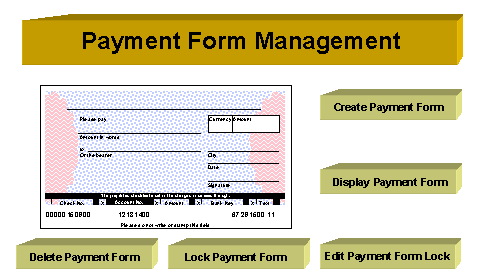
For more information about each of these functions, see the following in the SAP Library:
-
The system also provides you with a
detail screen
in display mode for each transaction in each payment form. This screen displays all the data for the selected payment form. In the same transaction in display and change mode, the system displays apayment form history
for each payment form, containing the change data for the selected payment form. -
 Note
NoteIf
Posting Lock Management
is active in your system, the system does not offer you the transactionLock Payment Form
orEdit Payment Form
, because these transactions are executed centrally. For more information aboutPosting Lock Management
in relation to payment form locks, see Editing Payment Forms and Posting Lock Management in the SAP Library.End of the note.
Lock Options
If you have not activated
Posting Lock Management
, then you can lock the payment form with the following locks:
Payment form lock (via payment form management)
Posting lock (not specific to payment form)
Amount-dependent posting lock (not specific to payment form)
Payment Form Lock
The payment form lock is more optimal for performance than the general posting lock. If you know the payment form identification number(s) for the form(s) to be locked, then use a payment form lock. You can also enter settings in the Customizing for
Account
Management (FS-AM)
under

Item Management

Define Payment Form Types
 as follows:
Save
(Save Payment Form)
payment forms that were not created in the system, but have been presented for posting, as well as the payment forms created in your system.Exclude payment forms from the posting or continue processing them if they were created in your system and are presented more than once at deferred intervals
(Duplicate Check)
Exclude payment forms from the posting or continue processing them if they were created in external systems or in your system and are presented more than once at deferred intervals (
Duplicate Check
andSave Payment Form
).
You can specify how processing is to continue in the Customizing for
Account Management,
under
Item Management
Posting Control Rules
Define Main Rule Set.
For more information about the posting control rules, see the SAP Library, under
Posting Control Rules
.
 Example
A customer has lost a bearer check with payment form identification number 12345678 and reports this to the bank. The lock entered prevents this check from being posted.
Posting Lock
The posting lock is not specific to the payment form. If you do
not
know the payment form identification number(s) for the form(s) you want to lock, and you want to lock an unspecified number of forms, enter a posting lock for particular transaction types. To include payment forms in the posting lock process, you need to make the Customizing settings under
Item Management
Basic Functions
Transaction Types and Transaction Type Groups
Define Transaction Type Groups for Posting Check
and under
Contract Management
Account
Define Posting Locks.
Example
A customer has lost a set of order checks, and does not know the payment form identification number(s) and reports this to the bank. The lock entered generally prevents the posting of the order check presentation transaction type.
Amount-dependent posting lock
The amount-dependent lock is not specific to the payment form. If you do
not
know the payment form identification number(s) for the form(s) you want to lock, but want to lock an unspecified number of forms on the basis of the amount, you can enter an amount-dependent posting lock for particular transaction types. To include payment forms in the posting lock process, you need to make the Customizing settings under
Item Management
Basic Functions
Transaction Types and Transaction Type Groups
Define Transaction Type Groups for Posting Check
and under
Contract Management
Account
Define Posting Locks.
Next, you define the amount-dependency of posting locks in the application under
Create/Change Account
or in
Posting Lock Management
Create/Change Document for Account.
Example
A customer (paying party) is expecting a check that is not to be posted if the amount is the same as that defined in the lock. The lock that has been entered prevents the corresponding transaction type (check cashing) from being posted if the amount of the check is in the locked amount range.
For more information about posting locks, see the SAP Library under Editing Posting Locks .
Structure
The structure definition of the payment form explains the methods for processing payment forms.
Methods
In
Account Management (FS-AM)
, you can use one of the following channels for processing objects:
Dialog
Business Application Programming Interface (BAPI)
Direct Input (DI)
The following shows which methods of a payment form can be called up via which channel:
Method |
Channel |
||
|---|---|---|---|
Dialog |
BAPI |
DI |
|
Creating Payment Forms |
x |
x |
|
Displaying/Reading Payment Forms |
x |
x |
|
Locking Payment Forms |
x |
||
Editing Payment Form Locks |
x |
||
Deleting Payment Forms |
x |
x |
|
Changing the status of payment forms |
x |
||
Voiding payment forms |
X |
||
Business Application Programming Interface (BAPI)
You can call the following methods using the BAPI Explorer:
Method |
Short Description |
|---|---|
PaymentForm.ChangeStatusMultiple |
Changing the status of payment forms |
PaymentForm.CreateMultiple |
Creating payment forms |
PaymentForm.DeleteMultiple |
Deleting payment forms |
PaymentForm.GetDetailedListByAccount |
Importing payment forms for each account |
PaymentForm.VoidMultiple |
Voiding payment forms |
Dialog
You can call up the following transactions in dialog mode:
Transaction Code |
Short Description |
|---|---|
BCA_PFM_CREATE |
Creating payment forms |
BCA_PFM_MAINTAIN |
Displaying payment forms |
BCA_PFM_LOCK |
Locking payment forms |
BCA_PFM_UNLOCK |
Editing payment form locks |
BCA_PFM_DELETE |
Deleting payment forms |
Note
You can create payment forms in the dialog only for accounts that are
productive.
Direct input
You cannot process payment forms with direct input.
Integration
Customizing
You set up payment forms in the Customizing for
Account Management (FS-AM)
as detailed below. The first setting is necessary for the second:
Choose
Item Management
Basic Functions
Transaction Types and Transaction Type Groups
Maintain Transaction Types for Payment Items.
Choose
Item Management
Define Payment Form Types.
Other customizing settings for locking payment forms depend on the locks that you selected. See the information above under
Lock Options.
Checks Run by the System
Payment Forms
When a payment form created in the payment form management of
Account
Management (FS-AM)
is presented, the system checks whether it has been flagged as being locked or having already been presented. The system does this if you have entered the required settings in the Customizing for
Account Management (FS-AM).
Check forFormalandMaterialErrors
The system does this if you have entered the required settings in the Customizing for
Account Management (FS-AM).
Objects Derived or Generated by the System
Payment Form Number
When you create payment forms and enter the
payment form type
and
number
, the system automatically assigns the other payment form numbers if the categories for the new payment forms to be created are numeric. There are no number ranges for alphanumeric categories.
Payment Item
If a payment item is posted with the corresponding payment form transaction type, the system generates a payment form with the
Cashed
status. If the payment form was already in the system as
Created¸
its status changes to
Cashed.
Event-ControlledBank Statements
If a payment item that has a payment form is returned, and if you have entered the following settings in the Customizing for
Account Management (FS-AM)
under
Item Management
Basic Functions
, then the system generates an event-controlled bank statement:
-
Returns
Define Return Reasons
-
Returns
Define Returnable Transaction Types
Specify
Triggering Event for Event-Controlled Bank Statement
Other Objects to Which Payment Form is Also Related
Account
Posting Lock Management
When you activate this component, there is also a relationship with
Posting Lock Management
.
Posting Control Rules
When you use the
posting control rules
for payment items, a relationship with these rules is established.