 Posting Control Rules
Purpose
In Account Management the posting control rules are used to automate processing of mass payment transactions, and to control the continued processing if problems occur during the posting of payment items (such as exceeding the available amount, or locks). In many cases, incorrect postings can be processed automatically without requiring any manual processing.
You define the posting control rules in the Customizing for
Account
Management (FS-AM)
.
Prerequisites
To make full use of the posting control rules, you need to process the following IMG activities in the Customizing for
Account
Management
under
Item Management
first:
Basic Functions
→
Account Symbols
→
Define Account Symbols
Basic Functions
→
Account Symbols
→
Assign Account Symbols
Basic Functions
→
Define Rejection Reasons
Basic Functions
→
Returns
→
Define Return Reasons
Posting Control Rules
→
Define Transaction Type Groups
Posting Control Rules
→
Define Own Check Results
Posting Control Rules
→
Control Calculation and Check on Available Amount
Posting Control Rules
→
Error Types
→
Define Error Types
Posting Control Rules
→
Error Types
→
Specify Amount Limits
Posting Control Rules
→
Error Types
→
Assign Error Types
Posting Control Rules
→
Define Channels
Posting Control Rules
→
Define Posting Control Groups
Posting Control Rules
→
Define Field Sequence for Determination of a Rule in Main Rule Set
Posting Control Rules
→
Define Main Rule Set
You have also programmed the
Business Transaction Event (BTE) 10010 (
Report Result of Processing to Feeder System
) if required.
Process Flow
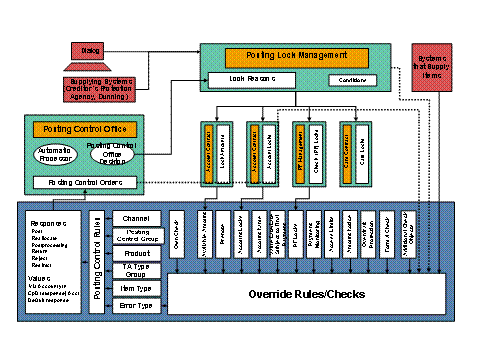
Integrating the posting control rules in PLM/AM/the Posting Control Office
You post payment items in
dialog processing, or the payment items come from a payment transaction system and go via a
Business Application Programming Interface (BAPI) into
Account Management
During posting,
the system
runs a series of
formal and
material checks for every payment item, irrespective of whether it was entered manually or arrived in the
Account Management
system via a BAPI.
If these checks find
formal or
material errors,
the system
issues an error message.
The system determines the first response for all payment items that you defined for the corresponding posting problem in the IMG activity
Define Main Rule Set.
The following system responses are possible:
Post
: The payment item is posted on the account and given the status
Posted
. The participant objects are updated: General ledger, balance (account balance, transaction counter), payment forms, counters and prenotes. In addition, the account status is set to
active
, if needed, and the generation of an event-controlled bank statement is triggered.
Postprocessing
The payment item is assigned to the target account but it is not posted. The general ledger is updated for target payment items in postprocessing. All other participant objects are not updated. The payment item is given the
In Postprocessing
status. If the
Posting Control Office (FS-PCO-AM)
has been activated in Customizing, a
posting control order is automatically generated for further processing in the Posting Control Office.
Reallocation
: The payment item is posted on the account and given the status
Posted
. If the
Posting Control Office
is activated in Customizing, a posting control order is created automatically to enable further processing in the
Posting Control Office
. Otherwise the same conditions apply as for the first response
Post
.
Redirect
The payment item is not posted to the original target account, rather it is redirected to a suspense account or processing account. This normally occurs if the target account cannot be determined or is inactive. You need to define an
account symbol for the redirection. The payment item receives the status
posted
. The original recipient details are noted on the payment item. If redirection to a suspense account is executed and the
Posting Control Office
is activated, a posting control order is created automatically to enable further processing in the
Posting Control Office
. If the item is redirected to a processing account, you must manually process it in Account Management.
Return
: The recipient item is returned to the payment transaction system automatically by way of a payment order and is given the
Returned
status.
Reject
:
Account
Management
does not accept the ordering party item and sends it back to the payment transaction system. The payment item is no longer traceable in
Account Management
.

In the standard system, payment items are rejected in the following cases unless
Reject
is set up as a response in the main rule set: The system overrides the settings in the main rule set.
There are formal errors to which posting control cannot be applied.
You have used a BAPI to set the indicator
Process Incorrect Items only for Response Post (PostOrTerminate)
and the response is not
Post
, as per the main rule set.
You are editing a payment item in the dialog that requires releasing, and there are
formal errors that are subject to posting control, and according to the rule set, there is a response that is not
Post.
The material checks are not run until the payment item is released.
You enter a settlement posting, and there is a response that is not
Post
or
Reallocate
as per the rule set.
According to the main rule set, there is a response for a subsequent position of a payment item that is not valid for the main position.

If the response
Redirect
is set up for the transaction charge (subsequent position) for an ordering party item (main position), the ordering party item and the charge are both rejected.
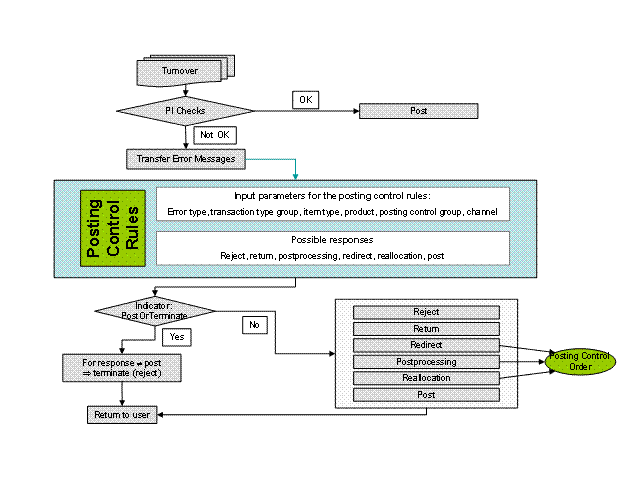
Posting control for payment items in Account Management
During the determination of the relevant first response, the system proceeds as follows:
If the posting problem was found when the
Own Check,
Access Limit, or Plan Monitoring
check object is run, the system determines the error message by using the combination of the check object, check, and result number that you assigned in Customizing under
Define Own Check Results.
The same applies if you have specified your own posting locks for the check object
Account Posting
for the check
Account Posting Locks
in the Customizing of
Account M
anagement under Contract Management→Account→Define Posting Locks.
If the posting problem is found by one of the other check objects, the system assigns the standard error message.
The system determines the error type that you assigned to the combination of check object, check, and result number in Customizing under
Assign Error Types.
In the main rule set, the system selects the entry where your settings for the error type, payment item type, transaction type group, product, posting control group and channel match the corresponding attributes of the payment item. If it does not find an exact match, it looks for the one with the most matching criteria. The sequence is taken into account that you specified in the IMG activity Define Field Sequence for Determination of a Rule in Main Rule Set.
Result
The system
executes the first response assigned to the selected entry.
If there are multiple check errors, and thus multiple entries with different initial responses apply equally, the system selects the strongest initial response. The following sequence of first responses applies:
Reject
Return
If multiple entries apply, but all of them give rise to the first response
Return
, the system chooses the entry with return reason that you assigned with the highest priority in the IMG activity
Define Return Reasons
.
Redirect
Postprocessing
Reallocation
Posting
If multiple entries apply, but all give rise to the same first response, the system chooses the entry with the strongest final response. The following sequence of final responses applies:
Reverse
Reject
Return
If multiple entries have the same first response and final response
Return
, the priorities are set according to the return reason.
Transfer Post
Posting
If the
Posting Control Office
is active, and if the first responses are
postprocessing, reallocation,
and
redirect
, and the redirection is to a suspense (CpD) account,
the system
forwards the required details for further processing to the
Posting Control Office
, where a posting control order is generated.
Depending on your customizing settings in the
Posting Control Office
, the posting control order is either processed manually in the
Posting Control Office
with the
Posting Control Desktop, or automatically with the
Automatic Processing Function. The automatic processing function ensures that
Account Management
executes the final response that you defined in the main rule set. The responses
Post, Transfer Post, Return, Reject
and
Reverse
are always possible end responses.
If the payment item came into
Account Management
via a payment transaction system, then the system returns the first response to the payment transaction system. If you have defined reasons for the initial responses
Return
and
Reject
in the main set of rules, these are also forwarded to the payment transaction system.
If a payment item is still in processing after the initial response, whereby it is initially placed in postprocessing and posted later as a final response, for example, then the information about the final response is transferred to the payment transaction system only if you have programmed the BTE 10010.